Mio FUSE User Guide 04
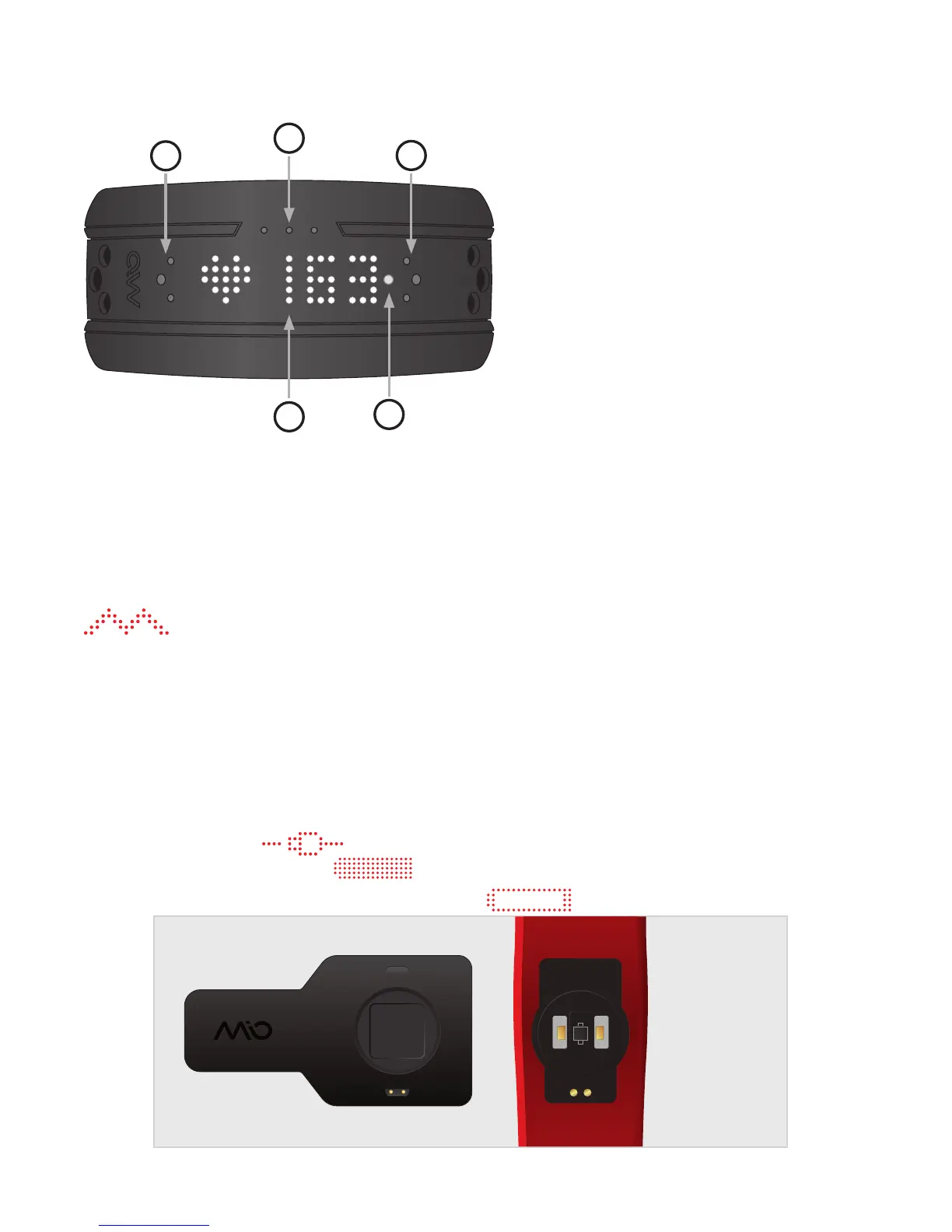
YOUR MIO FUSE
B
A
C
D
E
A Heart Rate / Timer Touchpoint
B/C Scroll Touchpoints
D Display
E Heart Rate (HR) Indicator Light
GETTING STARTED
Activating Your Mio FUSE
To activate your Mio FUSE, simply charge it with the USB charger provided. Mio FUSE has
successfully activated when you see this symbol on the display:
Charging
1. Warning: Make sure the two charging pins on the back of Mio FUSE are dry. If they are
wet, pat them gently with a dry towel.
2. Plug the USB charger into the USB port of your computer.
3. Align the two charging pins on the back of Mio FUSE to the two charging pins on the
USB charger. The magnets in the charging pins will help the two pieces lock into place
The display will show
to indicate that the battery is charging. Once the battery is fully
charged, the display will show:
When the battery level is low, Mio FUSE will show . You can also see the battery level


 To Next Page