Need help?
Do you have a question about the Mio Fuse and is the answer not in the manual?
Instructions for activating and charging your Mio FUSE device.
Steps for starting, recording, and pausing workouts with heart rate monitoring.
Detailed instructions for updating firmware on Android devices.
Detailed instructions for updating firmware on iPhone/iOS devices.
How to get the most accurate heart rate readings during workouts.
 General
| Band size | L |
|---|---|
| Band color | Black, Blue |
| Waterproof | Yes |
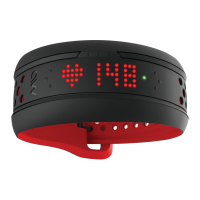
| Device type | Wristband activity tracker |
| Control type | Touch |
| Product color | Black, Red |
| Housing material | Silicone |
| Waterproof up to | 30 m |
| Bluetooth version | 4.0 |
| Brand compatibility | Any brand |
| Connectivity technology | Wireless |
| Mobile operating systems supported | Android 4.3, Android 4.4, Android 5.0, Android 5.1, iOS |
| Battery life | 7 day(s) |
| Charging source | USB |
| Display type | LED |
 Weight and Dimensions
| Depth | 259 mm |
|---|---|
| Width | 30 mm |
| Height | 16 mm |
| Weight | 39 g |

 To Next Page