5. Usage
MiR Charge 24V Operating Guide (en) 06/2020 - v.3.1 ©Copyright 2017-2020: Mobile Industrial Robots A/S. 37
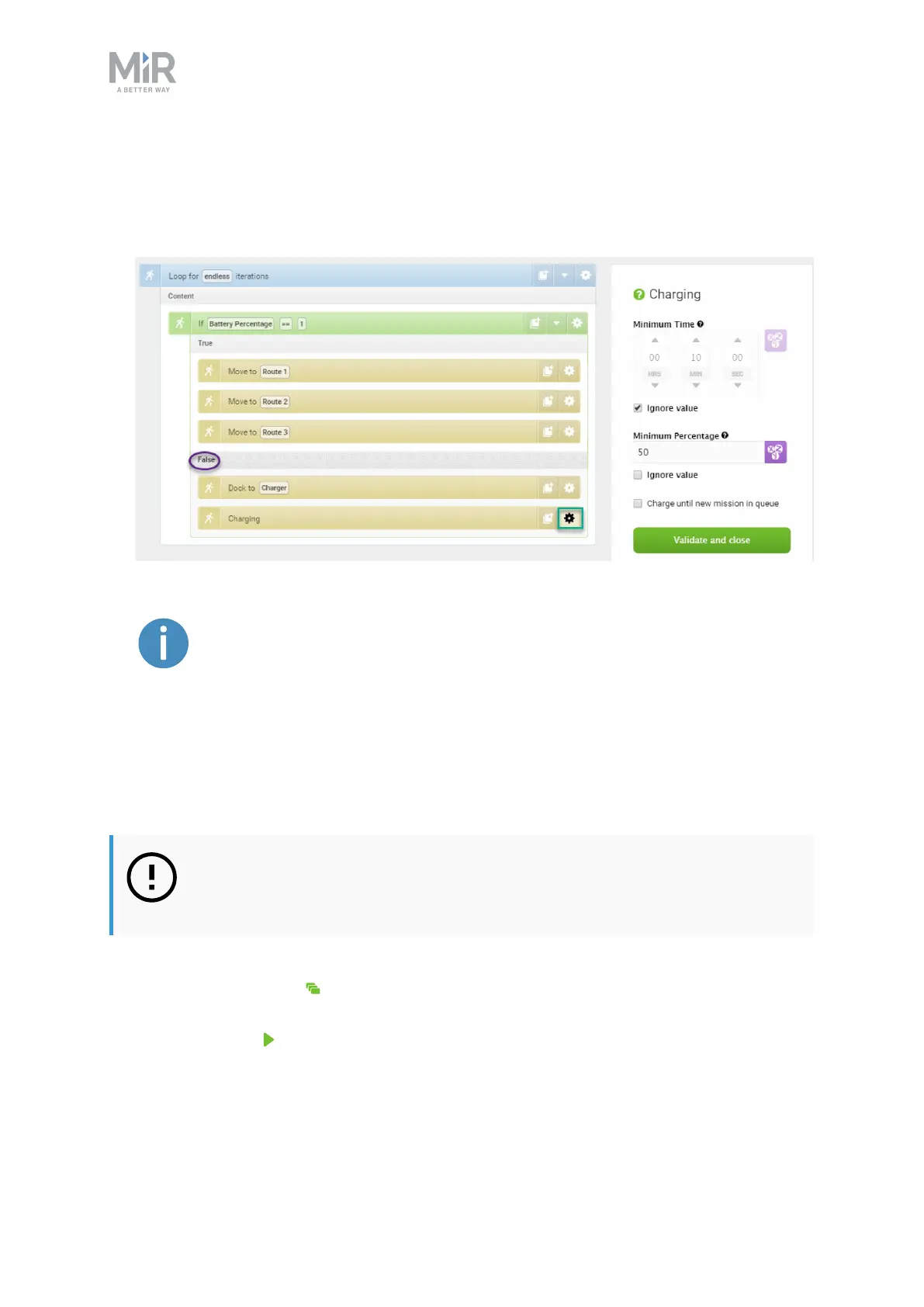
8. For the Charging action, set the parameters as follows:
• Minimum Time: Select Ignore value.
• Minimum Percentage: Type 50.
To read more about the different Charging action combinations, see
Charging action parameters explained on the next page.
9. The mission is now ready. Select Save to save your mission.
Testing the mission
To test that the robot executes the mission correctly, you can try running the mission.
NOTICE
Always test missions without payload to minimize potential hazards.
1. Go to Setup >Missions.
2. Select Queue mission next to the mission you just created. The mission is now added
to the mission queue.
3. Select Continue to start the mission.
4. Watch the robot execute the mission, and verify that it performs as expected.


 To Next Page