Need help?
Do you have a question about the MIRI AD2006+ and is the answer not in the manual?
Details specifications for the M-16LN Input Module, including voltage, impedance, and isolation.
Details specifications for the M-16HN Input Module, including voltage, impedance, and isolation.
Describes the function of DIP switches for configuring module settings like Baud Rate, Protocol, and Address.
Instructions on setting the baud rate for expansion modules using DIP switches.
How to configure status default behavior (HOLD LAST or CLEAR ALL) during communication loss.
Guidance on selecting between Miri protocol and Modbus RTU using DIP switches.
Instructions for assigning a unique ID to each expansion module in an RS485 network.
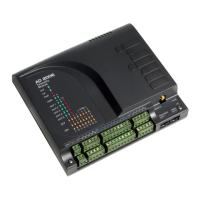
The AD2006+ is a series of expansion modules designed for DIN rail mounting, eliminating the need for additional DIN rail mounting terminals. These modules are driven from the RS485 port of an AD2006+ module or via an M232-485 converter if using the RS232 port of an AD2000 module. Up to 32 expansion modules can be driven from a single AD2006+ module. The RS485 bus allows modules to be located up to 1.5km from the AD2006+ telemetry module. An option to run Modbus on the RS485 bus is provided, allowing expansion modules to operate with third-party Modbus devices on a multi-drop RS485 bus. The protocol selection in MiriMap must match the DIP switch settings on the expansion modules. Other typical software settings include "Interface - Expansion Modules," "Polling - Continuous," "RTS during Tx must be checked," and a "Baud rate - 38.4k (default)."
The AD2006+ series includes several module types:
This module provides 16 optically isolated inputs with an input voltage range of 10-35 Volts AC or DC. The input impedance is 4k7 Ohms. It features two separate groups of 8 commons and offers 3.5kV isolation. The module operates on a 10-30VDC supply. Its power consumption is 200mW when no inputs are driven and 1.2W when all inputs are driven.
Similar to the M-16LN, this module also offers 16 optically isolated inputs but with a higher input voltage range of 70-130 Volts AC or DC. The input impedance is 27k Ohms. It also has two separate groups of 8 commons and 3.5kV isolation. The supply voltage is 10-30VDC, and its power drain is 200mW with no inputs driven and 1.2W with all inputs driven.
This module provides 8 analog input channels, which are common-grounded. It supports input current ranges of 0-20mA or 4-20mA and input voltage ranges of 0-5V or 1-5V. The input impedance is 250 ohms in current mode. It offers a resolution of 12 bits and an accuracy and linearity of 0.1%. The module operates on a 10-30VDC supply and has an idle power drain of 200mW.
This module features 16 relays, each capable of switching 2 Amps at 30VDC or 240VAC. It has two separate groups of 8 commons, with a total output capability of 10 Amps per common. The module provides 3.5kV isolation and operates on a 10-30VDC supply. Its power drain is 200mW with no outputs driven and 2W with all outputs driven.
This module offers 4 analog output channels with a common ground. The output current range is 4-20mA. The load impedance is 250 Ohms at 12V or 500 Ohms at 24V. It provides a resolution of 16 bits and an accuracy and linearity of 0.1%. The module operates on a 10-30VDC supply and has an idle power drain of 200mW.
 General
| Brand | MIRI |
|---|---|
| Model | AD2006+ |
| Category | Control Unit |
| Language | English |

 To Next Page