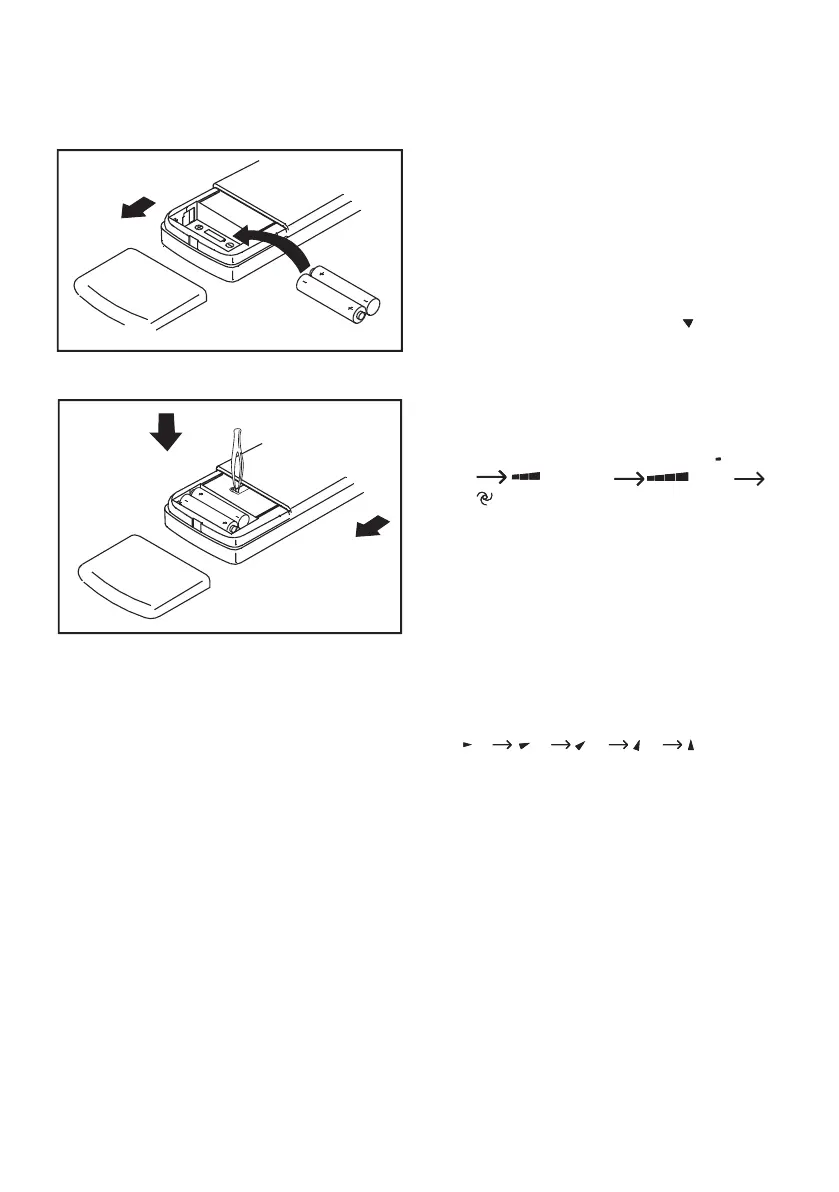
2. Short circuit reset contacts with forceps.
(Short two RESET buttons after changing the
Operating procedure using the
• Press I/O button to start operation, the unit
will stop when repressed.
2. Temperature adjustment
• Press TEMPERATURE ADJUSTMENT button,
decreases by 1˚C by pressing “ ” button
decreases by 1˚C by pressing “ ” button
• The temperature change will display in the
remote controller’s display.
• Pressing FAN SPEED button changes the fan
speed of indoor unit in the order of
speed of indoor unit in the order of
• Press SLEEP button to set sleep operation,
this operation will cancel when the sleep
5. Air fl ow direction adjustment
• Change up/down air fl ow direction
1. Press the MANUAL SWING button, the defl ector
will move to a specifi c angle. Change the
defl ector of indoor unit following the order of
(1) (2) (3) (4) (5)(Fig.2)
(1) (2) (3) (4) (5)(Fig.2)
(1) (2) (3) (4) (5)(Fig.2)
(1) (2) (3) (4) (5)(Fig.2)
(1) (2) (3) (4) (5)(Fig.2)
(1) (2) (3) (4) (5)(Fig.2)
(1) (2) (3) (4) (5)(Fig.2)
(1) (2) (3) (4) (5)(Fig.2)
(1) (2) (3) (4) (5)(Fig.2)
(1) (2) (3) (4) (5)(Fig.2)
(1) (2) (3) (4) (5)(Fig.2)
(1) (2) (3) (4) (5)(Fig.2)
(1) (2) (3) (4) (5)(Fig.2)
(1) (2) (3) (4) (5)(Fig.2)
(1) (2) (3) (4) (5)(Fig.2)
(1) (2) (3) (4) (5)(Fig.2)
(1) (2) (3) (4) (5)(Fig.2)
(1) (2) (3) (4) (5)(Fig.2)
2. Press the SWING button, the defl ector will start
• To change the air fl ow direction from left to
You can manually adjust the swing defl ector, Left/
Right to change the air fl ow direction.
Complete adjustment before operation, if adjusted
during operation, the auto swinging defl ector may
pinch your fi ngers. (Fig.1) (see page 6).
1. Open back cover, put in batteries.
• If the remote control does not operate normally,
short circuit the RESET contacts, the unit will
• The remote control will only operate within a six
• Handle remote control carefully. Do not drop,
throw or allow any moisture to penetrate the
• When a button is pressed, the indoor unit will
beep once or twice, indicating the signal has
been received. If no beep is heard, press again.
• Remove batteries if the remote control is not
to be used for a long time.



 To Next Page