Make a Call
Li the handset OR
Press .
Dial the number OR
Press a Speed Call key OR
Press OR
Dial the prex for external calls
(e.g. 9) and the number.
Answer a Call
Li the handset OR
Press , and begin speaking.
End a Call
Press OR
Replace the handset.
Place a Call on Hold
Press . The line key ashes.
Replace the handset if necessary.
Retrieve a Call from Hold
Li the handset OR
Press .
Press the ashing line key.
Retrieve a Message
Press . It ashes when a
message is waing.
Follow the voice mail prompts to
retrieve your message.
Transfer a Call
Press .
Dial the number. Wait for an answer.
Hang up OR announce the transfer and then hang up.
Conference a Call
Press .
Dial the number. Wait for an answer.
Press .
Program a Speed Call
Press Menu OR .
Press # unl Personal Key appears.
Press *.
Press a Personal Key.
Press *.
Dial the number.
Press the Personal Key again.
Press * to make the number private, OR
Press # to keep the number visible.
Press
Adjust Volume Levels
Adjust ringer volume while the phone is ringing. Adjust handset
or speaker volume while using the handset and speaker.
Press repeatedly to raise the volume OR
repeatedly to lower the volume.
Press to mute your microphone.
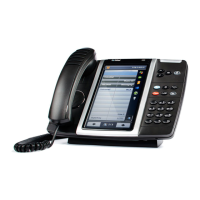
MiVoice 5312 IP Phone
User Guide
1
4
7
2
5
8
3
6
Display
Ring/Message Indicator
Volume, Speaker, Mute Controls
Fixed Funcon Keys
Keypad
Personal Keys
Speaker
Handset
Speaker
Mute
Menu
Cancel
Redial
Hold
Transfer/Conference
Message
For more informaon about other features and applicaons on your 5312 IP Phone, refer to 5312/5324 IP Phone User
Guide located at www.mitel.com, or contact your Administrator.
8
8
4
5
5
6
5
4
5
5
4
5
4
4
4
5
3
5
3
3
8
4
6
5
4
8
5
8
7
6
4
8
3
3
1
2
3
4
5
6
7
8
NN0330


 Need help?









 General