Introduction
Installation Equipment
To install the switch, you need the following equipment:
• AC surge protector for the power connection
• RJ-45 cables for connecting the switch to the local area network and Telco lines
• Music-on-hold source with a standard mini-headphone adapter (optional)
• Permanent earthing connector for grounding the device
• RJ-21 telephone cable (female connector on end that is connected to the Mitel Voice Switch)
for analog port connections
• RJ-21 to RJ-11 patch panel for connecting telephones and analog trunks
• #1 Phillips screwdriver
Installation Location Requirements
To ensure optimum operating conditions for the ST100DA Voice Switch, verify the operating
environment is adequately ventilated, free of gas or airborne particles, and isolated from electrical
noise.
Power
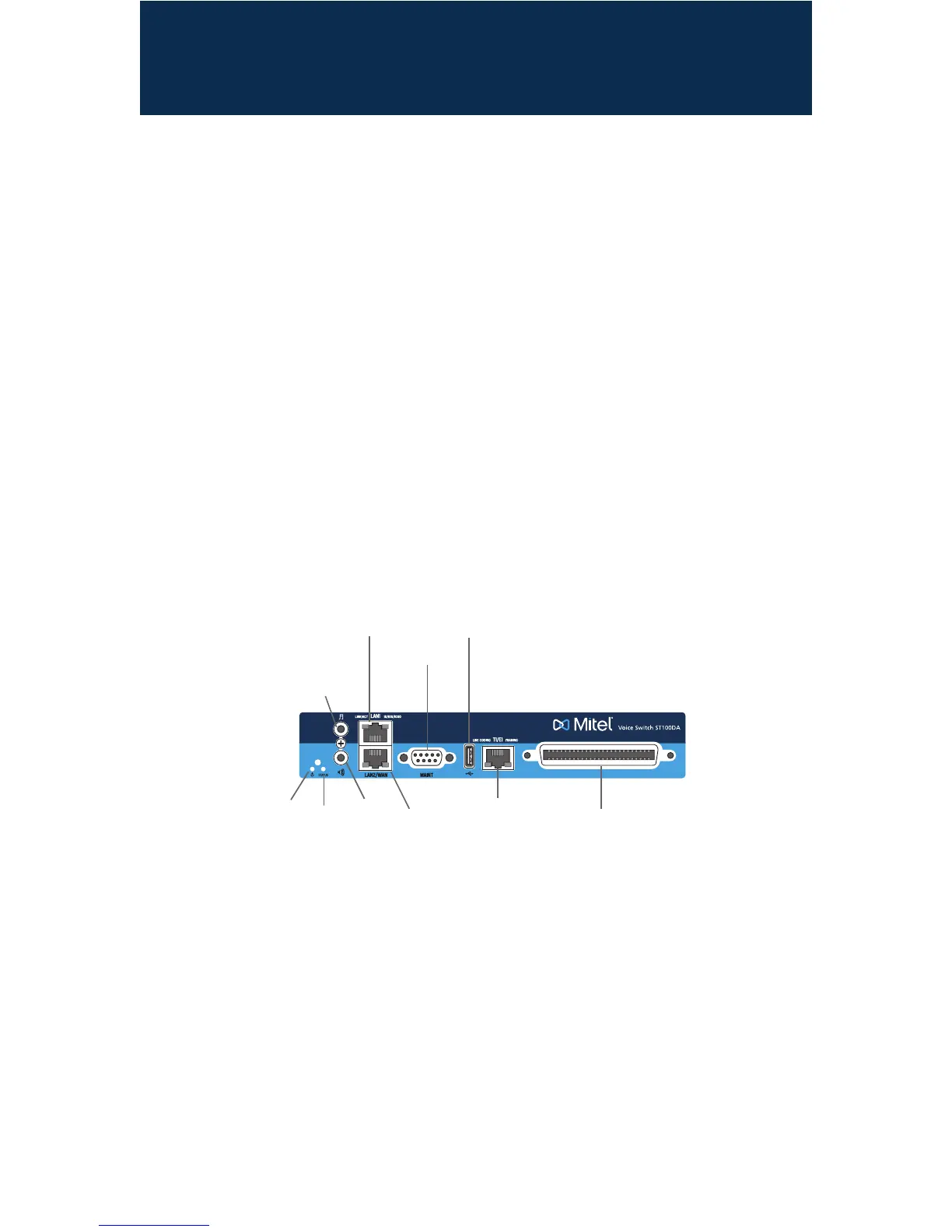
LED
USB 2.0
port
Audio
input
port
10/100/1000
Mbps Ethernet
ports
LAN1
RS-232C
maintenance
port
Status
LED
Audio
output
port
RJ-21X
port
T1/E1
Telco
port
LAN2
About the ST100DA*
The ST100DA Voice Switch connects enterprise telephone extensions through an internal IP
networkortoanycentralofce(CO)digitaloranalogtrunkline.
The switch provides connectivity through:
• Oneaudioinputport(3.5mmstereo)forconnectingtoamusic-on-holdsource
• Oneaudiooutputport(3.5mmstereo)forconnectingtoacorporatepagingsystemornight
bell. Mitel offers an optional paging adapter to provide a balanced output as well as a contact
closure ideal for overhead paging systems. Refer to the Mitel Paging Adapter Quick Install
Guide for information about the Paging Adapter.
• Two RJ-45 10/100/1000 Mbps LAN connectors
• OneDB-9(female),RS-232Cmaintenanceport(default115,200bps,8bits,noparity,1stop
bit, no handshake) for serial communications
• USBportforlogging/troubleshooting
• RJ-48CTelcoportforconnectingtheswitchtoatelephonecompanyline
• RJ-21X port for connections to analog lines and trunks
* This document also applies to ShoreTel branded models of the same model number.
The Mitel ST100DA Voice Switch Package Contains:
• Mitel ST100DA Voice Switch
• Power cord
• Adhesive rubber feet for surface placement
• Mounting Ears – attachable installation brackets
• Cable retainer for the Telco cable (metal bracket with a Velcro strap)



 To Next Page