M Mitel (design) is a registered trademark of Mitel Networks Corporation. © 2014, Mitel Networks Corporation.
All other products and services are the trademarks of their respective holders. All rights reserved.
2900-001
UC360 COLLABORATION POINT - QUICK REFERENCE GUIDE for Clearspan
Adjusting the In-Call Volume
• Press the volume button during a call.
Adjusting the Ringer Volume
• Press the volume button during ringing.
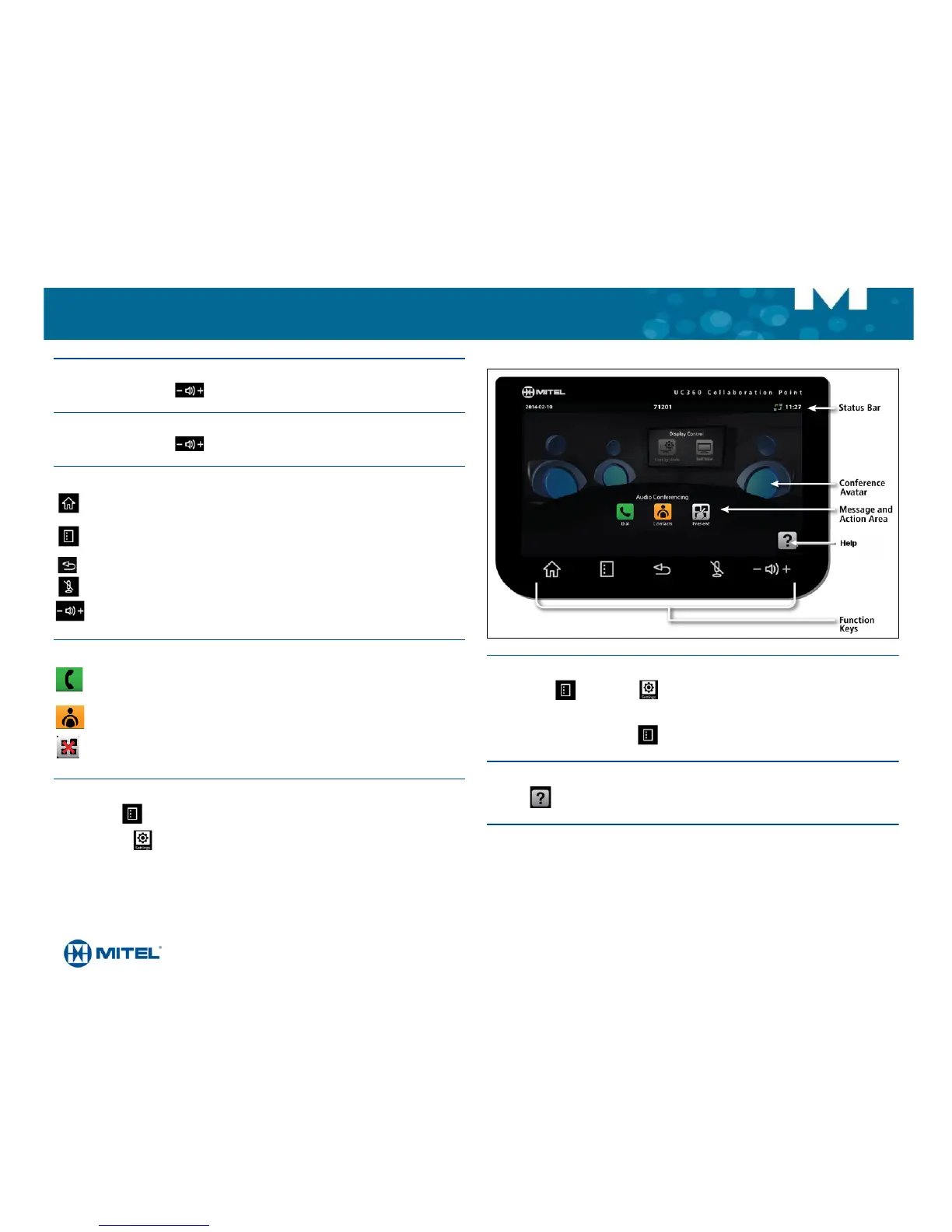
Function Keys
App Controls
Brightness
1. Press Menu .
2. Press Settings .
3. Tap Brightness and drag the slider to the desired brightness.
4. Press OK.
Cleaning the UC360 Display Screen
1. Press Menu then Settings .
2. Tap Clean Mode.
3. When the screen is clean, hold for 3 seconds to exit Clean Mode.
Accessing Help
•Press on any screen to access help for the active screen.
More Information
Refer to the UC360 User Guide for Clearspan on www.mitel.edocs.com.
Home - Go to the Home screen
Menu - Display the Menu bar
Back - Go back one menu or to the previous screen
Mute - Turn off the microphone
Volume - Increase or decrease the volume
Phone - Open the keypad to dial an audio call
Open Contacts App to select a contact to dial.
Close All Apps and delete data



 To Previous Page