EasyManua.ls Logo

Mitsubishi Electric G50A - User Manual

Mitsubishi Electric G50A
2 pages
Print Icon
To Next Page IconTo Next Page
Loading...
Technical Information
>
User Guide
G50A
Initial Settings
When the G50A is powered for the first time select
group setting option 4 (press 4), after the initialisation
has finished.
If system is already working Press “ ” curser keys
together for 3 sec until the second menu appears.
Select group setting option 1 (press “1”).
Select the group to change with the group select switch.
Enter the indoor addresses (001 enter, 002 enter etc)
in that group.
To enter the remote controller address press “ ”
key until the curser is underneath “remote controller”
and enter the remote controller address.
If you want to name the group press “ ” until group
name set is flashing, then press enter.
Use the curser keys to highlight the letter required
and press enter.
When the name is complete press the back screen
button to return to the group screen.
Try to make the group number the same as first
address in that group.
When all groups are complete, press back screen
to return to the menu. Press “ ” curser keys
together for 3 sec to return to the user menu.
Timer Setting
Press the back screen until the user menu is displayed.
Select option 3 schedule setting (press 3).
Use the curser keys to select the timer pattern
P1, P2, P3 or P4 then press enter.
Use the clock pattern buttons to set the On time.
Move the curser and set the Off time.
Once all the on/off s have been set press the back
screen to return to the previous screen.
Move the curser under the day of the week you
want to apply the pattern to and with clock pattern
buttons set the pattern number.
If you want to apply the same timer patterns to each
group move the curser to M in the bottom right of the
screen and press enter to put the settings into memory
change the group with the group setting button and
use MR enter to put the timer settings into that group.
When this is complete back screen to the menu and
the timer is set.
Back Screen Button
Repeated pressing of the back screen button will
return to a menu screen.
4/Temp
5/Clock Pattern
6/Air Direction
Back Screen
7/Temp
8/Clock Pattern
9/Ventilation
1/On/Off 2/Mode 3/Fan Speed Group Select
0/Remote Prohibit Timer Mode Del/Reset Curser Keys Enter
www.mitsubishielectric.co.uk/aircon
Question and Answer IconNeed help?

Do you have a question about the Mitsubishi Electric G50A and is the answer not in the manual?

Summary

G50 A Controller Overview

Basic Operation Controls

Key controls for basic functions like power, mode selection, and fan speed adjustment.

Advanced Setting Controls

Controls for temperature, clock patterns, air direction, and group settings.

Initial Settings Procedure

Timer Setting Procedure

Back Screen Button Functionality

Overview

The Mitsubishi Electric G50A is a central controller designed for managing air conditioning systems. It offers a comprehensive interface for controlling multiple indoor units, setting schedules, and monitoring system status. The device is equipped with a clear display and a tactile button layout, making it accessible for both initial setup and daily operation.

Function Description

The G50A central controller serves as the primary interface for managing a network of Mitsubishi Electric air conditioning units. Its core functions include:

  • On/Off Control: Users can power the entire system or individual groups of units on or off.
  • Mode Selection: The controller allows selection of various operating modes such as cooling, heating, fan-only, and auto, depending on the capabilities of the connected indoor units.
  • Fan Speed Adjustment: Users can adjust the fan speed for optimal comfort and energy efficiency.
  • Temperature Setting: Precise temperature control is available, allowing users to set desired temperatures for different zones or groups.
  • Group Management: The G50A enables the creation and management of groups of indoor units. This feature is particularly useful in larger installations where different areas require distinct climate control settings.
  • Timer and Schedule Setting: A robust scheduling function allows users to program daily or weekly operational schedules, including on/off times and desired temperatures, to automate climate control and optimize energy consumption.
  • Air Direction Control: For units with adjustable louvers, the controller provides options to modify the air direction.
  • Remote Prohibit: This feature allows the central controller to override or disable local remote controllers, ensuring centralized control.
  • System Monitoring: The display provides feedback on the current operational status of the system.
  • Test Run Function: A dedicated test run button assists in commissioning and troubleshooting the system after installation or maintenance.

Usage Features

The G50A is designed for intuitive operation, offering several features that enhance its usability:

  • Initial Setup Wizard: When first powered on, the controller guides the user through an initial setup process, prompting for group settings and other essential configurations. This ensures a smooth initial deployment.
  • Cursor-Based Navigation: The "SELECT" cursor keys (up, down, left, right) are central to navigating the menu system, highlighting options, and adjusting settings.
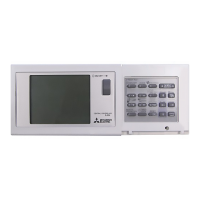
  • Dedicated Function Buttons: Specific buttons for "ON/OFF," "MODE," "FAN SPEED," "GROUP," "TEMP," "CLOCK PATTERN," "AIR DIRECTION," "PROHIBITION," "TIMER," "RESET," "DEL," and "ENTER" provide direct access to key functions, reducing the need to navigate through complex menus for common operations.
  • Back Screen Button: A dedicated "BACK SCREEN" button allows users to easily return to previous menus or the main user menu, simplifying navigation. Repeated presses will eventually lead back to the main menu.
  • Group Setting Flexibility: Users can define groups of indoor units, assign indoor addresses, and even name these groups for easier identification and management. The controller allows for flexible assignment of units to groups and the ability to modify these assignments as needed.
  • Remote Controller Address Setting: The device supports setting remote controller addresses, which is crucial for integrating local controllers with the central system.
  • Timer Pattern Management: The timer function allows users to create and apply different timer patterns (P1, P2, P3, P4) to specific days of the week or to multiple groups. This enables sophisticated scheduling tailored to varying daily requirements.
  • Copying Timer Settings: The "MR" (Memory Recall) function allows users to copy timer settings from one group to another, streamlining the setup process for installations with similar scheduling needs across different zones.
  • Intuitive Group Naming: When naming groups, the controller provides a cursor-based interface to select letters, making the process straightforward.
  • Error Indication: While not explicitly detailed, central controllers typically provide error codes or indicators on the display to alert users to system malfunctions, aiding in quick diagnosis.

Maintenance Features

While the G50A is primarily an operational interface, certain features indirectly support maintenance or troubleshooting:

  • Test Run Function: The "TEST RUN" button is a critical tool for maintenance personnel. It allows them to quickly verify the operation of connected indoor units after installation, repair, or routine service, ensuring all components are functioning correctly.
  • System Reset: The "RESET" button can be used to clear certain settings or states, which can be helpful in troubleshooting minor system glitches.
  • Deletion Function: The "DEL" button allows for the removal of unwanted settings, such as group configurations or timer patterns, which is useful during system reconfigurations or when simplifying settings.
  • Centralized Control for Diagnostics: By providing a central point of control and status display, the G50A can assist maintenance staff in identifying which units are operational, which are scheduled, and potentially where issues might be occurring across the entire system.
  • Remote Prohibit for Servicing: The remote prohibit function can be used during maintenance to prevent local users from interfering with system adjustments or tests being performed by technicians.

The Mitsubishi Electric G50A central controller is a robust and user-friendly device designed to provide comprehensive and efficient management of air conditioning systems, offering both detailed control and simplified operation for various applications.

Mitsubishi Electric G50A Specifications

General IconGeneral
ManufacturerMitsubishi Electric
ModelG50A
TypePLC
Communication PortsRS-232
Operating Temperature0°C to 55°C

Related product manuals