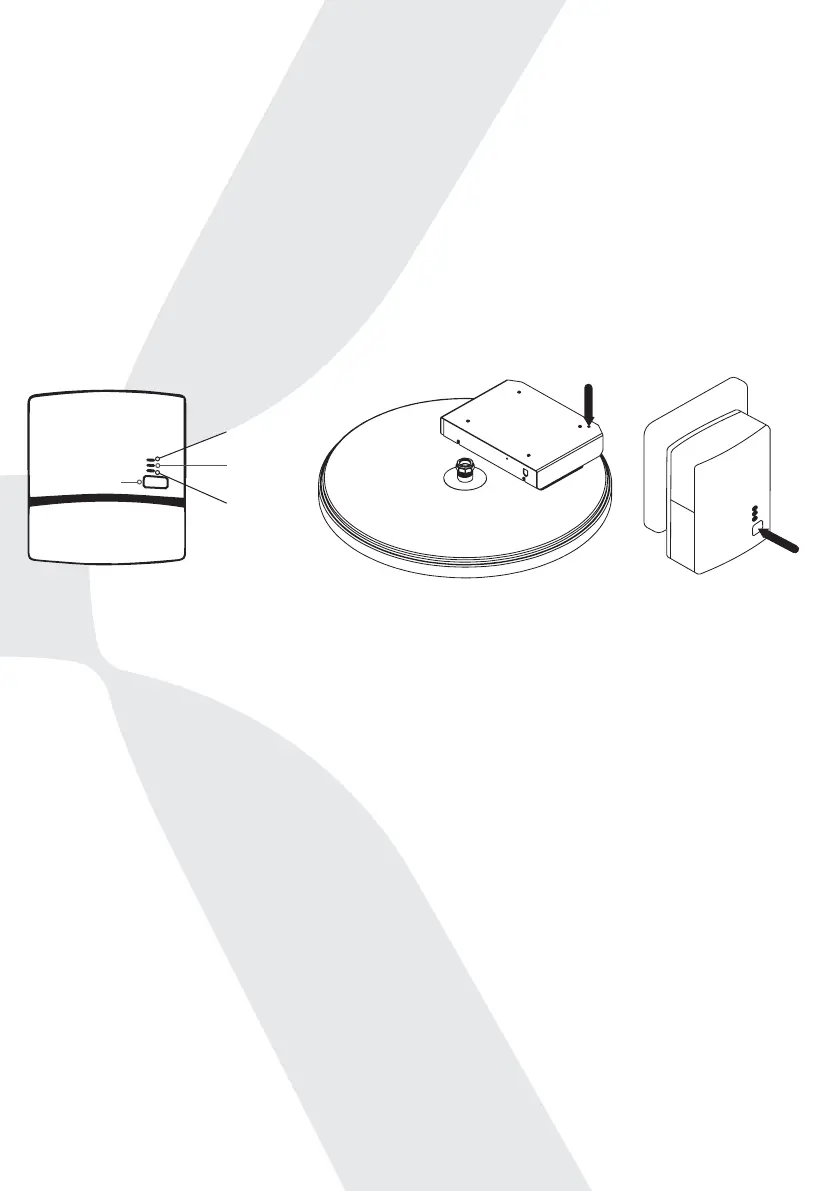
1. You will need to press the pair buttons on both the adapter [3] (plugged
into the mains) and the tank (the pair button is within the Mixergy controller
box [1] found on the top of the tank – you will need to use a thin tool to press
the button inside [2]). Press both buttons for one second, within 2 minutes of
each other in order to re-establish pairing.
2. During the pairing process, the top power LED on the adapter [4] should
start blinking, if it doesn’t, press the pair buttons again.
3. The middle LED will be solid when the pairing is complete.
If the above steps do not work to re-establish internet, try to power the tank o
and on at the mains, not through the power button on the gauge.
3. What will happen to my heating schedule if the tank loses internet
connection?
a. Your tank will continue to heat according to the last schedule set when
there was internet connection.
i. However, if you power the tank o at the mains it will need to re-connect
to the internet in order to begin running the schedule again with the correct
time. If no internet connection is available, the tank will enter an ‘oine’
mode where it will constantly maintain between 40-50% charge using your
primary heat source.
b. You can continue to boost your tank via the gauge without an internet
connection.
3
1
2
4
Power
Powerline
Ethernet
Pair
20


 To Next Page