FAQs and troubleshooting
1. The Mixergy App won’t let me register my tank, what should I do?
a. Before you will be able to register your tank with your Mixergy account,
the tank must rst be installed and connected to the internet. If you are
unable to establish internet connection, please see the answers to question
2 below.
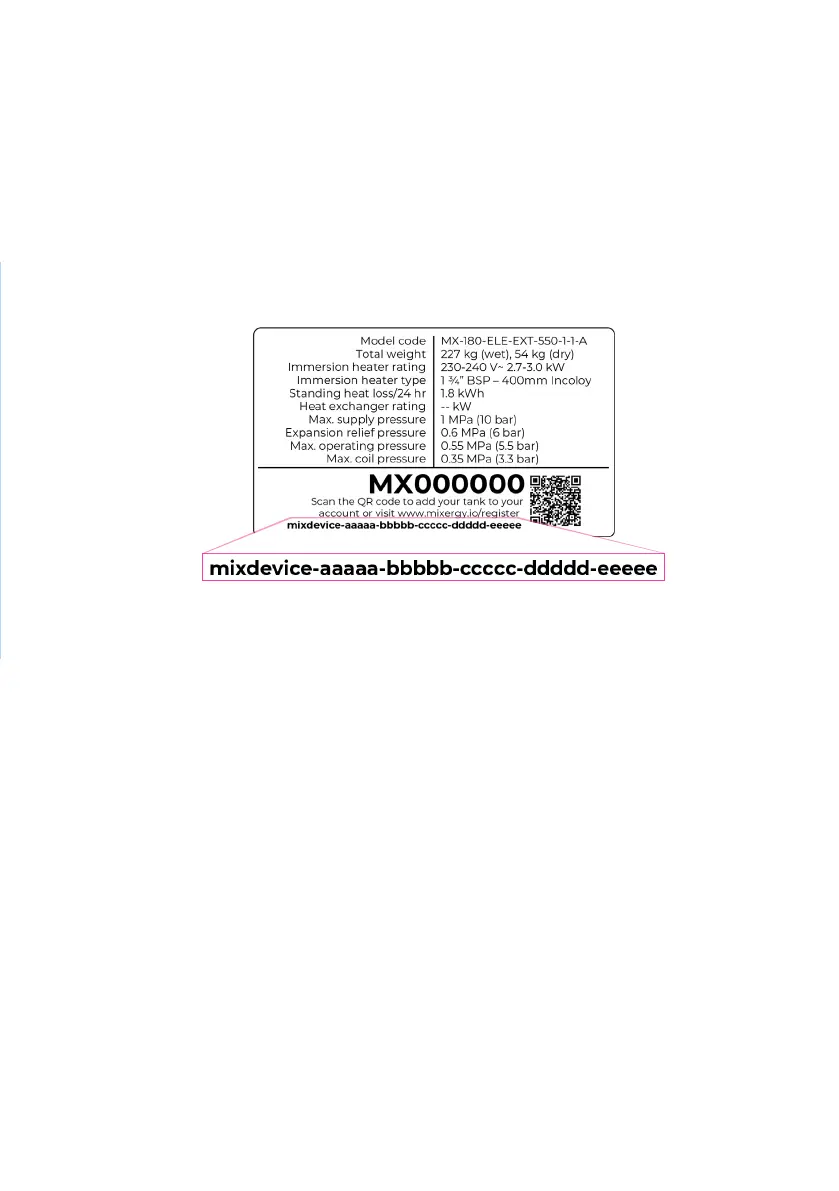
b. Ensure you are entering the 25-character mixdevice number, and not the
MX number. This is printed on a white sticker on the side of your tank.
2. What should I do if my tank is not connecting to the internet?
A powerline adapter (included with your tank) should be plugged into
a mains socket and connected to your internet router via the included
ethernet cable. Check this set-up has been correctly followed by your
installer. If you still do not have internet connection, check each of the
following steps:
i. If you already have a homeplug AV network installed in your home, it is
recommended that you pair the tank with an existing homeplug adaptor to
avoid interference
ii. Ensure that the adapter is not plugged into an extension lead.
iii. If the bottom ethernet LED on the adapter [4] is not lit, the ethernet
cable may have come loose and will need to be plugged in again (you
should hear it click into place).
iv. If the middle powerline LED on the adapter [4] is not lit, then your tank
may have become unpaired from the powerline adapter connected to your
router.
19


 To Next Page