C
M
J
CM
MJ
CJ
CMJ
N
vibe-watermark-bright.pdf 03/04/2009 16:07:52vibe-watermark-bright.pdf 03/04/2009 16:07:52
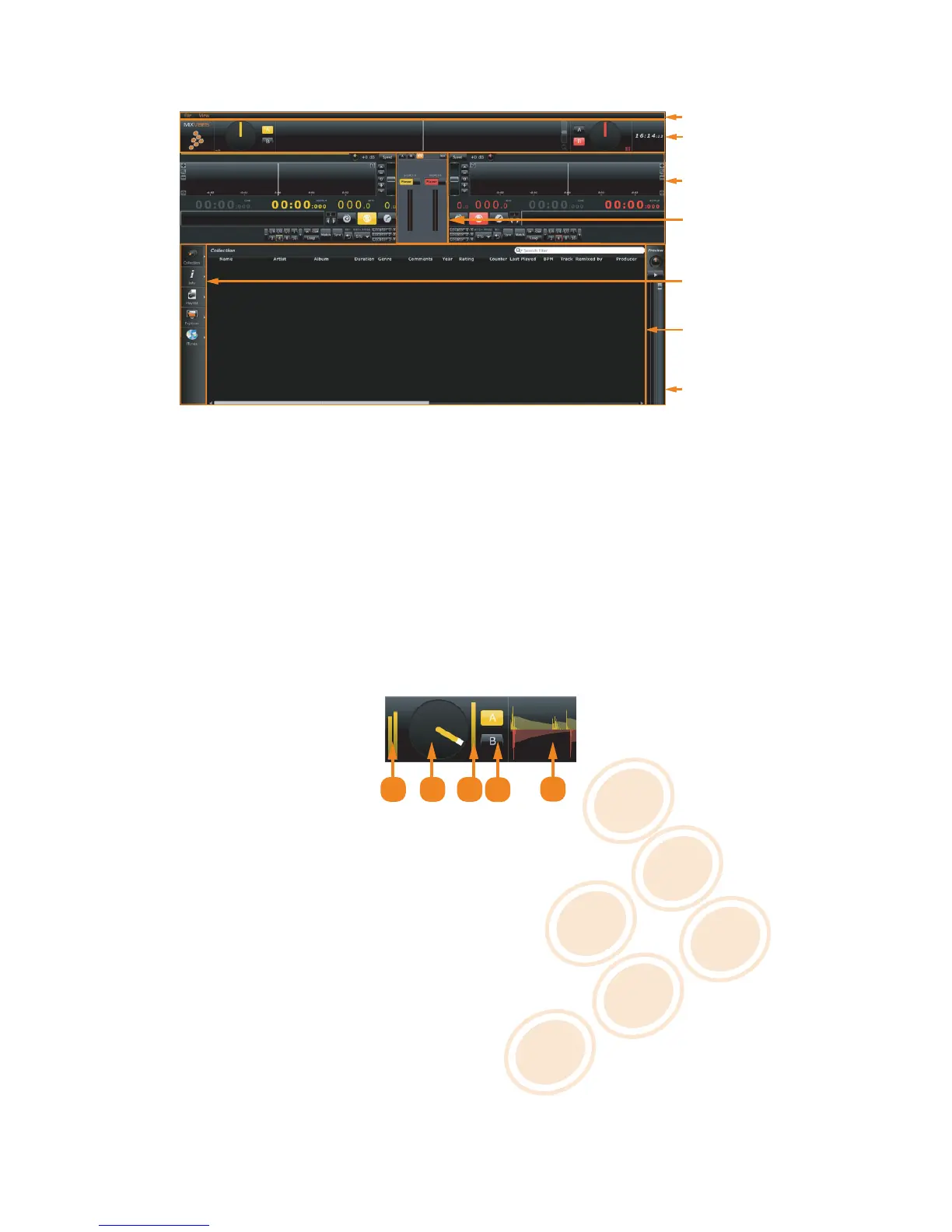
5 Overview of the Graphical User Interface
Once CROSS is configured, you will see the following graphical interface:
Preview Deck
Browser
Dock
Integrated
Mixer
Player
Head-Up
Display
Menu
C
M
J
CM
MJ
CJ
CMJ
N
overview.pdf 08/12/2009 16:42:34overview.pdf 08/12/2009 16:42:34
User Interface
5.1 Menu
The menu lets you access various commands in CROSS.
5.2 Head-Up Display (HUD)
The Head-Up Display contains information essential to your mix:
1 2
3
4
5
C
M
J
CM
MJ
CJ
CMJ
N
hud.pdf 07/12/2009 18:06:54hud.pdf 07/12/2009 18:06:54
Head-Up Display
1 Input level meters.
2 Playback position of the control media.
3 Time code quality meter.
4 Deck Selectors.
5 The Beat Matcher display gives a visual representation of the synchronization between the players.
5.3 Players
The Players control the various playback functions of an audio file. Those function-sets will change based on the
control mode - internal vs external.
13 / 21


 To Next Page