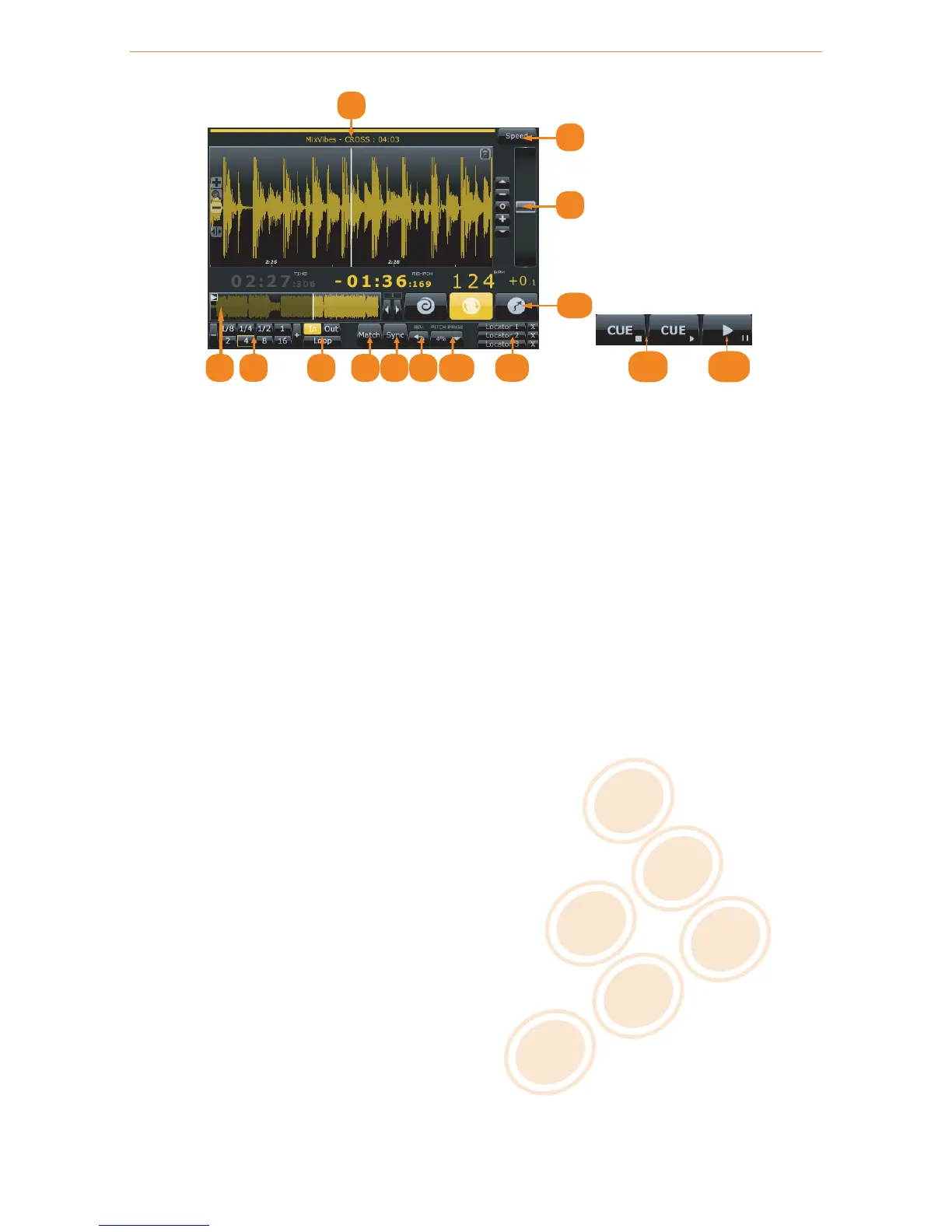
Player
1 Displays the Title, Artist and Duration of the audio file.
2 Mode selector for the pitch fader. Selects between Speed, Tempo, or Hybrid modes.
3 Pitch fader.
4 Full track display. Gives an overview of the waveform for the entire audio file. Clicking on the waveform
to will jump to that point in the track.
5 Smart Loop.
6 Manual loop.
7 Match the speed or tempo of the other deck.
8 Sync to the nearest down-beat of the other deck.
9 Reverse the playback direction.
10 Pitch range selector. Set the range of the pitch fader up to +/- 100%.
11 Set locators for seamless cue points.
12 Playback modes for external control media: Absolute, Relative, or Flexible.
13 Cue (internal playback mode only).
14 Play/Pause (internal playback mode only).
5.4 Integrated Mixer
When in External Mixer routing mode, only functions 1-3 will be available.
14 / 21


 To Next Page