EasyManua.ls Logo

MIXVIBES Cross Pack - Page 8

MIXVIBES Cross Pack
21 pages
Print Icon
To Next Page IconTo Next Page
To Previous Page IconTo Previous Page
Loading...
C
M
J
CM
MJ
CJ
CMJ
N
vibe-watermark-bright.pdf 03/04/2009 16:07:52vibe-watermark-bright.pdf 03/04/2009 16:07:52
3 Installation
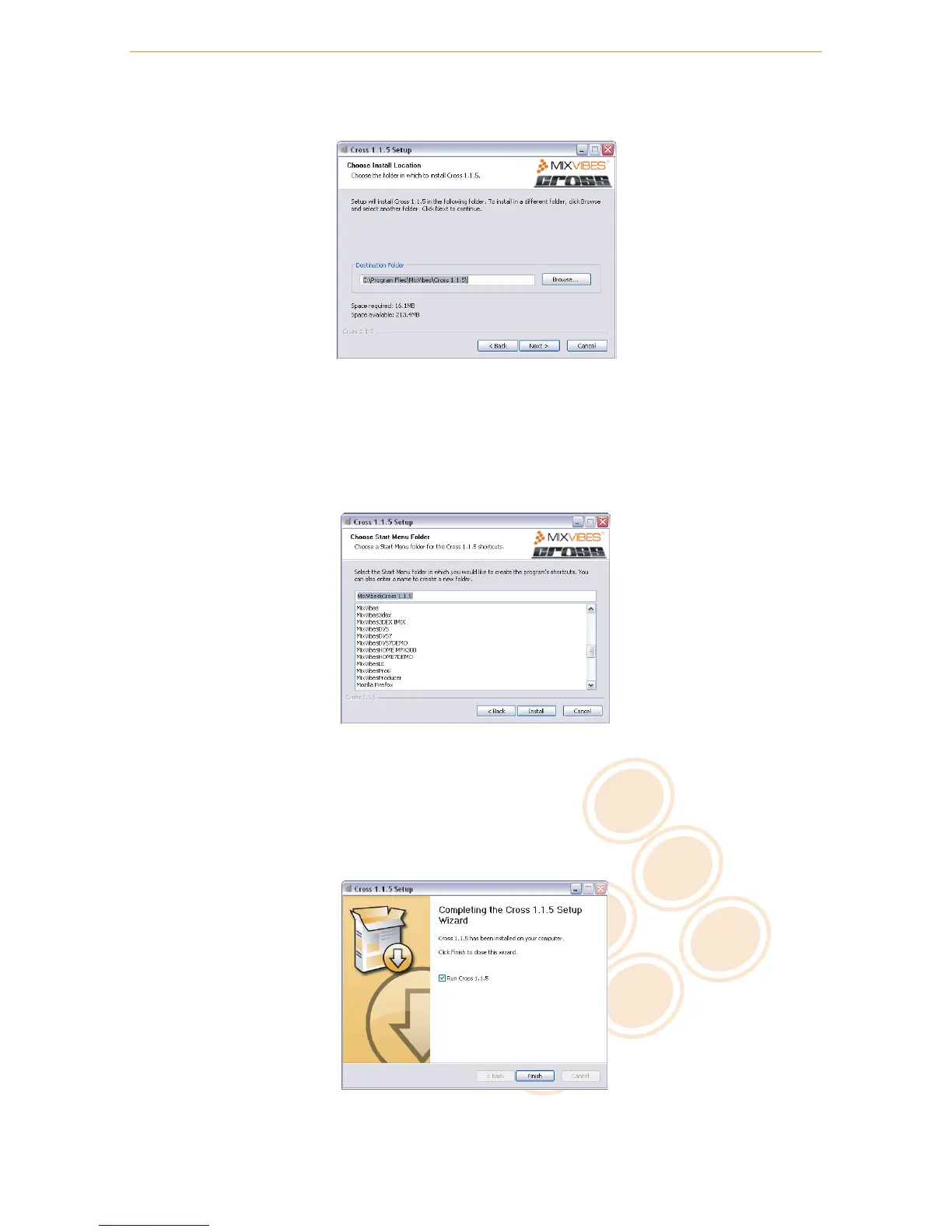
5 Choose the folder in which you want to install CROSS and click Next.
Choose Install location
6
Choose the Start Menu folder in which you want to create the CROSS shortcut. To start the installation,
click Install.
C
M
J
CM
MJ
CJ
CMJ
N
install_start_menu_folder.pdf 26/02/2009 20:52:03install_start_menu_folder.pdf 26/02/2009 20:52:03
Start Menu Folder Location
7 Once the installation is complete you can click Finish. If the check box Run CROSS is selected, CROSS
will launch automatically.
C
M
J
CM
MJ
CJ
CMJ
N
install_finish.pdf 26/02/2009 20:49:36install_finish.pdf 26/02/2009 20:49:36
Finish Installation
8 / 21

Related product manuals