!
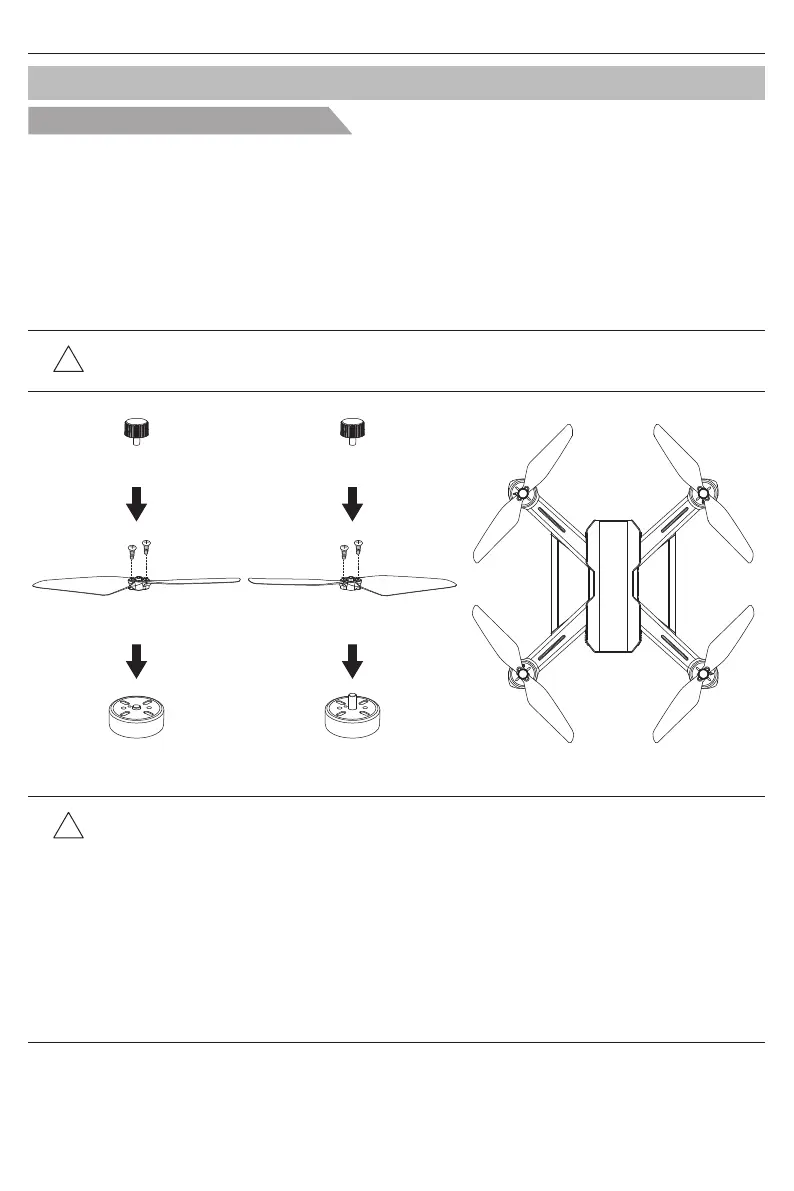
● Please make sure that the clockwise and the counter-clockwise propellers are installed on
the correct motors, because the aircraft will not fly normally for wrong propellers installation.
● Be aware of the sharp edges of the propellers. Handle with care.
● ONLY use the factory approved propellers. DO NOT mix propellers types.
● Stand clear of the motors and DO NOT touch the propellers when they are spinning.
● Check that the propellers and motors are installed correctly and firmly before every flight.
● Ensure that all propellers are in good condition before each flight. DO NOT use aged,
chipped, or broken propellers.
● To avoid injury, STAND CLEAR of and DO NOT touch propellers or motors when they are
spinning.
● ONLY use designated propellers for a better and safer flight experience.
Blade assemble and disassemble
Attach and Detach the Propellers
Bugs 20EIS User Manual
A
A B
A
B
B
B
A
Front
Rear
Clockwise Motor
Propeller A
(clockwise)
Screws
Propeller Cover
Step 2
Step 1
●Attach propeller A:
Insert Propeller marked “A” into clockwise motor, fix it with 2 screws.
Then place the propeller cover on the motor and tighten it anti-clockwise by hand.
●Attach propeller B:
Insert Propeller marked ‘B’ into anti-clockwise motor, fix it with 2 screws.
Then place the propeller cover on the motor and tighten it clockwise by hand.
!
Tips: The propeller covers, propellers have clockwise/anti-clockwise installation.
Please install all the accessories properly as following pictures.
●Detach the propellers:
Hold the motors, screw the propellers out by counterclockwise installation direction.
Then using screwdriver take out the screws and disassemble the propellers.
Anti-clockwise-Motor
Propeller B
(counter-clockwise)
Screws
Propeller Cover
Step 2
Step 1
-10-



 To Next Page