!
Tips: The 4K HD Photos and videos cannot be saved without TF Card.
If TF Card is in errors, the drone cannot take picture/video.
Bugs 20EIS User Manual
Photo/Video
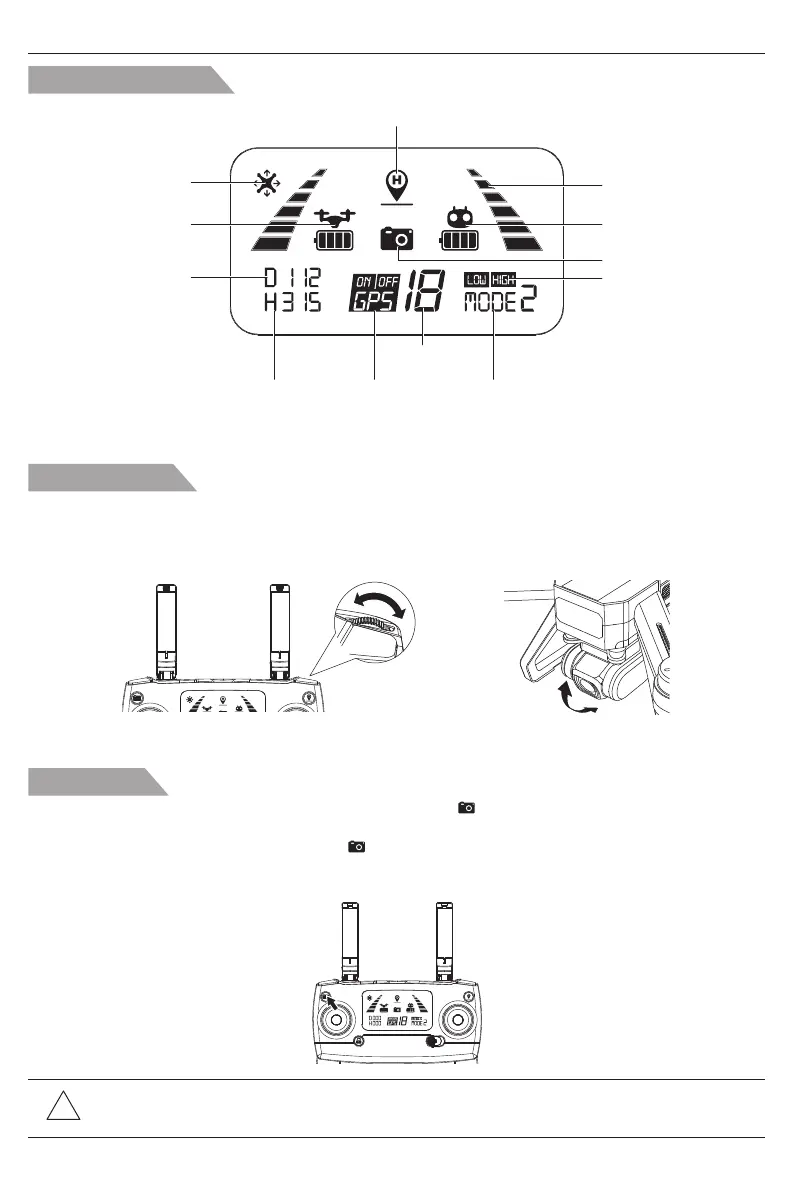
Short-press the button indicated as below, the camera icon “ ” on the LCD screen flashes once, the
camera takes one photo;
Long-press the same button, the video icon “ ” on the LCD screen flashes slowly, the camera is taking
video.
Long-press again will exit shooting.
Gimbal trimmer
The camera angle can be adjusted within a 90 degree range by operating the gimbal trimmer to obtain
a better aerial experience. When scroll up the gimbal trimmer (upward to direction of “A”), the camera
will tilt upward to the direction of A; when scroll down the gimbal trimmer (downward to direction of “B”),
the camera will tilt downward to the direction of B.
LCD Screen display
Remote controller
battery level
GPS
mode
Satellite
amount
Altitude against
Home Point
Photo/Video
Return to Home
(RTH) icon
Aircraft battery level
Remote controller
throttle mode
Distance against
Home Point
Headless mode
Signal strength
High/Low speed mode
A
B
A
B
90°
-12-



 To Next Page