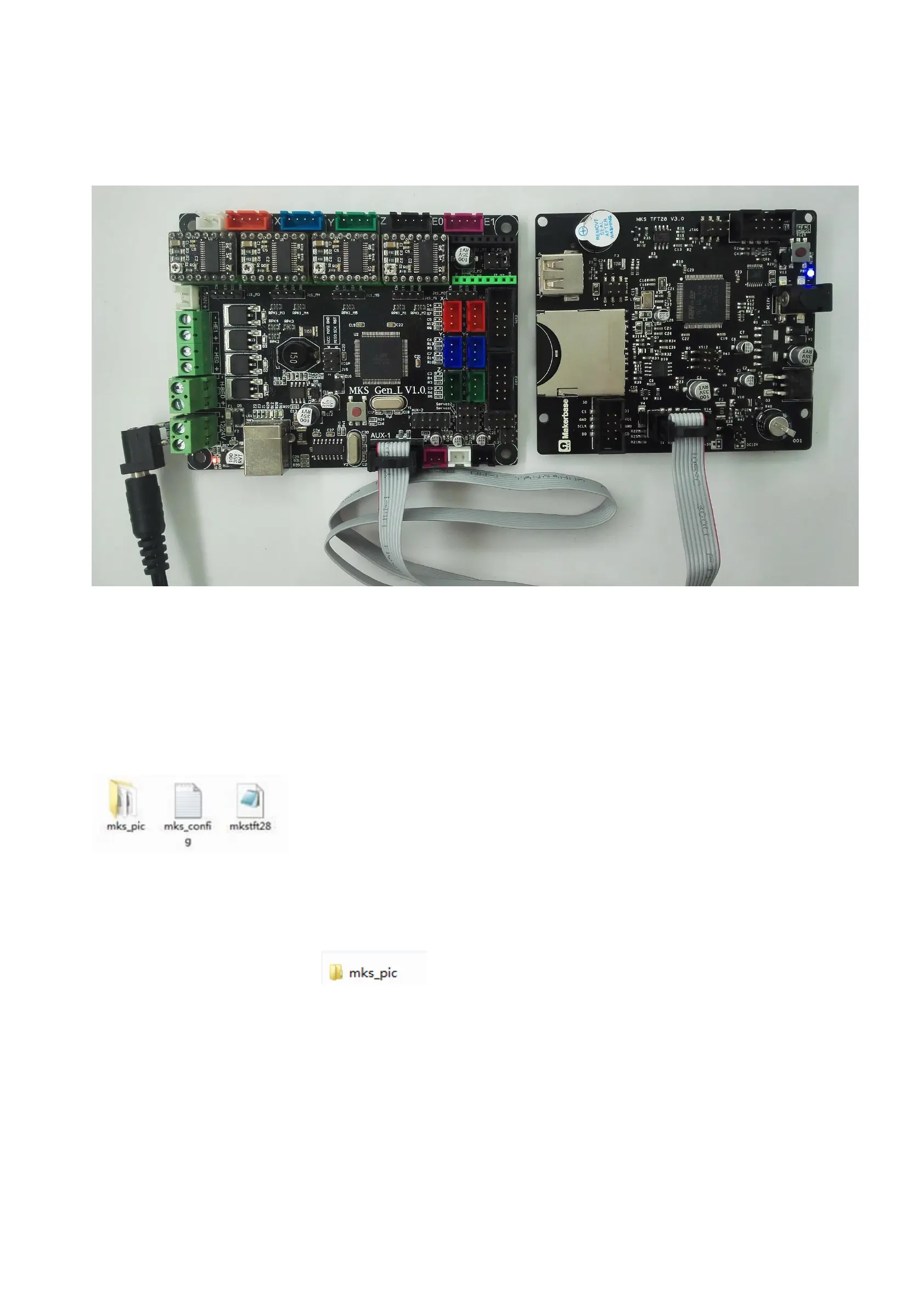
6.3. Connect to MKS Base,MKS GEN-L, MKS MINI and MKS Base
Connect the TFT display to the Aux-1 of MKS series controller board. The TFT display is not necessary to connect external
12V power supply.
IV. Function Instruction
1. The way to get the latest firmware
1.1. Ask the customer services for the latest firmware.
1.2. Login this website to download: https://github.com/makerbase-mks/MKS-TFT
2. The ways to upgrate the TFT firmware
2.1. Copy the latest program to the the root directory of the SD card, including:
Notice: Do not change the file name.
2.2. Plug the SD card, power up again. The screen will show the upgrating progress when hearing a short sound “didi~”, then
the upgrating is finish after about 30 seconds.
2.3. View the current firmware version through clicking “Set>About”.
2.4. Suggest deleting the picture file to avoid uograting the picture again when booting next time.
Notice: when using Ramps 1.4, you must connect external 12V power supply to the TFT display before upgrating the firmware.
3. Boot Settings
It’s necessary to set the printer type when getting the configuration.


 To Next Page