9
during the printing. Users can set the extruder unload speed and min temperature of “filament replacement process” on the config.
7. Print from the Breakpoint Function
Undoubtedly, you must feel crazy when you mistake the operation to stop the printing. Take it easy, the printing from the breakpoint
function would help you save your beloved model . The operations are as followed,
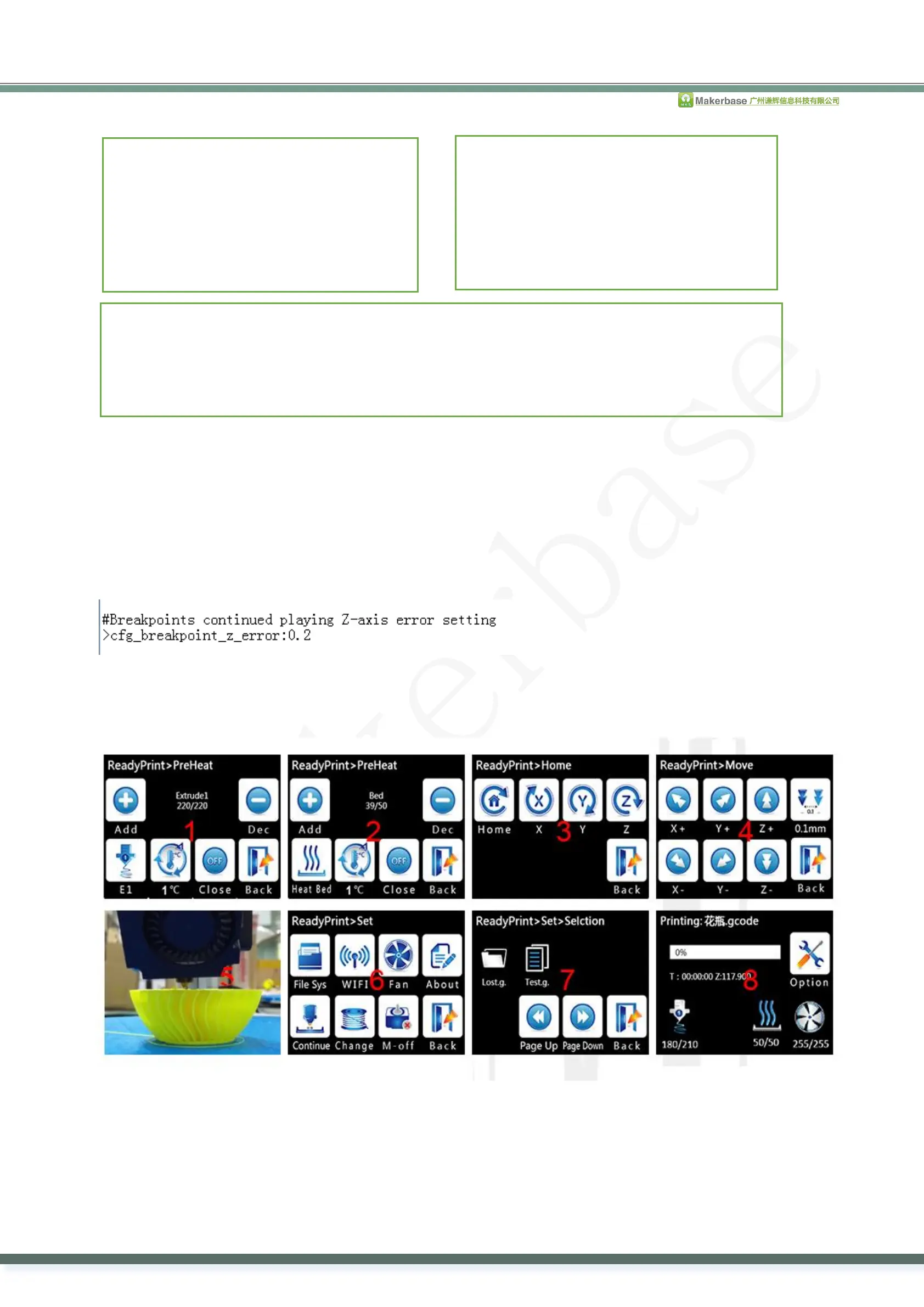
7.1. Click “pre-heat , set the target temperature of the extruder and heated bed . (picture1, picture2)
(No heated bed, you can ignore the target temperature of the heated bed. )
7.2. Click “Home” when the temperature reaches to the target temperature, let every axis go back to the zero point. (picture 3)
7.3. After every axis goes back to the zero point, move the nozzle to the layer where stops printing. (picture4, picture5) As shown
below,
7.4. Click “Set”, then click the printing from the breakpoint, choose the file that print from the breakpoint.( picture6, picture7)
7.5. After choosing the file, just wait to print. (picture8) (After choosing the file, the larger and more complicated the model is,
the longer time you need to wait.)
8. Power Outage to Save
The printer is allowed to directly turn off if it suddenly enters the pause state while printing. The printing will be continued from the
pause when restarting next time.( Remember to delete the upgrated file from the SD card to avoid upgrating firmware again when
booting next time, otherwise, it can’t print from the power outage point.)
9. Power Outage to Continue(only above MKS TFT28 V1.1 can support this function)
9.1. Don’t connect UPS power supply
The printer will continue printing from the pause when restarting, if it suddenly powers out.( The motor can not be driven due to
#the speed to extrude filament(mm/min)
>cfg_filament_load_speed:1200
#the lenght to extrude filament (mm)
>cfg_filament_load_length:200
#the speed to retract filament(mm/min)
>cfg_filament_unload_speed:1200
#the lenght to retract filament(mm)
>cfg_filament_unload_length:200
#It is the minimum temperature for filament change.It will auto heat up if the current temp doesn't
reach the target.
>cfg_filament_limit_temperature:200


 To Next Page
 Loading...