P/N 330654-E 01/2018 COPYRIGHT © Dansensor A/S
18 User Guide EN Lippke 4000/4500
Setting Up
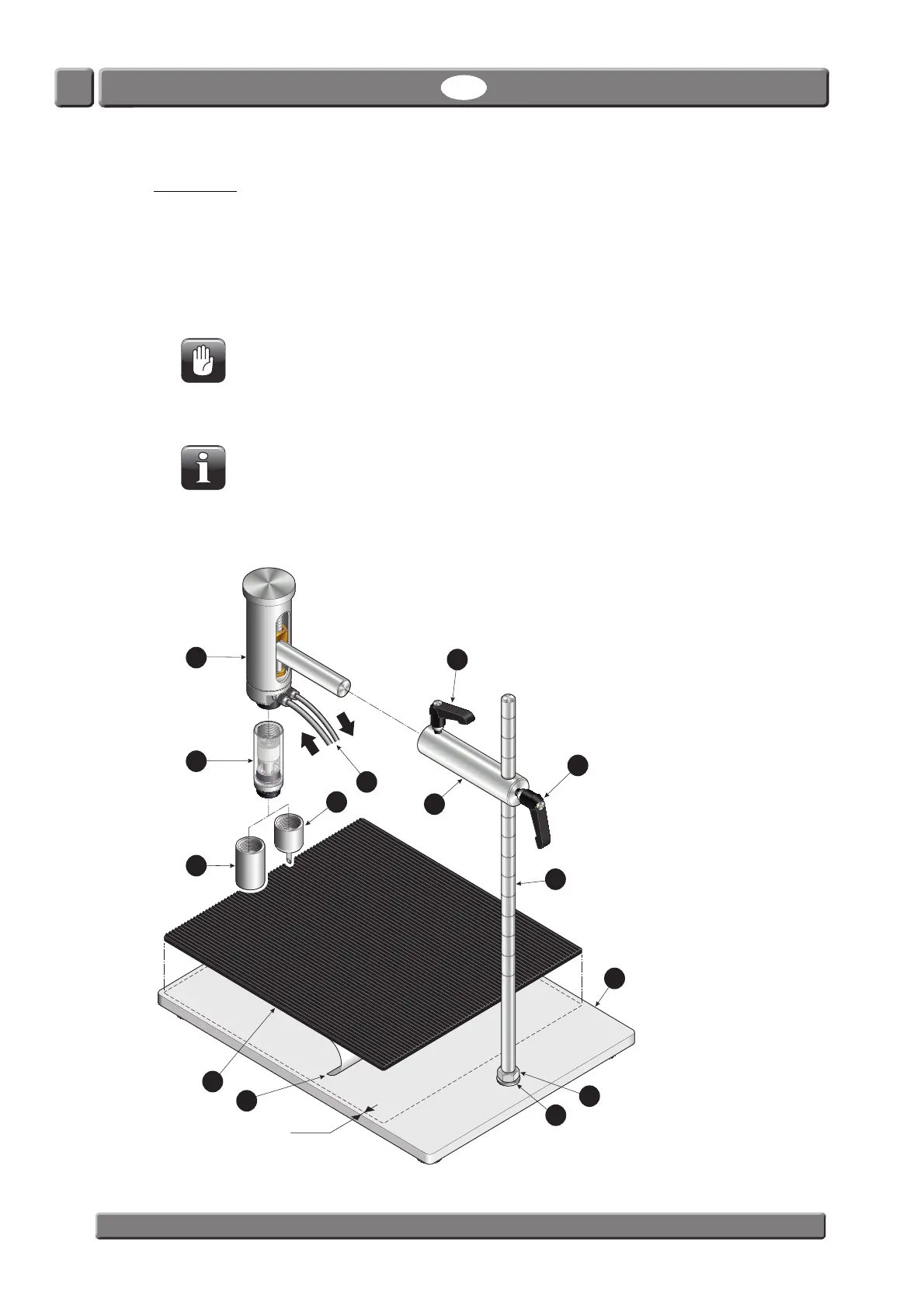
1. Mount the nut and the washer on the vertical rod , then screw the rod into the base plate
as far as it goes. Tighten assembly by screwing the nut against the base plate .
2. Fit the two handles
and to the connector rod and slide it onto the vertical rod . Tighten
the handle
to position the connector rod on the vertical rod .
3. Fit the needle
(or tube adapter ) and the filter (if any) on the test head , then insert test
head into the connector rod
and tighten handle to keep it in position.
CAUTION! Filters and needles should only be hand tightened - do not use any tools.
4. Apply the self-adhesive rubber mat
by removing the protective paper and position the mat
approx. 5 mm from the front and side edges of the base plate
.
NOTE! You can choose not to use the rubber mat, as cleaning of the base plate is easier
without it. Still we recommend to use it, as it provides better friction for the test items.
5. Connect air supply (Feed) and pressure measurement (Sense) hoses
to the Lippke 4000/4500
device - see page 53 for details.
7
8
5 mm
1
3
6
5
2
4
12
13
10
11
Sense
Feed
9
14



 To Next Page