Industrial Electronic Devices
ADFweb.com Srl – IT31010 – Mareno – Treviso INFO: www.adfweb.com Phone +39.0438.30.91.31
Document code: MN674-A003_ENG Revision 1.000 Page 17 of 30
N
ORMAL
M
ODE
(
WITH
T
RANSLATE
T
ABLE
):
Using this function, the converter can be seen like a single serial Modbus slave. The address of Modbus is assigned in the “Set
Communication” section.
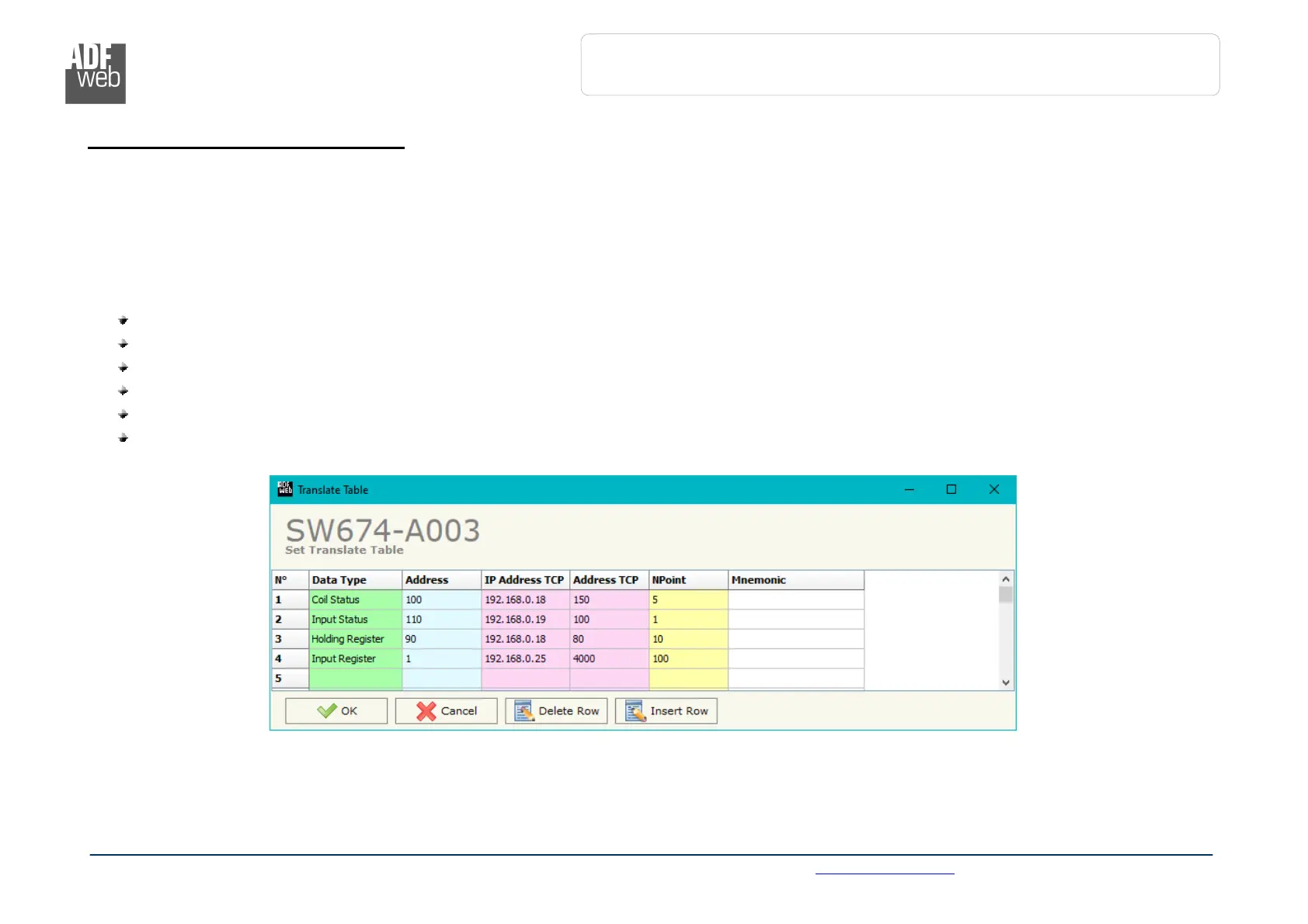
By pressing the “Translate Table” button from the main window for SW674-A003 (Fig. 2), the window “Set Translate Table” appears (Fig.
4).
The data of the columns have the following meanings:
In the field “Data Type” the type of Modbus data is defined;
In the field “Address” the address of the Modbus register to which address the requests on RTU side is defined;
In the field “IP Address TCP” the IP address of the Modbus TCP slave to which the converter will address the request is defined;
In the field “Address TCP” the address of the Modbus register to which the converter will address the TCP request is defined;
In the field “NPoint” the number of consecutive registers starting from the one set is defined;
In the field “Mnemonic” a brief description is defined.
Figure 4: “Set Translate Table” window


 To Next Page