25MCP15-500.9
START-UP PROCEDURE - CONTINUED
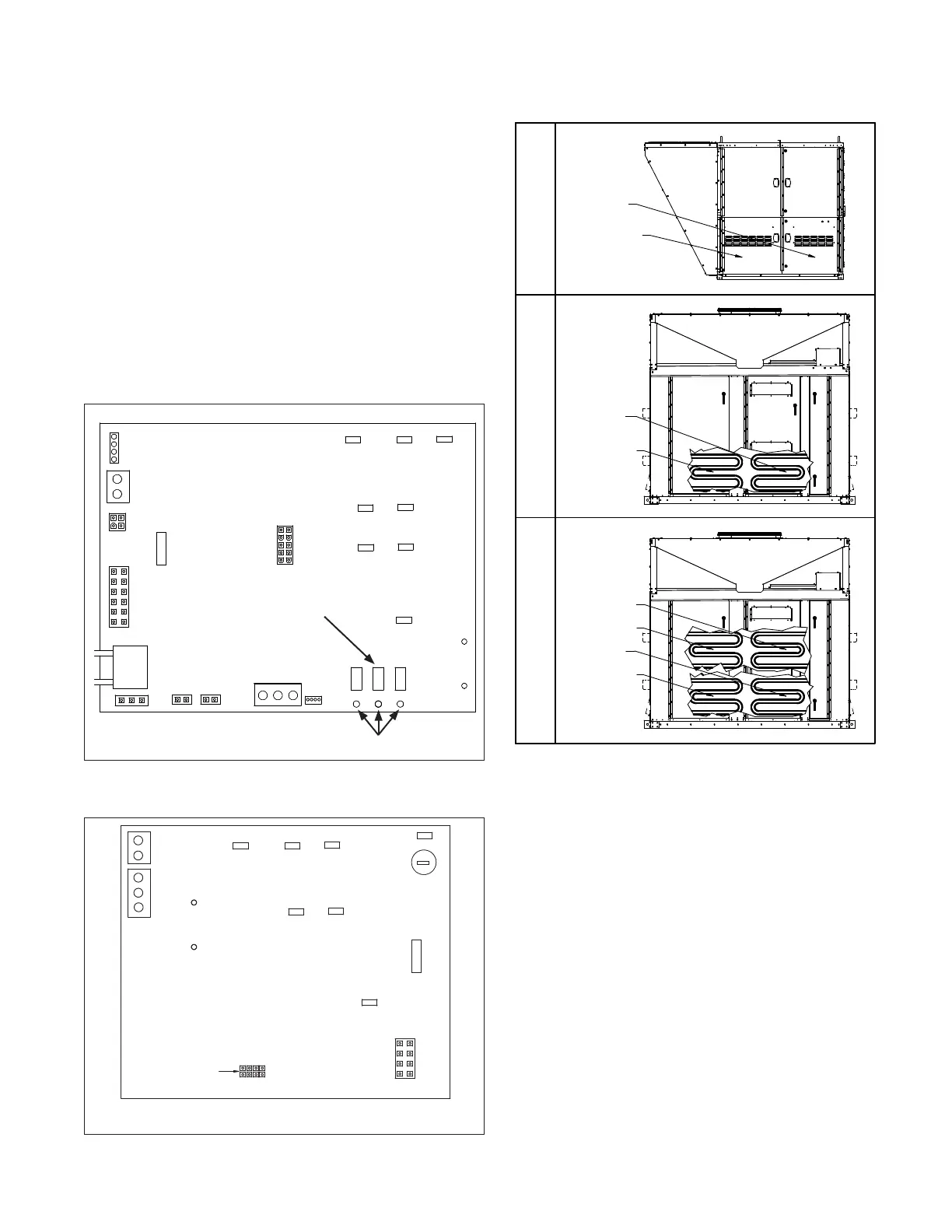
Figure 25.1 - Primary Furnace Control Board
(Furnace models with Digit 11=6 or 8 only)
FLAME VOLT
1.0VDC=1MCIROAMP
+
_
FLAME ROD
IND-L2
IND-L1
L2
L1
FUSE
3
W
R
VB1201
CONTROL BOARD
IND-L2
IND-L1
GND
A
B
GND
A B C D
GND
WHITE
JUMPER SETTING MUST
MATCH FURNACE
SECONDARY DESIGNATION.
Figure 25.2 - Secondary Furnace Control Board
(Furnace models with Digit 11=8) j
NOTE: FOR ACTUAL WIRING TO THE FURNACE CONTROL BOARD, PLEASE REFER TO THE
WIRING DIAGRAM LOCATED IN THE FURNACE CONTROL COMPARTMENT.
j This applies to C- and D-Cabinet sized units with furnace model Digit 11=8.
Refer to Figure 25.3 for identifying which furnace is the Primary and which
furnace(s) are the Secondary furnace(s).
J13
J8
J12
J6
J7
J4
+
_
-
+
W
R
+
_
FLAME ROD
L2
L1
ALARM
OUTPUT
FUSE
3
J13
J8
J12
J6
-
+
VB1200
CONTROL BOARD
DOWNUPMODE
PRESSURE
SENSOR
FLAME VOLT
1.0VDC=1MCIROAMP
ID
PLUG
AUX-L2
AUX-L1
IND-L2
IND-L1
L2
L1
GND
BA
GND
NOTE: FOR ACTUAL WIRING TO THE FURNACE CONTROL
BOARD, PLEASE REFER TO THE WIRING DIAGRAM LOCATED
IN THE FURNACE CONTROL COMPARTMENT.
7-SEGMENT
LED DISPLAY
BUTTONS
5. If a lockout error condition occurs, or the MODE button is
depressed for more than 4 seconds, or there is no push
button activity for 30 minutes, then the Checkout Test mode
will be exited.
Clearing Furnace Control Board Error Codes
1. Fault codes can be reviewed by pressing the MODE button
for at least 4 seconds until the LED display changes to
display “Lo9”. Refer to Figure 25.1 for location of buttons
and LED display.
2. Briefly press the MODE button again to review the fault
codes. Up to 15 fault codes are stored and can be
reviewed by pressing the UP or DOWN buttons. Codes will
be displayed followed by the number of days since the fault
was detected.
D-CABINET SIZE UNIT
(OVER 800,000 BTU/HR)
D-CABINET SIZE UNIT
(UP TO 800,000 BTU/HR)
C-CABINET SIZE UNIT
(ALL GAS HEAT SIZES)
SECONDARY A
SECONDARY C
SECONDARY B
PRIMARY
SECONDARY A
PRIMARY
SECONDARY A
PRIMARY
3. To clear the fault codes from memory, press the DOWN
button until “CLr” is displayed. Press and hold the MODE
button to clear the memory. The board will then revert to
normal operation.
Final Check
1. Operate furnace (all furnaces for units with multiple heat
exchangers) at high fire and verify that gas pressure to the
INLET of the combination gas control valve is maintained
at 6”-7” W.C. for Natural Gas (11-14" W.C. for Propane).
If the pressure cannot be maintained in this range while
operating at high fire, the gas supply system is undersized
and must be corrected and the entire check and adjustment
of gas pressures section must be repeated.
2. Once all gas pressures have been checked and are at
the proper settings, shut the unit down and move the field
installed manual shut-off value to the “OFF” position.
3. Remove all testing equipment and replace any hardware
(plugs, covers, etc.). For furnace models with Digit 11=6,
replace wire #804 that was temporarily removed when the
control was placed in the “Checkout Test Mode”.
4. Close the unit access doors.
Figure 25.3 - Furnace Primary/Secondary Locations
k Furnace locations are shown for reference, not the location of the furnace
controls. Refer to the figures on pages 26 through 31 for controls location.



 To Next Page