EasyManua.ls Logo

Modine Manufacturing MPR - User Manual

Modine Manufacturing MPR
60 pages
Print Icon
To Next Page IconTo Next Page
Loading...
1MCP15-500.7
March, 2018
INSTALLATION AND SERVICE MANUAL
commercial packaged ventilation system units
model MPR
(for units with 24 digit model numbers)
MCP15-500.7
5H0816400000
Inspection on Arrival
1. Inspect unit upon arrival. In case of damage, report it
immediately to transportation company and your local
factory sales representative.
2.
Check rating plate on unit to verify that power supply meets
available electric power at the point of installation.
3. Inspect unit upon arrival for conformance with description
of product ordered (including specifications where
applicable).
THIS MANUAL IS THE PROPERTY OF THE OWNER.
PLEASE BE SURE TO LEAVE IT WITH THE OWNER WHEN YOU LEAVE THE JOB.
Improper installation, adjustment, alteration,
service or maintenance can cause property
damage, injury or death, and could cause
exposure to substances which have been
determined by various state agencies to cause
cancer, birth defects or other reproductive
harm. Read the installation, operating and
maintenance instructions thoroughly before
installing or servicing this equipment.
WARNING
This unit contains R-410A high pressure
refrigerant. Hazards exist that could result in
personal injury or death. Installation,
maintenance, and service must only be
performed by an HVAC technician qualified in
R-410A refrigerant and using proper tools and
equipment. Due to much higher pressure of
R-410A refrigerant, DO NOT USE service
equipment or tools designed for refrigerants
other than R410A.
WARNING
FIRE OR EXPLOSION HAZARD
Failure to follow safety warnings exactly could
result in serious injury, death or property
damage.
Be sure to read and understand the installation,
operation and service instructions in this manual.
Improper installation, adjustment, alteration,
service or maintenance can cause serious
injury, death or property damage.
Do not store or use gasoline or other
flammable vapors and liquids in the vicinity
of this or any other appliance.
WHAT TO DO IF YOU SMELL GAS:
Do not try to light any appliance.
Do not touch any electrical switch, do
not use any phone in your building.
Leave the building immediately.
Immediately call your gas supplier from
a phone remote from the building.
Follow the gas suppliers instructions.
If you cannot reach your gas supplier,
call the fire department.
Installation and service must be performed by
a qualified installer, service agency or the gas
supplier.
WARNING
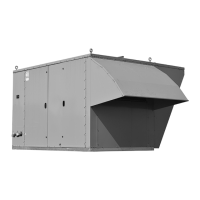
Model MPR Commercial Packaged Ventilation
System Unit (C-Cabinet size shown)

Questions and Answers

  • J
    Jennifer HansonAug 3, 2025
    How to troubleshoot power failure in Modine Manufacturing Fan?
    • J
      Jonathan GarzaAug 3, 2025
      If your Modine Manufacturing Fan has no power, there are several things you can check: * Ensure the disconnect switch is turned on. * Inspect and replace any blown fuses or reset the circuit breaker. * Verify that the main power supply to the unit is turned on at the main panel.
  • D
    Daniel BuchananAug 10, 2025
    What to do if Modine Manufacturing MPR motor fails?
    • N
      Natalie YoungAug 10, 2025
      If the motor in your Modine Manufacturing Fan fails, consider these potential causes and solutions: 1. Refer to Problem A for power-related issues. 2. Inspect the motor itself and replace it if it has failed. 3. Check for loose wiring to the motor and tighten as necessary. 4. Reset the motor starter if the motor is overloaded, and then check the motor load. 5. Ensure the supply voltage is correct and make any necessary corrections.
  • A
    Allison LeeAug 15, 2025
    Why is there insufficient airflow in my Modine Manufacturing MPR Fan?
    • C
      Carlos WallaceAug 15, 2025
      If your Modine Manufacturing Fan has insufficient airflow, consider the following: * Ensure the motor is running in the correct direction by checking and correcting the motor wiring to the phase rotation of the supply power; reverse any two lines to the motor if needed. * Verify that the fan speed setting is appropriately adjusted. * Inspect and clean or replace any dirty or clogged filters or coils. * Check and correct the duct system if it has more static pressure drop than expected. * Ensure dampers and/or discharge registers are open.
  • C
    Charles JordanAug 21, 2025
    What to do if Modine Manufacturing MPR blower is not turning or turns slow?
    • R
      Rachel TaylorAug 21, 2025
      If the blower in your Modine Manufacturing Fan isn't turning or is turning slowly: * First, refer to problems A and B for potential power or motor issues. * Check the drive belt and replace it if it's broken. * Ensure the motor voltage is adequate and correct if necessary. * Verify the supply power line sizing is appropriate and correct if needed. * If the controls are in Unoccupied mode, wait for Occupied mode or override. * Check and correct any controller alarms. * Ensure the blower door is closed.
  • R
    Ryan ChenAug 27, 2025
    Why is there excessive airflow in my Modine Manufacturing Fan?
    • M
      Michael ObrienAug 27, 2025
      If your Modine Manufacturing Fan has excessive airflow: * Check and correct the fan speed setting, as it may be too high. * Ensure that filters are properly installed. * Verify that ductwork grilles or registers are installed. * Check and correct the duct system if it has less static pressure drop than expected. * Make sure all unit side access doors are closed.

Summary

Special Precautions

Hazard Intensity Levels

Defines DANGER, WARNING, CAUTION, IMPORTANT levels for hazard communication.

Unit Location

General Rigging Instructions; Unit Installation

General Rigging Instructions

Safety precautions and methods for lifting and rigging the unit.

Duct Installation and Utility Connections

Condensate Drain Installation

Electrical Connections

Electrical Connections

Detailed instructions and warnings for making electrical connections.

Gas Connections

Gas Connections

Instructions and warnings for connecting the unit's gas supply.

Gas Heating Option Vent Terminals and Combustion Air Hoods

Gas Heating Option Condensate Drain and Trap Installation

Hot Water Piping Connections

Start-Up Procedure

General

General warnings and important notes before starting the unit.

Blower Adjustments

Blower Adjustments - Direct Drive Fans

Blower Adjustments - Belt Drive Fans

Air Flow Proving Switch; Optional Dirty Filter Switch

Checking Refrigerant Charge

Gas Heating Option

Gas Heating Option

Steps for checking and adjusting gas pressure for the heating option.

Check;Adjust Pressure at Manifold

Placing Furnace Control Into Checkout Test Mode

Final Check

Energy Recovery Exhaust Option

Maintenance

Cooling Coil Drain Pan and Drain System

Refrigeration System Coil Maintenance

Hot Water Heat Coil Maintenance

Energy Recovery Exhaust Assembly

Service & Troubleshooting

Table 51.1 - Troubleshooting

Troubleshooting guide for common power, motor, and airflow issues.

Table 52.1 - Troubleshooting (Continued)

Table 54.1 - Furnace Master Control Board (VB1200) Error Codes

Table 55.1 - Furnace Slave Control Board (VB1201) Error Codes

Model Identification & Serial Plates

Model Nomenclature

Table 58.1 - Model Nomenclature - Main Unit

Table 59.1 - Model Nomenclature - Main Unit (Continued from previous page)

Modine Manufacturing MPR Specifications

General IconGeneral
BrandModine Manufacturing
ModelMPR
CategoryFan
LanguageEnglish

Related product manuals