F
Manual Mini Blizzard Pro
www.modster.at 17
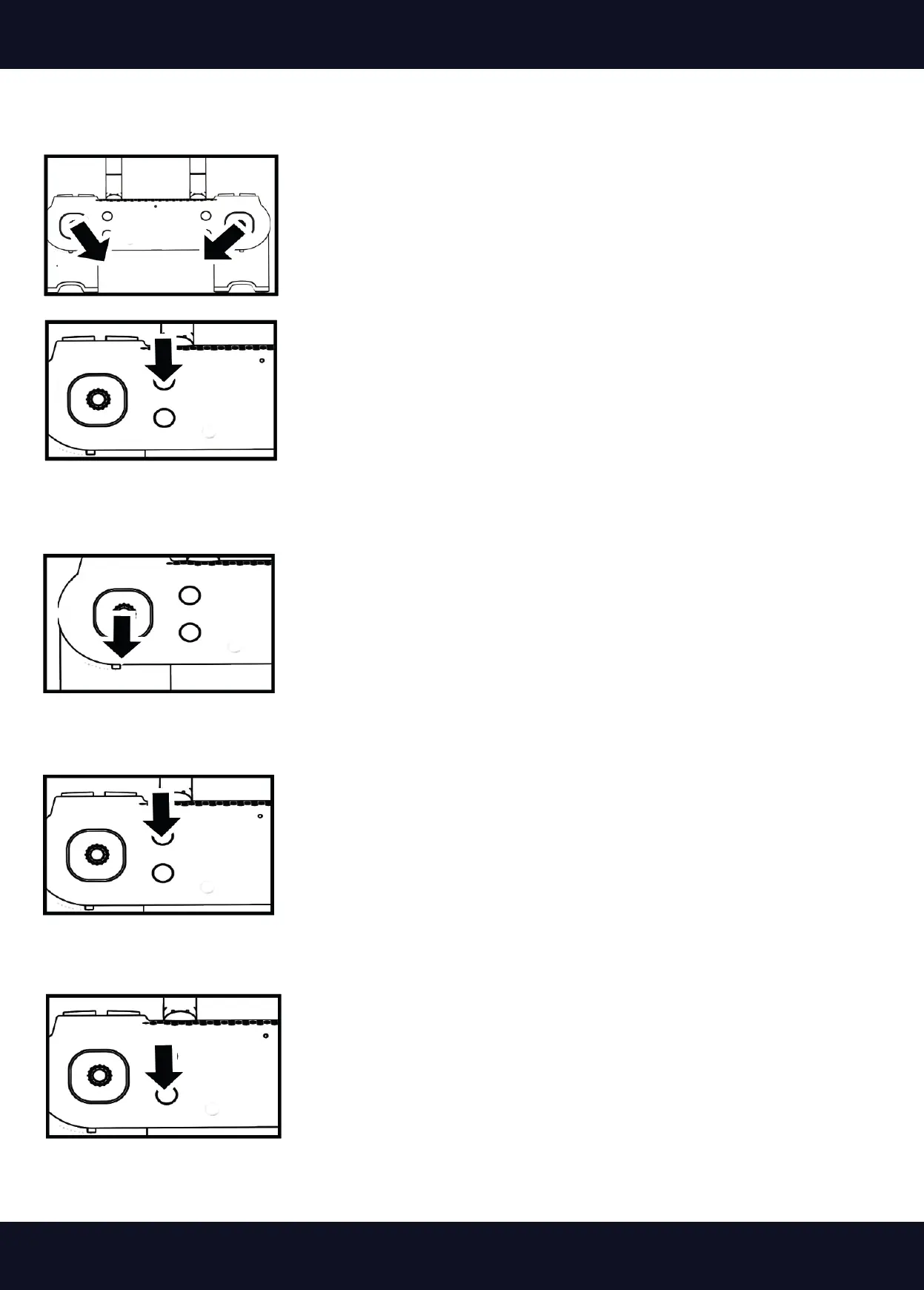
1. Place the drone on a at surface. Move the two control sticks to the
apparent position. After 2-3 seconds, the LED will ash rapidly. The
calibration was successful if the LED lights up constantly after
2-3 seconds.
2. Move the two control sticks as shown in the gure to start the motors.
3. Move the left control stick forward, the drone will take o.
Landing method 1:
Landing method 2:
Landing method 3:
Start method 2:
2. Press the takeo/landing button and the drone will take o
1. Place the drone on a at surface. Move the two control
sticks to the position shown in the picture. After 2-3 se-
conds, the LED of the drone will ash rapidly. After 2-3
seconds, the LED will be on constantly, the calibration was
successful.
Slowly pull the left stick back until the drone lands. After landing, hold
the stick in the rear position for another 2 seconds until the motors stop.
Press the takeo/landing button, the drone will take o by itself and
then stop the motors.
In case of emergency, e.g. if the drone ies against an obstacle, press
the the emergency stop button. The motors will stop immediately and
the drone will to the ground. This is an emergency measure to prevent
further damage, but damage may occur in the process.


 To Next Page