- 19 -
1. Press OK button to enter sub-menu 1.
2. Select ‘zone’.
3. Press OK button to select the desired
zone.
4. Press UP, DOWN, LEFT and RIGHT
buttons to select the distance and
percentage.
5. Press OK button to confirm each zone.
6. Repeat step 3 to 5.
7. Press OK button to confirm the setting
of all the zones.
1. Place the mower in the garden.
2. Press OK button to enter sub-menu 1.
3. Select ‘spot mode’.
4. Close the cover to start.
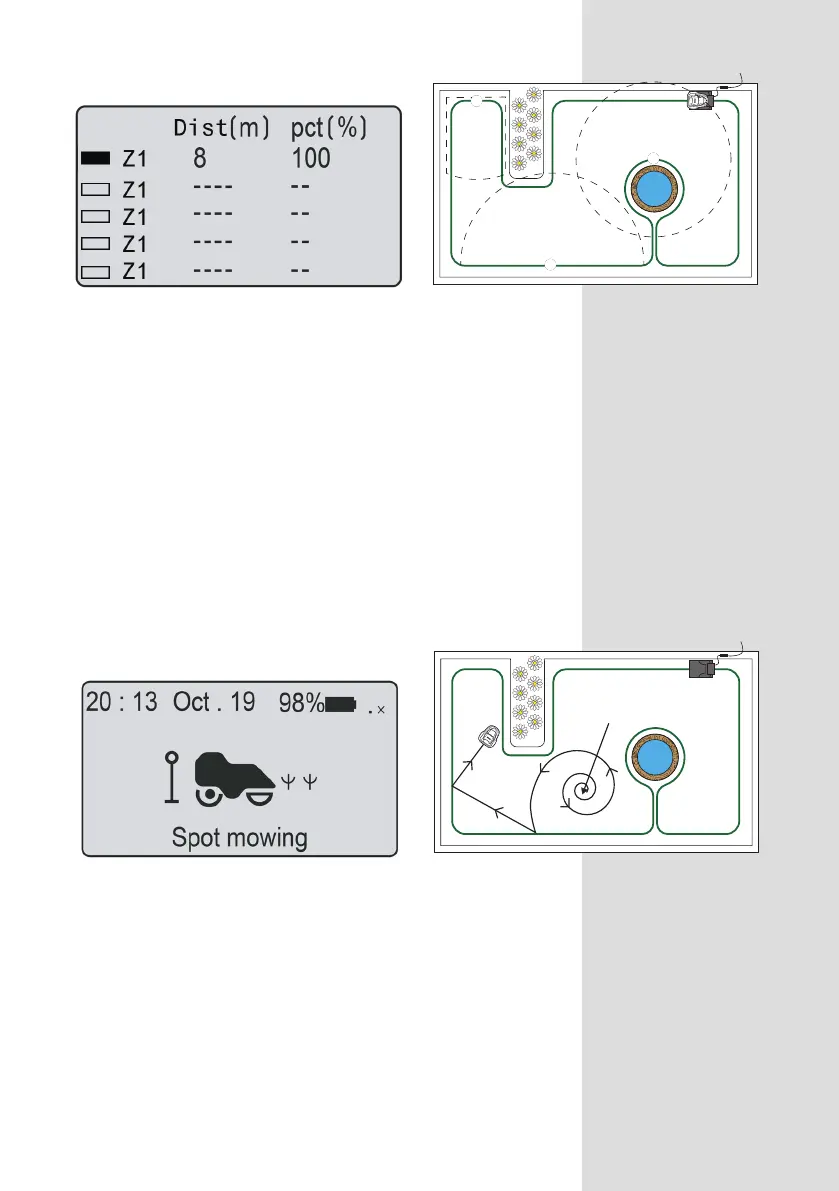
The mower can be placed within the
perimeter boundary and that the spot mow
function will mow in relatively uniform spiral
pattern
for 5 minutes. This is useful when
you want to cover a specific area or clear
grass on the first mow more quickly.
You can set up to 5 zones in your garden.
This enables you to decide areas of your
garden that need more or less attention. A
zone is set by how far along the boundary
wire from the base station. The distance
should be 0 to 200m and the
percentages should add up to 100% or
the setting cannot be completed.
Zone
Spot mow
ZONE 3
ZONE 2
ZONE 1
1
2
3
mower placed here


 To Next Page