- 22 -
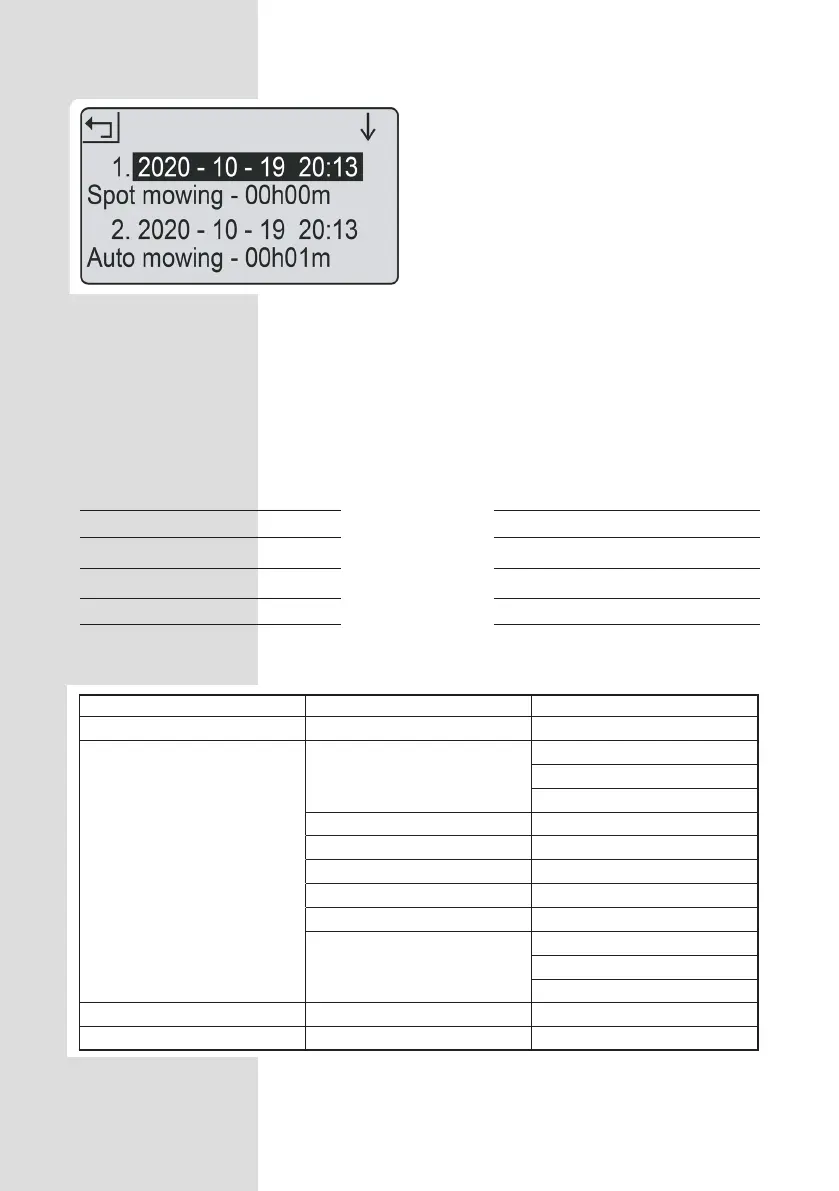
1. Press OK button to enter sub-menu 1.
2. Select ‘setting’ to enter sub-menu 2.
3. Select ‘information’ to enter sub-menu 3.
4. Select ‘work log’.
5. The past 10 records (including date, time
and work mode and work time) will be
shown.
Work log
Save power
The backlight will switch off after 2 minutes
in the mower will power off after 8 minutes,
respectively, without user interference.
LED indicator
The backlight will switch off after 2 minutes
and the mower will power off after 8
minutes, respectively, without user
interference.
LED on charge station
Solid red light
Flashing blue light
Solid blue light
Status
Broken boundary wire
Mower charging
Loop signal normal or fully charged
Sub-menu 1 Sub-menu 2 Sub-menu 3
Spot mode
Setting
Language
English
German
French
Date & Time
Rain mode
Work time
Change PIN
Factory reset
Information
About
Error log
Work log
Schedule
Zone


 To Next Page