Wash and dry functions will only work
when the user is seated on the e-toilet seat.
There is no sound of a beep when the user
sits on the seat.
To turn on the seat sound: Press the
“Flush” button on the remote for 3 seconds.
A single beep will sound to confirm that the
seat sound is activated.
Repeat above step to turn off the function.
A double beep will sound to confirm the seat
sound function is off.
Light Temperature Indicators
Red
Pink
Blue
No Light
Hot
Warm
Cold
None
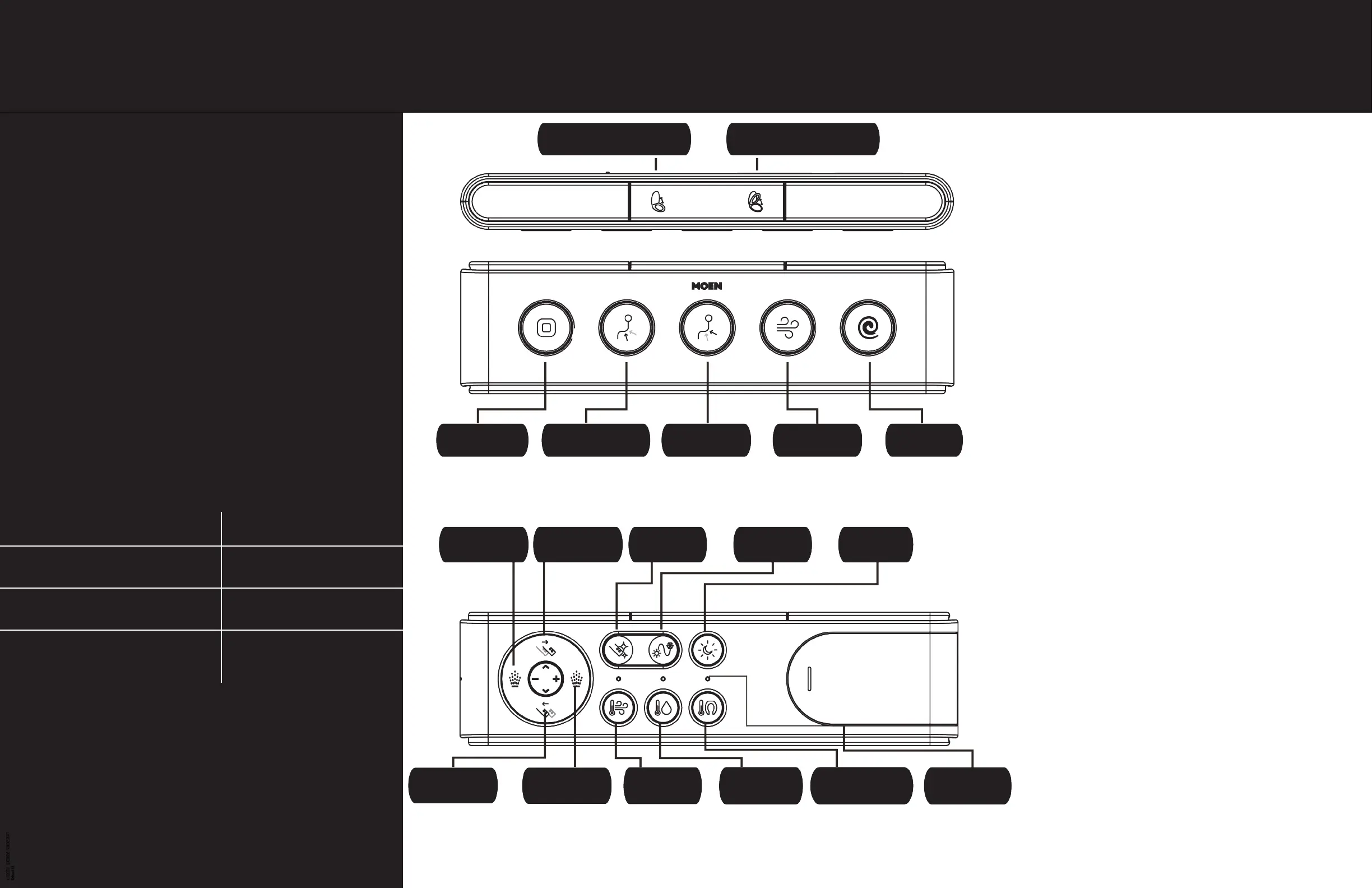
REMOTE CONTROL FUNCTIONS:
A B
C D E F G
H I J K L
M N O P Q R
A. OPEN/CLOSE SEAT COVER
B. OPEN/CLOSE SEAT RING
C. STOP
Turn product off to stop an operating function.
D. FRONT
Front wash.
E. REAR
Rear Wash.
F. DRYER
Activate dryer function.
G. FLUSH
Flushing after toilet use.
H. WATER PRESSURE
Adjust intensity (reduce) of front and rear wash.
I. NOZZLE FORWARD
Nozzle position can be positioned
5 different ways.
J. NOZZLE CLEAN
Extend nozzle for manual cleaning.
K. H/C MASSAGE
Alternate water temperature of spray between
cold and hot water during wash.
L. Night Light
Turn night light on/off.
M. NOZZLE BACKWARD
Nozzle position can be positioned
5 different ways.
N. WATER PRESSURE
Adjust intensity (increase) of
front and rear wash.
O. DRYER TEMPERATURE
Adjust dryer temperature
P. WATER TEMPERATURE
Adjust water temperature
Q. SEAT TEMPERATURE
Adjust seat temperature
R. TEMPERATURE INDICATOR LIGHTS
Colored lights based on
water temperature.


 To Next Page