Need help?
Do you have a question about the Moes BAT-80A and is the answer not in the manual?
Illustrates the ATS connection using Live and Neutral wiring for power supply.
Details the ATS connection using Live1, Live2, and Neutral wiring for power supply.
Explains the operational uses of the ATS power transfer controller.
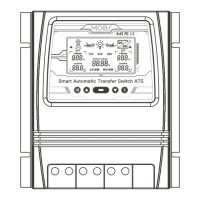
Overview of the Dual Power Transfer Controller and its system integration.
Step-by-step guide for the proper installation of the ATS controller.
Details the voltage detection ranges for 12V, 24V, and 48V systems.
Explanation of symbols, indicators, and information shown on the ATS LCD.
Illustrates display modes for automatic switching between grid and inverter.
Description of the front panel buttons and their respective operations.
Procedure for adjusting voltage error values and saving modifications.
Guide to selecting and modifying battery voltage and low-voltage switch settings.
Information on the automatic turn-off feature of the LCD display backlight.
Details battery voltage thresholds and switching actions for 12V systems.
Details battery voltage thresholds and switching actions for 24V systems.
Details battery voltage thresholds and switching actions for 48V systems.
Instructions for downloading the MOES app and registering an account.
Procedure to reset the device and confirm successful re-pairing.
Describes methods for pairing the ATS with the mobile application.
Guide to pairing the device by scanning a QR code within the MOES app.
Initial steps for pairing the device using the Smart Life/Tuya app.
Steps for discovering, adding, and confirming the device in the app.
The MOES Smart Automatic Transfer Switch (ATS) is a sophisticated device designed to provide reliable and seamless power transfer between an off-grid power system and a public utility power supply. It acts as a central controller, ensuring continuous power availability by automatically switching between different power sources, while also safeguarding the inverter from external voltage fluctuations. This compact unit integrates the functions of an inverter and an AC utility power transfer controller, making it an essential component for off-grid solar systems, wind generators, and hydro generators.
The primary function of the MOES ATS is to manage the flow of AC power to a connected load by intelligently selecting the most appropriate power source. It connects to four distinct components: the utility power, an inverter, a battery bank, and the load. The ATS continuously monitors the status of both the utility power and the inverter/battery system. When the utility power is available and within acceptable parameters, the ATS will prioritize it as the primary power source. However, if the utility power fails or falls outside the specified voltage range, the ATS will automatically and rapidly switch the load to the inverter, drawing power from the connected battery bank. Conversely, once the utility power is restored and stable, the ATS will seamlessly transfer the load back to the utility, allowing the inverter and battery system to recharge or remain in standby. This automatic transfer capability ensures an uninterrupted power supply to critical loads, enhancing the reliability and convenience of off-grid setups. The device is capable of auto-selecting the system voltage (12V, 24V, or 48V) based on the connected battery bank, further simplifying its integration into various power systems.
The MOES ATS is designed with user-friendliness and comprehensive monitoring in mind. Its front panel features an intuitive LCD display that provides real-time information about the system's operational status. Users can easily view the battery voltage, the current power source (utility or inverter), and the corresponding AC voltage and current being supplied to the load. The LCD also indicates when the system is in a low-voltage switching state or when there's a failure of non-voltage AC current, with flashing icons for clear alerts.
The device incorporates several buttons for easy interaction and configuration. A "Mode" button allows users to switch between automatic mode, grid power supply mode, and inverter power supply mode, offering flexibility in power management. "Plus" and "Minus" buttons are provided for adjusting voltage settings, specifically for the low-voltage switching voltage (LV-SW) and low-voltage recovery voltage (HV-SW). These settings are crucial for defining the thresholds at which the ATS will transfer power to and from the battery system, protecting the battery from deep discharge and ensuring its longevity. A "Function" button cycles through these voltage settings, making it easy to configure the desired parameters. The battery voltage is displayed by default upon power-on, and the display reverts to this default after 10 seconds of no button activity on the setting interface.
For enhanced smart home integration, the MOES ATS includes an "APP Configuration Button." Pressing and holding this button for 6 seconds puts the device into network distribution state, indicated by a flashing blue light. This allows the ATS to be paired with the MOES App (or Tuya Smart/Smart Life App), enabling remote monitoring and control. Through the app, users can register or log in, add the device by scanning a QR code or through an automatic discovery process, and then manage its settings from their smartphone. This smart functionality provides convenience and allows users to keep track of their power system's performance from anywhere.
While the MOES ATS is built for reliable operation, certain features and recommendations contribute to its long-term performance and ease of maintenance. The device's design emphasizes proper installation, which is a key aspect of its maintenance. It requires mounting to a clean, dry surface in a location that allows for free air circulation, preventing overheating. The use of appropriately sized cables (AWG 14 for smaller connections and AWG 6 for larger ones) and ensuring all connections are properly tightened are critical to prevent overheating and potential damage.
The LCD display backlight automatically turns off after 60 seconds of inactivity to conserve energy, but pressing any button will re-illuminate it. This feature helps extend the life of the display. The ATS also includes an error adjustment function. If any error voltage value occurs, users can press and hold the "Add" and "Minus" buttons simultaneously for 3 seconds to release a 0.0V voltage flicker. They can then use the "Add" or "Minus" buttons to modify the detection error voltage value and save the changes by holding the "Function" button for 3 seconds. This allows for fine-tuning and calibration if needed, ensuring accurate voltage readings and transfer operations.
For troubleshooting or re-pairing with the app, the device offers a reset function. Pressing and holding the APP Configuration Button for about 6 seconds will cause the blue indicator to flash quickly after 3 seconds, signaling a successful reset and readiness for re-pairing. This simplifies the process of re-establishing network connectivity or resolving minor software glitches. The manual also emphasizes the importance of periodic checks of connection cables for any damage, recommending immediate replacement if issues are found. Adherence to all safety protocols during installation and operation, including ensuring AC power supplies are off and secured, is paramount for both device longevity and user safety. The ATS is designed to operate within specific environmental conditions, and avoiding exposure to extreme temperatures, flammable gases, ignitable vapors, excessive humidity, or moisture contact is crucial for its proper functioning and durability.
 General
| Model | BAT-80A |
|---|---|
| Category | Switch |
| Type | Smart Switch |
| Frequency | 50/60Hz |
| Wireless Protocol | Wi-Fi |
| App Compatibility | Smart Life, Tuya |
| Voice Control | Amazon Alexa, Google Assistant |
| Material | PC |
| Dimensions | 86 x 86 x 35mm |

 To Next Page