EZ Repair Instructions
Damaged Carrier Locking Pin Assembly
If additional help is needed, please call MoJack Customer Service: 1-877-575-3173.
© MoJack July 2012 Rev. 2
6)
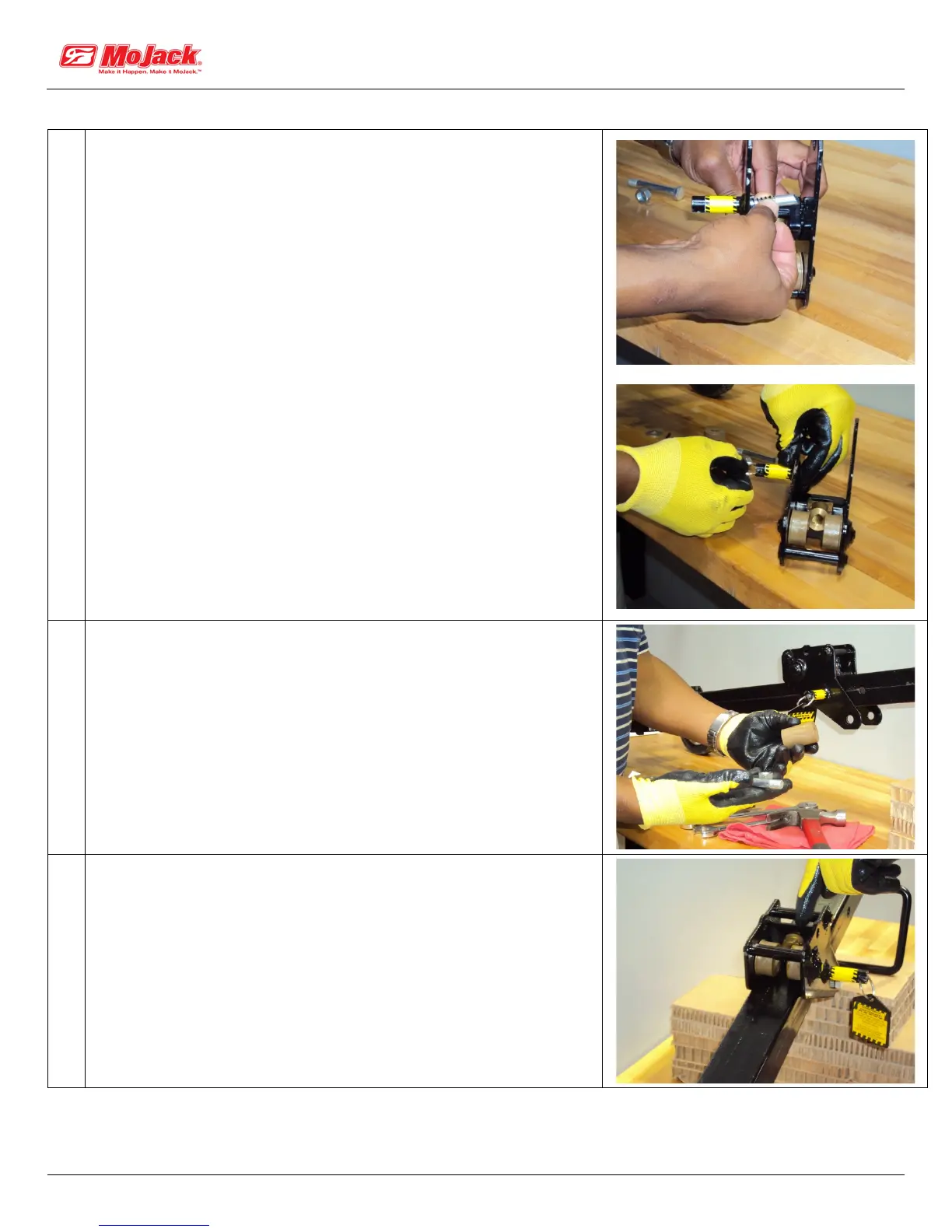
Insert the new Carrier Locking Pin with the new Spring-Locking
Pin #34 from the inside of the Carrier Assembly and fasten in
place on the outside with new Key Ring #35 (Safety Tag #42 is
optional).
• IMPORTANT: new Locking Pin is beveled and must be
inserted with the short part of the bevel on top and the long
part on the bottom.
Insert new locking pin and spring
Fasten locking pin with key ring
7)
• Install the Carrier Assembly back on the Tower with the
Carrier Bolt and Rear Carriage Roller.
• This will require pulling out on the Key Ring.
• Caution: do not over-tighten the Carrier Bolt as the Rear Roller
needs to turn freely.
8)
Make sure the two Front Carriage Rollers #29 are in place below
the new Bronze Nut and to the left and right side.


 To Next Page