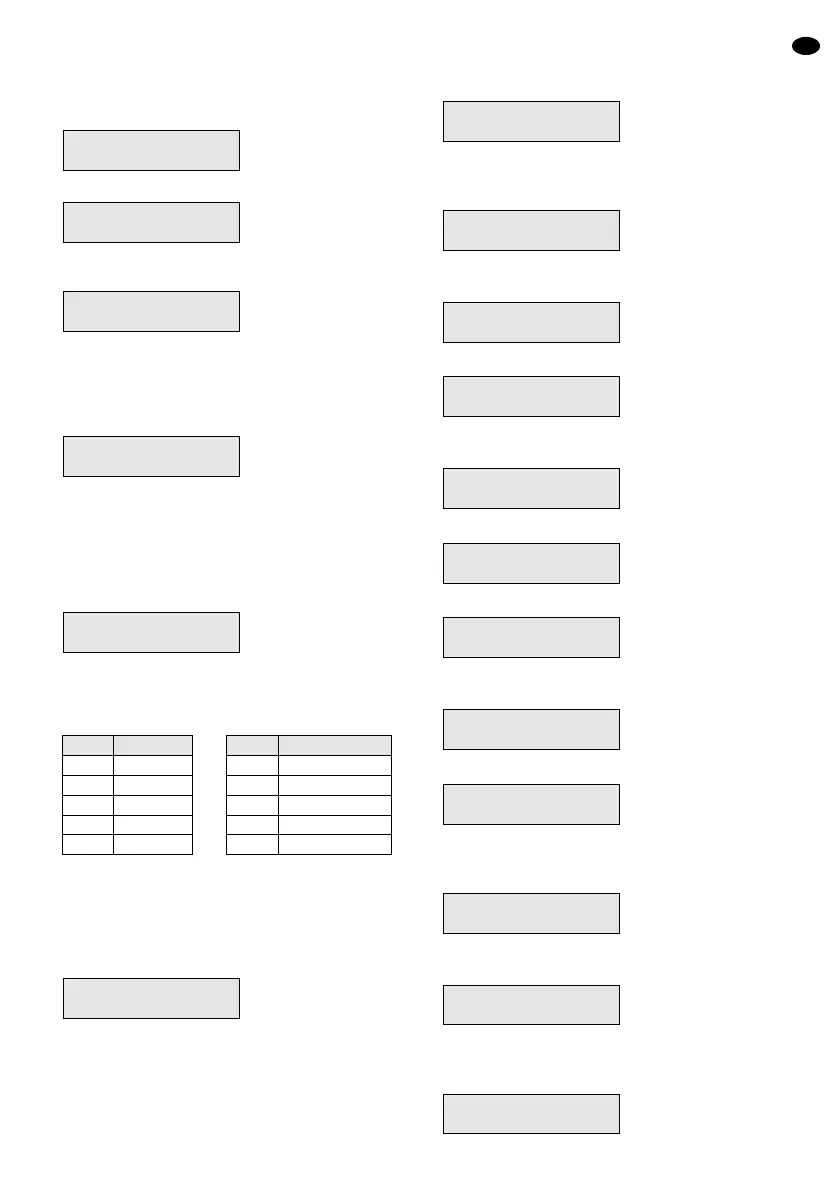
9) For changing the code of user number 1, select
this number with the button 1 or, for creating an-
other access code, press the numerical key which
corresponds to the desired access authorizations.
The display shows e. g.:
10) Press the button No. The display shows:
11) Enter the desired sequence of numbers and make
sure to remember it. Example:
or for deleting the access code for the selected
user number, enter the sequence of numbers 0, 0,
0, 0.
12) To confirm the entry, press the button Yes. The
display changes e. g. to:
13) The user name is indicated in the lower display
line. The default setting is “User” and the corre-
sponding number. For keeping the default setting
press the button Yes and continue with operating
step 16.
For indicating another code press the button
No. The display shows:
14) Enter eight letters, numbers, and, if necessary,
blanks with the numerical keys. Press the corre-
sponding numerical key so many times until the
desired character appears:
If the desired character is shown, actuate the but-
ton Yes and enter the next letter. If not all eight
characters are required, complete the remaining
positions with blanks.
15) As soon as the 8th character is confirmed with the
button Yes, the display returns to:
16) For creating further access codes repeat the oper-
ating steps 8) to 15).
17) When all codes are created, press the button 0
twice after the operating step 15) so that a signal
will sound after exiting the menu and the display
shows date, time, and <<< UNSET >>> again.
2.2 Setting time and date
1) The alarm control system must be deactivated.
Then the display shows:
2) Enter a valid master access code (user numbers 1
to 3) with the numerical keys (e. g. that of the
default setting 5, 6, 7, 8). The display shows:
3) Press the button No within 15 seconds, otherwise
the menu will be exited. The display shows:
4) Press the button No again. The display shows:
5) Press the button No once more. The display
shows:
6) Press the button Yes. The display shows:
7) Press the button No. The display shows:
8) Press the button No once more. The display
shows:
9) Press the button Yes. The display shows:
10) Enter the day and the month with the numerical
keys, e. g. for June 21 the buttons 2, 1, 0, 6. The
display shows:
11) Confirm with the button Yes. The display changes
to:
12) Enter the hours and the minutes with the numeri-
cal keys, e. g. for 9.45 a.m. press the buttons 0, 9,
4, 5. The display shows:
Type Hrs/Mins
0945<
—
Type Hrs/Mins
0000<
—
Type Day/Mnth
2106<
—
Type Day/Mnth
0000<
—
Do You Want to..
Set Date/Time ?
Do You Want to..
Program Codes ?
Do You Want to..
Program Chime ?
Do You Want to..
Select Options ?
Do You Want to..
Delete Zone ?
Do You Want to..
Test ?
Do You Want to..
Set User 1 ?
01 Jan 00:00
<<<
UNSET
>>>
Do You Want to..
Program Codes ?
Code 4 Text
-
Code 4 Text
User 4
Code 4
2933<
—
Code 4
0000<
—
Code 4
####
GB
13
Key Character
1 A, B, C
2 D, E, F
3 G, H, I
4 J, K, L
5 M, N, O
Key Character
6 P, Q, R
7 S, T, U
8 V, W, X
9 Y, Z, blank
0 1, 2, 3, … 9, 0


 To Next Page