Potensi Elevator
6
/
13
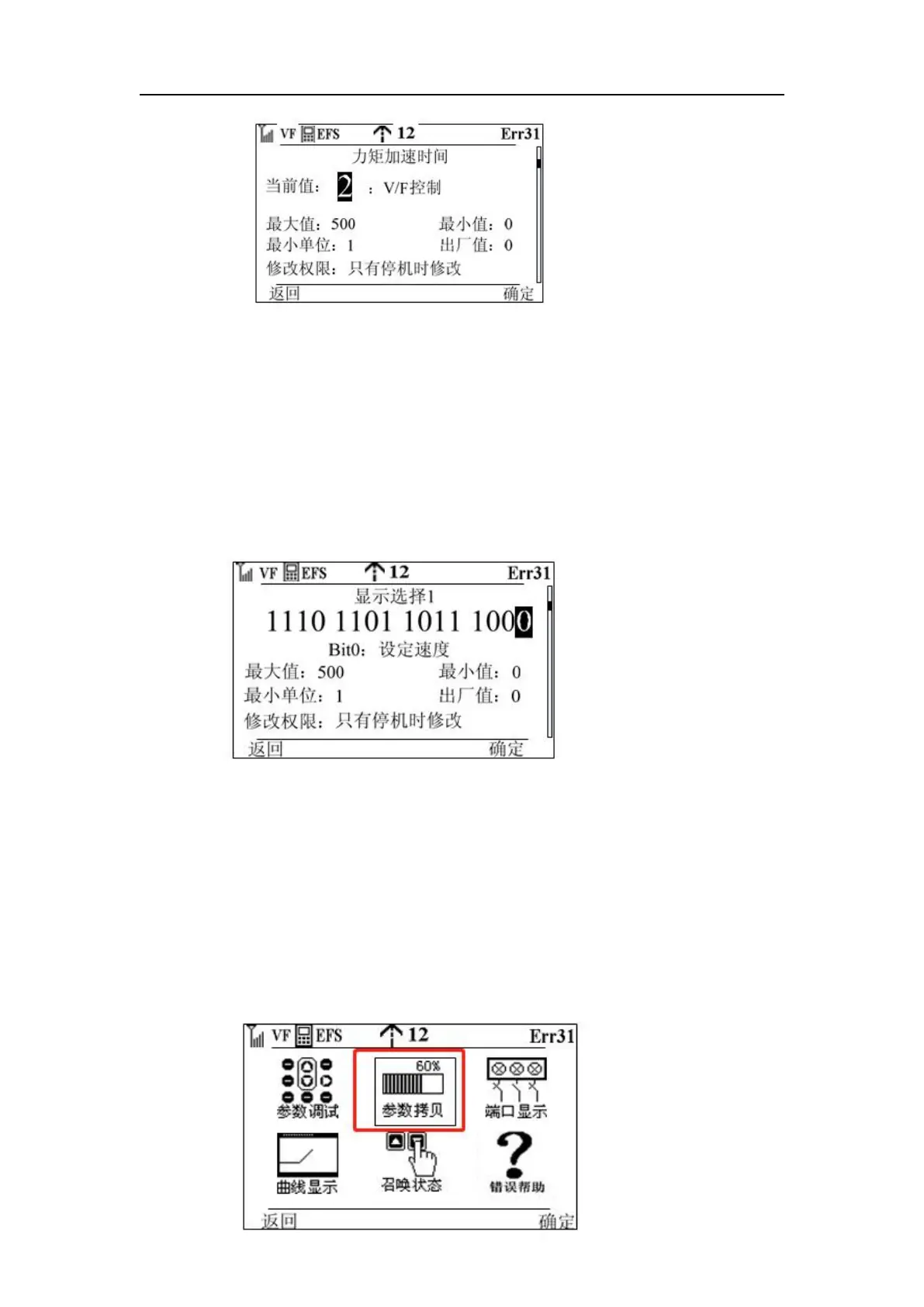
Press the knob to determine the key or function key 2, modify successfully, return to step three,
press function key 2 to return to step three, do not modify the parameters
b) Modify parameters bitwise such as: FA-01 (bit0: set speed, bit1: logic information, bit2:
curve information, bit3: pre-torque current, bit4:
Feedback speed, bit5: bus voltage, bit6: output voltage, bit7: output current, bit8: output
frequency, bit9: output torque, bit10: torque current, bit11: output power bit12: current position
bit13: communication interference, bit14: encoder interference, bit15: car load)
The first three steps are the same as above:
Step 4: Enter the modification screen
Step 5: Rotate the button to adjust the cursor position, press the knob OK key, modify to 0 or
1, 0 means not displayed, 1 means display, when the setting is completed press the function key
1, the modification is successful, return to step three
2. Parameter modification interface as above three cases, in the parameter modification
interface, the operator will be based on the parameter modification authority and the current
state of the elevator, to determine whether this parameter can be modified, if not modified, the
operator will not see the black cursor, naturally can not modify the parameters
Parameter copy
Step 1: Move the cursor to the position below screenshot shown on the main interface


 To Next Page
 Loading...



