Moneris Go Plus Integrated: Getting Started Guide 7
Installing the Hardware
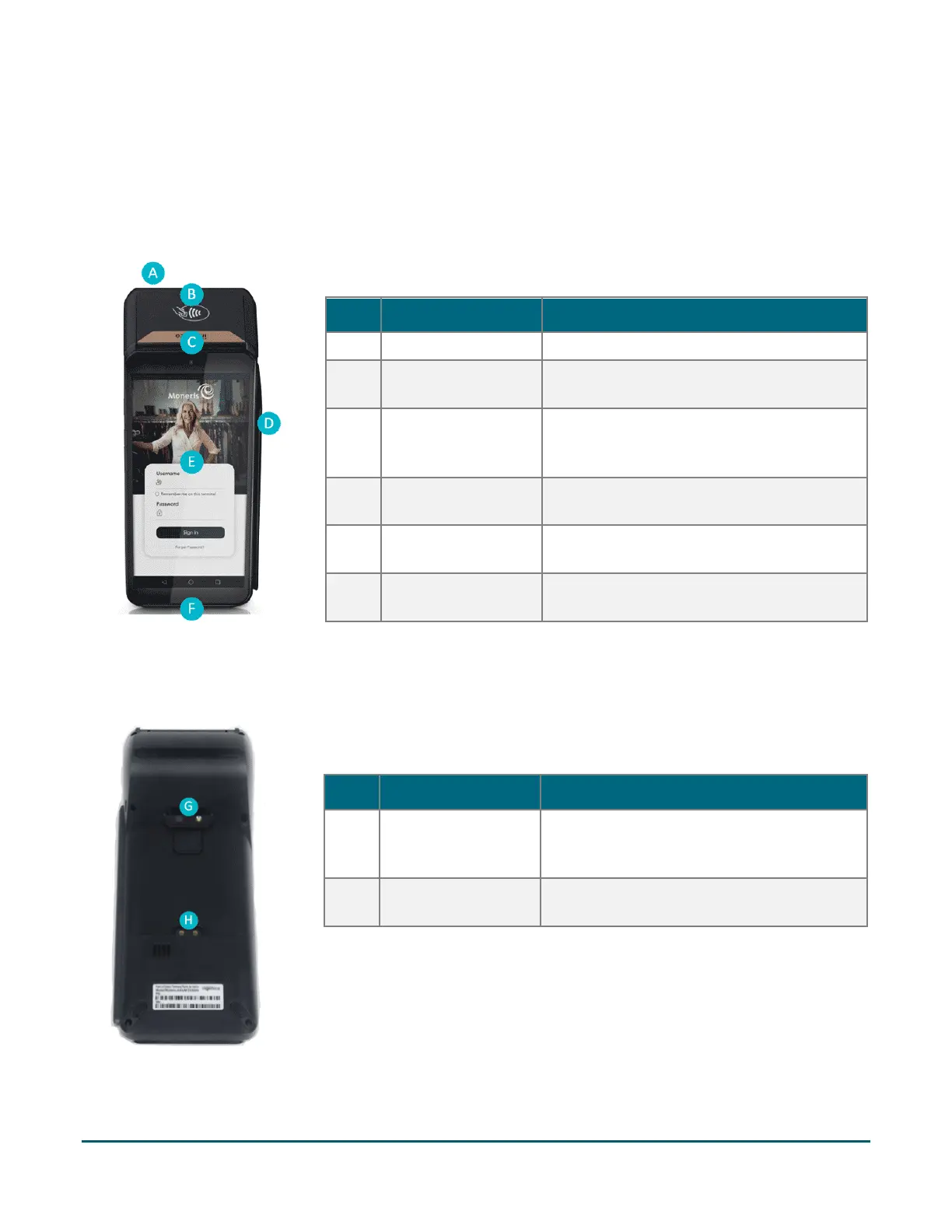
Diagram of the front of the Moneris Go Plus
Use this diagram to get familiar with the interfaces and ports located in the front of the Moneris Go Plus.
Diagram of the back of the Moneris Go Plus
Use this diagram to get familiar with the interfaces and ports located on the sides
and back of the Moneris Go Plus.
Label Hardware Element Function
Prints receipts and reports.
B Contactless reader
Reads card information when a card is
C Front camera
Scans QR codes on a receipt to help you
find a transaction to refund, void, or reprint
D
Magnetic stripe
Reads card information when a card is
E
Touch screen
Displays information and allows you to
enter information by touching the screen.
F Chip card reader
Reads card information when a chip card is
Label Hardware Element Function
G Rear camera
Scans QR codes on a receipt to help you find
a transaction to refund, void, or reprint
H Metal contacts
Connects the terminal with the optional



 To Next Page