GEO-FENCE
A geo-fence is an invisible programmable boundary.
The boundary has a minimum radius of 100m to a maximum of 5000m.
200m is the recommended minimum to avoid false alerts.
The area is easily set from the APP or website.
If the tracker moves outside this area it will send an alert to the paired mobile phone. You
will also receive an alert when it re-enters the area.
Multiple geo-fences can be set, for instance, around your home, your place of work, usual
parking places, shopping centres, friend’s houses, etc.
Delete a geo-fence if you do not wish to receive alerts.
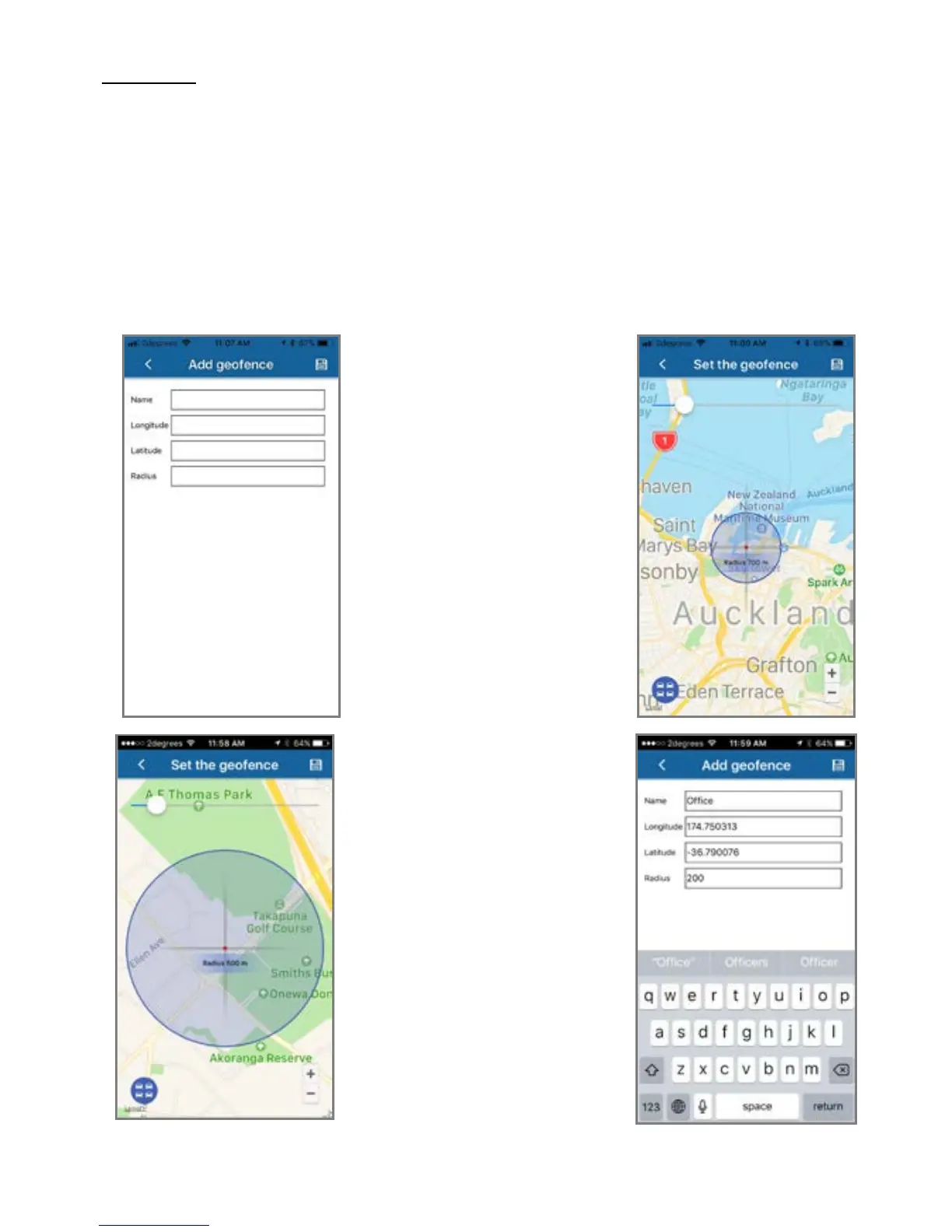
Enter a name for your geo-
fence. Then tap ‘longitude’
The map on the right opens.
Move the map so the cross-
hairs are over where you want
the centre of your geo-fence to
be.
Use the slider bar to increase or
decrease the size of the geo-
fenced area.
The text in the centre of the
‘cross-hairs’ shows the radius
chosen (distance from centre to
perimeter).
Min’ 100m Max’ 5000m
Press the save icon top right.



 To Next Page