REAL TIME TRACKING
Select ‘Real Time’.
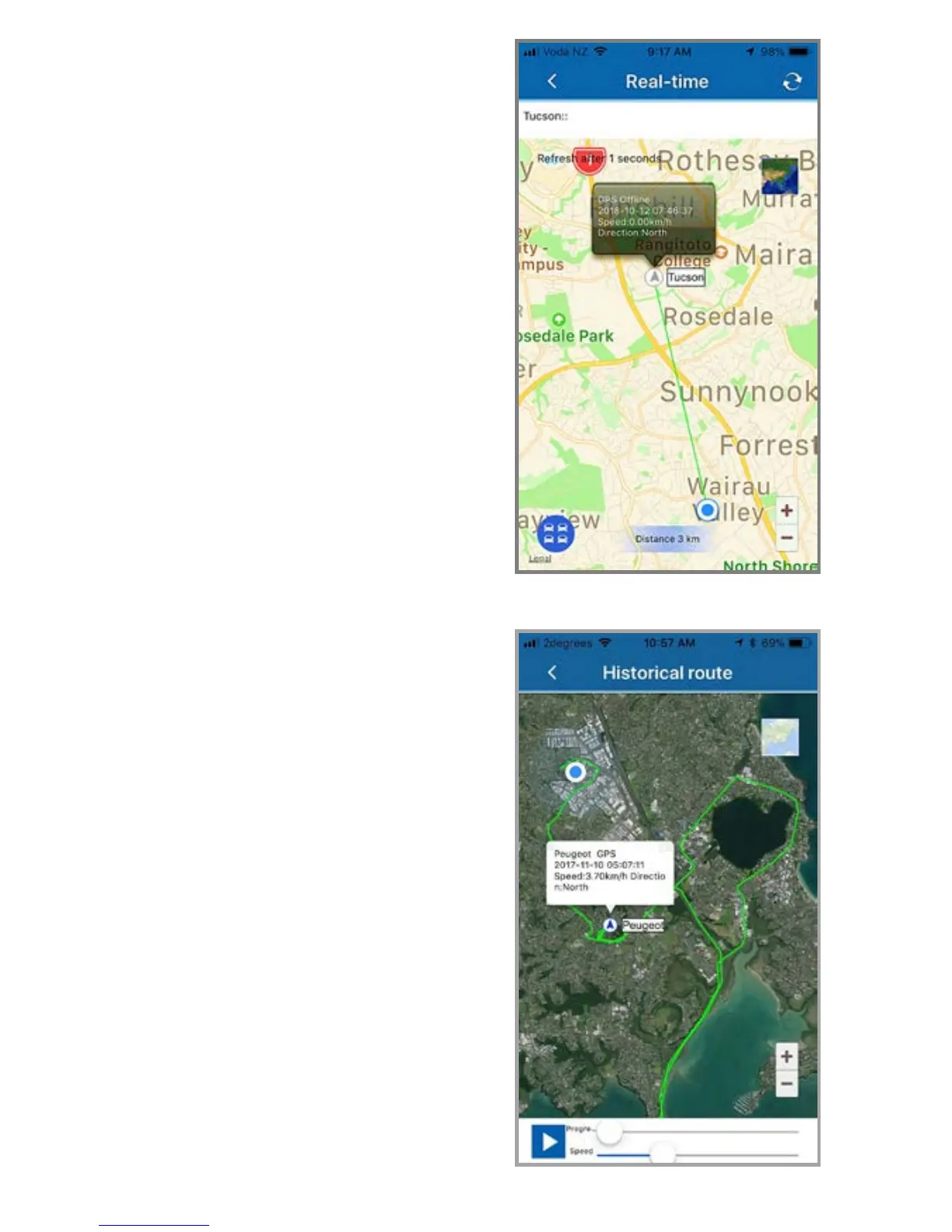
The green triangle is the tracker.
The blue dot is your mobile phone.
The green line shows the direction and distance
your phone is from the tracker.
This location is the last one recorded.
This could be right now, or sometime in the past.
The grey dialogue box gives the time and date of
that recorded location.
You can view in either map or satellite view.
The blue circle with 4 cars showing is for zooming
into the area where your phone is – or where the
tracker is and back to normal view.
HISTORICAL TRACKING
Select ‘Historical’
The opening screen allows you to choose;
‘Today’ – ‘Yesterday’ or ‘Custom’
You can only replay any 24 hour period.
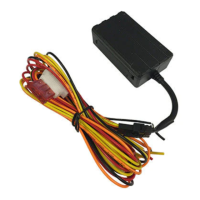
Once you have selected a 24 hour period, the
screen opposite will appear showing start and end
points. The green trace line is the route taken.
The control buttons at the bottom allow you to
play – pause – change progress – change replay
speed.
The dialogue box will change for each recorded
location and disaplays;
vehicle – time – date – speed - direction



 To Next Page