Once your Cycloop has been successfully set up it will always be ON unless you
specifically switch it OFF or it runs out of batteries.
Once a device has been switched OFF, the only way to switch ON the device
is by plugging in the powered USB-C charging cable to the charging port. It
is impossible to switch ON the device from the App or by pushing the reset
button, only plugging in the charging cable can switch ON the device.
IMPORTANT:
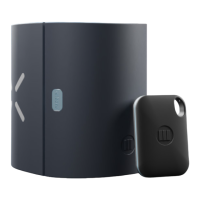
1. Find the Reset button (same button as in Restoring Default Settings).
2. Press and Hold the Reset button for 3 seconds -> 1 LED on the side with the little
‘lock’ symbol will turn SOLID BLUE then it will turn OFF. Release the button
once the blue LED has turned o to avoid accidentally resetting the device!
3. Device is now turned OFF.
To SWITCH OFF your device.
HOW TO SWITCH
ON AND OFF
CYCLOOP


 To Next Page