EasyManua.ls Logo

Monitor M441 - SECTION J; PROGRAMMING THE HEATER

Monitor M441
27 pages
Print Icon
To Next Page IconTo Next Page
To Previous Page IconTo Previous Page
Loading...
SECTION
J
PROGRAMMING
THE
HEATER
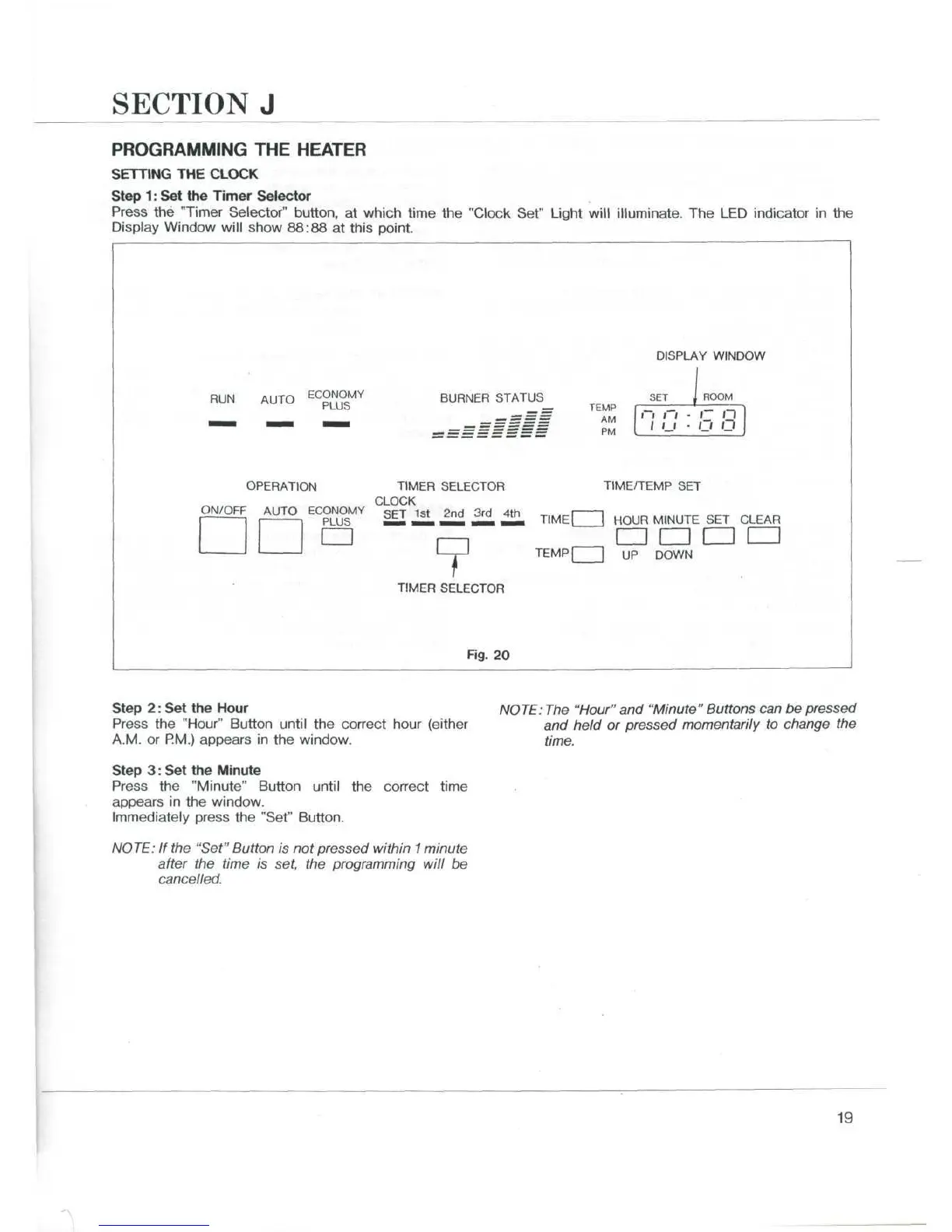
SETTING
THE
CLOCK
Step
1:
Set the
Timer
Selector
Press
the
"Timer
Selector"
button,
at
which
time
the
"Clock
Set"
Light
will
illuminate.
The LED
indicator
in the
Display
Window
will
show
88:88
at
this
point.
DISPLAY
WINDOW
RUN
AUTO
EC
£
L
N
°
S
MY
BURNER
STATUS
SET
TEMP
AM
PM
ROOM
Q
n
OPERATION
TIMER
SELECTOR
CLOCK
ON/OFF
AUTO
ECONOMY
SET
1st
2
nd
3rd 4th
PLUS
mSi
mmm
m—m
mmm
mmm
CD
TIME/TEMP
SET
HOUR
MINUTE
SET
CLEAR
CD
CD CD CD
TEMP
| | UP
DOWN
TIMER
SELECTOR
Fig.
20
Step
2:
Set
the
Hour
Press
the
"Hour"
Button
until
the
correct
hour
(either
A.M.
or
RM.)
appears
in the
window.
Step
3:
Set the
Minute
Press
the
"Minute"
Button
until
the
correct
time
appears
in the
window.
Immediately
press
the
"Set"
Burton.
NOTE:
If the
"Set" Button
is not
pressed within
1
minute
after
the
time
is
set,
the
programming will
be
cancelled.
NOTE:
The
"Hour"
and
"Minute" Buttons
can be
pressed
and
held
or
pressed momentarily
to
change
the
time.
19

Related product manuals