37
ZKHT1 Trim Kit
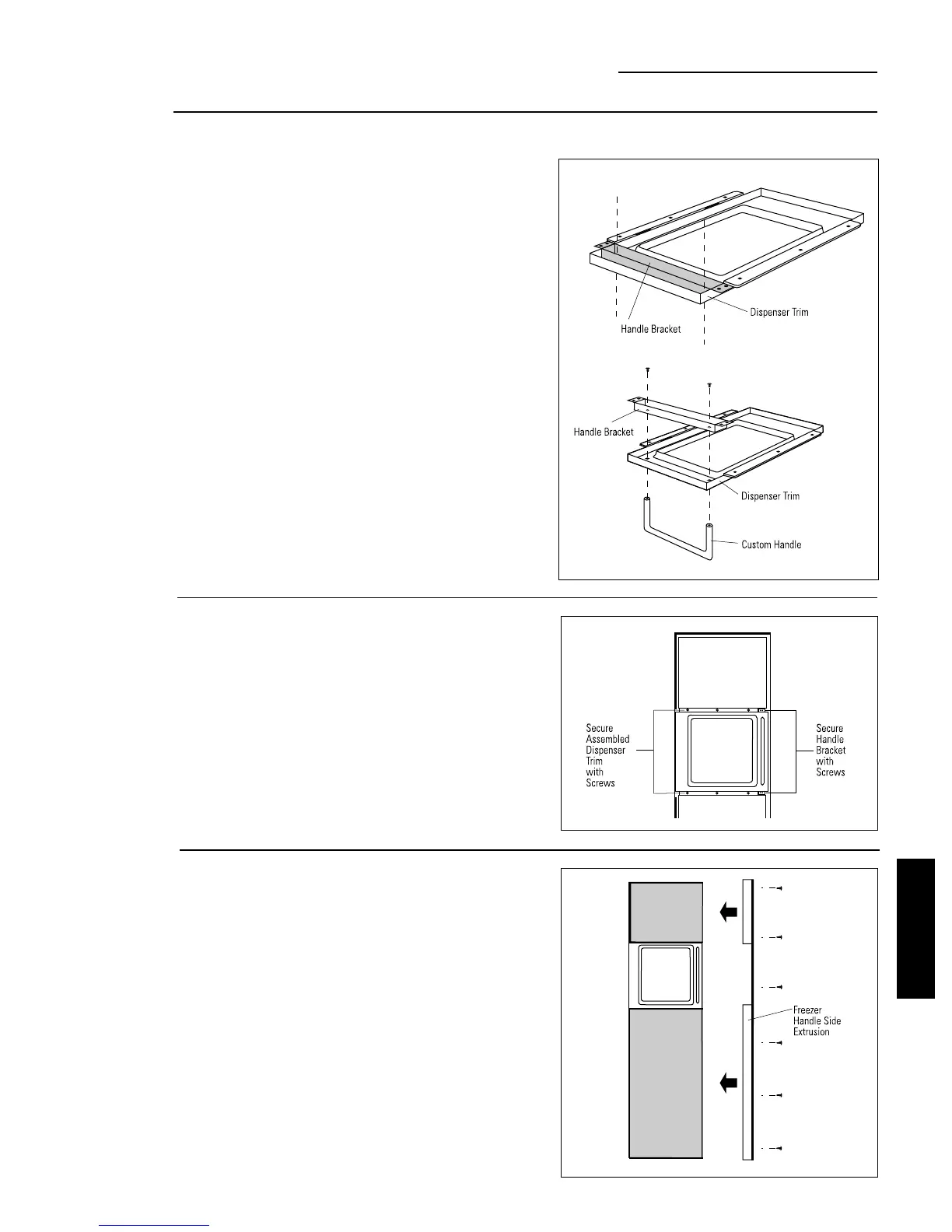
Custom Handles with 3/4" Panels
Option 2 Installation
Step 2
Install
custom handle
• Drill clearance holes through the handle bracket and
the dispenser trim.
• Install screw(s) long enough to pass through the
handle bracket, dispenser trim and into the
custom handle.
Step 3
Mount
assembled
dispenser
trim
• Mount assembled dispenser trim with handle onto
the door.
• Drive 2 screws through the top and bottom of the
handle bracket into the steel door.
• Re-install 3 screws at top and bottom of dispenser
trim.
Again, refer to ZKT42 trim kit, Option 2.
• Follow Step 4 to install freezer door panels and bottom
trim.
• Slide freezer handle side extrusion in between panels
and steel door. Secure with screws.
• To install fresh food handle, follow the same proce-
dure as in Option 1.
Step 4
Finalize
installation
Caution:
The handle bracket
must be secured to the steel
door. If it is not secured
properly, the dispenser trim will
pull away from the door.
ZKHT1 INSTALLATION
INSTRUCTIONS








 To Next Page