- 30 -
b) sous-programme caractéristique du semoir
Dans le mode programmation, mettre en sur-brillance
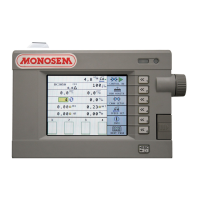
l’écran et valider. L’affichage (Fig. 1) apparaît
A : 3 caractéristiques de semoir peuvent être mémorisées.
Mettre en sur-brillance l’affichage et valider.
Sélectionner le numéro du semoir souhaité et valider.
B : nombre de rangs du semoir.
Pour modifier la valeur, mettre en sur-brillance l’affichage et
valider.
Rentrer la valeur souhaitée et valider.
C : écartement entre rangs
Pour modifier la valeur, mettre en sur-brillance l’affichage et
valider.
Rentrer la valeur souhaitée et valider.
D : largeur de travail
La largeur de travail est calculée en fonction du nombre de
rangs et de l’inter-rang mais elle peut être modifiée
manuellement. Pour cela, mettre en sur-brillance l’affichage
et valider.
b) Seeder property sub-programme
In programming mode, highlight the screen and
confirm. The display (Fig. 1) will appear.
A: 3 seeder properties may be saved.
Highlight the display and confirm.
Select the seeder number required and confirm.
B: number of seeder rows.
To modify the value, highlight the display and confirm.
Enter the value required and confirm.
C: distance between rows
To modify the value, highlight the display and confirm.
Enter the value required and confirm.
D: working width
The working width is calculated according to the number of
rows and the inter-row, but it may be modified manually. To
do this, highlight the display and confirm.
Fig. 1
Mode programmation/Programming mode
Programmiermodus/Programmeermodus
Modo de programación/Modalità di programmazione


 To Next Page
 Loading...