- 26 -
3. Utilisation
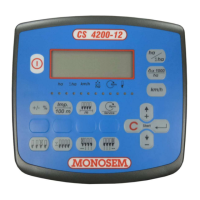
Appuyer sur la touche
pour allumer la console.
a. Affichage de la population et contrôleur de semis
Appuyer sur la touche
, la population en graines par hectares s’affiche (chiffre à multiplier par 1 000). La valeur affichée est la valeur moyenne de
l’ensemble des rangs.
Le curseur sur la partie inférieure de l’écran se positionne sur
.
Fonction ‘scanning’
Appuyer simultanément sur les touches
et .
L’écran affiche la population rang par rang. Le numéro du rang contrôlé est affiché à gauche de l’écran, la population à droite (chiffre à multiplier par 1 000).
Situation de manque de graines sur un rang.
Lorsque la population d’un rang se trouve au delà ou en deçà du seuil programmé :
Une alarme sonore retentit
À gauche de l’écran s’affiche le numéro du rang concerné par ce défaut ainsi qu’à droite la population réelle de ce même rang (chiffre à multiplier
par 1 000)
Un deuxième curseur sur la partie inférieure de l’écran clignote sur
.
Une fois le défaut corrigé, l’affichage revient automatiquement sur la fonction population.
3. Use
Press the key to switch on the console.
a. Population and sowing controller display
Press the
key to display the grain population per hectare (figure to be multiplied by 1,000). The value displayed is the average value for all the rows.
The curser in the lower part of the screen is positioned on
.
‘Scanning’ function
Simultaneously press the
and keys.
The screen will display the population row by row. The number of the row being scanned will be displayed on the left of the screen and the population on the
right (figure to be multiplied by 1,000).
Grain shortage for a row
If a row's population is above or below the threshold programmed:
An audible alarm sounds
The number of the row affected by the fault is displayed on the left of the screen and the actual population of the row is displayed on the right (figure
to be multiplied by 1,000)
A second cursor in the lower part of the screen will flash on
.
Once the fault has been corrected, the display will automatically return to the population function.
3. Utilizare
Apăsați tasta
pentru a porni consola.
a. Afişarea populaţiei şi a controlerului de semănat
Apăsaţi tasta
pentru a afişa populaţia de seminţe pe hectar (valoarea va fi multiplicată cu 1.000). valoarea afişată reprezintă valoarea medie pentru toate
rândurile.
Cursorul din partea inferioară a ecranului este poziţionat pe
.
Funcţia de « scanare »
Apăsaţi simultan tastele
şi .
Ecranul va afişa populaţia rând cu rând. Numărul de rânduri scanate va fi afişat în partea stângă a ecranului şi populaţia în dreapta (valoarea va fi multiplicată
cu 1.000).
Deficienţe de seminţe pentru un rând
Dacă populaţia unui rând este peste sau sub pragul programat :
Se activează o alarmă acustică
Numărul rândului afectat de deficienţă este afişat în partea stângă a ecranului iar poziţia efectivă a rândului este afişată în dreapta (valoarea este
multiplicată cu 1.000).
Un al doilea cursor din partea inferioară a ecranului se va poziţiona pe
.
După ce defecţiunea a fost corectată, afişajul va reveni la funcţia de populaţie.


 To Next Page
 Loading...