- 30 -
d. Commandes de coupures de rangs
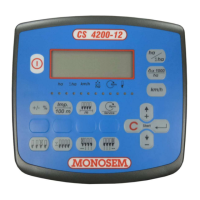
La console propose deux méthodes pour couper les rangs :
-Coupure par un côté (gauche ou droit)
-Coupure par sélection de rang.
La coupure d’un rang se visualise par l’allumage en rouge de la diode correspondant au rang coupé.
Le ré-embrayage d’un rang se visualise par l’allumage en vert de la diode correspondant au rang ré-embrayé.
Coupure par le côté gauche
Appuyer sur la touche
pour entrer dans la fonction coupure de rangs par la gauche.
Appuyer sur la touche
pour couper le premier rang gauche.
Appuyer à nouveau sur la touche
pour couper le deuxième rang gauche.
Cette opération peut se faire autant de fois qu’il y a de coupures de rangs sur le semoir.
Appuyer sur la touche
pour ré-embrayer le dernier rang couper.
Chaque pression sur la touche
ré-embraye un rang dans le sens inverse qu’ils ont été coupés
Tous les rangs peuvent être ré embrayés de cette manière.
d. Row cutter controls
The console offers two methods for row cutting:
-Cutting from one side (left or right)
-Cutting through row selection.
The cutting of a row is indicated by the lighting up in red of the diode corresponding to the row cut.
The re-engaging of a row is indicated by the lighting up in green of the diode corresponding to the row re-engaged.
Cutting from the left side
Press the
key to access the row cutting from the left function
Press the
key to cut the first row on the left
Press the
key again to cut the second row on the left
This operation may be repeated as many times as there are row cutters on the seeder.
Press the
key to re-engage the last row cut.
Each time the
key is pressed a row is re-engaged in the opposite direction to that in which they were cut.
All the rows may be re-engaged in this way.
d. Comenzile pentru întreruperea de rând
Consola oferă două metode pentru întreruperea rândurilor:
- Întrerupere dintr-o parte (stânga sau dreapta)
- Întrerupere prin selectarea rândului
Întreruperea unui rând este indicată prin aprinderea în roşu a diodei corespunzătoare rândului.
Recuplarea unui rând este indicată prin aprinderea în verde a diodei corespunzătoare rândului recuplat.
Întreruperea din partea stângă
Apăsaţi
pentru a accesa întrerupere rând din funcţia de pe stânga.
Apăsaţi
pentru a întrerupe primul rând din stânga.
Apăsaţi
din nou pentru a întrerupere al doilea rând din stânga.
Această operaţiune poate fi repetată în numărul de separatoare montate pe semănătoare.
Apăsaţi tasta
pentru a recupla ultimul rând întrerupt.
De fiecare dată când apăsaţi tasta
, un rând este recuplat în direcţia opusă faţă de cea în care a fost întrerupt.
Toate rândurile pot fi recuplate în acest mod.


 To Next Page
 Loading...