- 34 -
Coupure par sélection de rang
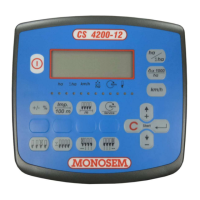
Appuyer sur la touche
pour entrer dans la fonction coupure par sélection de rang
Appuyer sur les touches
ou pour sélectionner le rang à couper
Appuyer sur la touche
pour couper le rang sélectionné.
Appuyer sur la touche
pour ré-embrayer le rang coupé.
Tous les rangs peuvent être coupés et ré-embrayés de cette manière.
Si tous les rangs coupés doivent être ré-embrayés ensemble, appuyer sur la touche
.
Un arrêt de l’entraînement du semoir de plus de 5 secondes va automatiquement ré-embrayer tous les rangs.
Une fois tous les rangs ré-embrayés, un appui bref sur la touche
coupe les mêmes rangs que la fois précédente.
*Option : boitier de commande indépendant CR 4200-12 « gestion des coupures de rangs individuelles ».
Brancher le boitier de commande sur la console, puis appuyer sur la touche
pour allumer la console.
Appuyer vers le haut pour ré-embrayer le rang (diode allumée) et vers le bas pour couper le rang (diode éteinte).
La coupure d’un rang se visualise par l’allumage en rouge de la diode correspondant au rang coupé.
Le ré-embrayage d’un rang se visualise par l’allumage en vert de la diode correspondant au rang ré-embrayé.
Une fois cette fonction activée, l’utilisation des coupures par la droite ou par la gauche via les touches de la console n’es
Cutting through row selection
Press the
key to access the cutting through row selection function
Press the
or keys to select the row to be cut
Press the
key to cut the row selected
Press the
key to re-engage the row cut
All the rows may be cut and re-engaged in this way.
If all the rows cut need to be re-engaged together, press the
key.
If the seeder’s drive is stopped for more than 5 seconds, all the rows will automatically be re-engaged.
Once all the rows have been re-engaged, briefly pressing the
key cuts the same rows as the previous time.
*Optional extra: “individual row cut-off management” CR 4200-12 independent control unit.
Connect the control unit to the console and then press the
key to switch on the console.
Push upwards to engage the row (diode lit) and downwards to cut off the row (diode off).
Cutting off a row is indicated by illumination, in red, of the diode corresponding to the row which is cut off.
Engaging a row is indicated by illumination, in green, of the diode corresponding to the row which is engaged.
has been activated, use of cut
off functions by the right or the left, using the console keys, is no longer possible.
Întreruperea prin selectarea rândului
Apăsaţi
pentru a accesa întrerupere rând din funcţia de selectare a rândului.
Apăsaţi
sau pentru a selecta rândul de întrerupt.
Apăsaţi
pentru a întrerupe rândul selectat.
Apăsaţi
pentru a recupla rândul întrerupt.
Toate rândurile pot fi recuplate în acest mod.
Dacă toate rândurile întrerupte trebuie recuplate împreună, apăsaţi tasta
.
Dacă transmisia semănătoarei este oprită mai mult de 5 secunde, toate rândurile vor fi recuplate automat.
După ce toate rândurile au fost recuplate, apăsând scurt tasta
întrerupe iar toate rândurile ce au fost întreupte anterior.
*Opţional extra : unitate de control independentă CR 4200-12 de management al întreruperilor individuale
Conectaţi unitatea de control la consolă şi apăsaţi tasta
pentru a porni consola.
Apăsaţi în sus pentru a cupla rândul (dioda aprinsă) şi în jos pentru a întrerupe rândul (dioda stinsă).
Întreruperea unui rând este indicată prin iluminare, în roşu, a diodei aferente rândului întrerupt.
Cuplarea unui rând este indicată prin iluminare, în verde, a diodei aferente rândului cuplat.
După ce această funcţie a fost activată, folosirea altor funcţii de întrerupere prin stânga sau dreapta, folosind tastele consolei, nu mai este posibilă.


 To Next Page
 Loading...