EasyManua.ls Logo

Monster Power HDP 1250G+ - User Manual

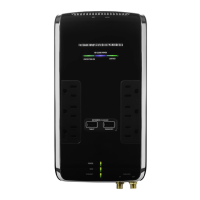
Monster Power HDP 1250G+
76 pages
Print Icon
To Next Page IconTo Next Page
Loading...
®
HDP 1250G
+
HIGH DEFINITION POWERCENTER
Instructions and Warranty Information
HAUTE DEFINITION POWERCENTER
Instructions et informations relatives à la garantie
ALTA DEFINICIÓN POWERCENTER
Instrucciones y información de garantía
LIT_MANUL_HDP_1250G+_NA_G1jl.indd 1 1/18/12 4:22 PM

Table of Contents

Questions and Answers

  • S
    Steven RichardsonAug 7, 2025
    What to do if device plugged into switched outlet of Monster Power Surge Protector is not working?
    • S
      Stephen AndersonAug 7, 2025
      If a component connected to your Monster Power Surge Protector is plugged into a switched outlet and isn't receiving power, first turn the PowerCenter on. Alternatively, plug the component into an unswitched outlet.
  • K
    Katherine MartinezAug 11, 2025
    What to do if my Monster Power Surge Protector trips the thermal circuit breaker?
    • P
      patrickhillAug 12, 2025
      If your Monster Power Surge Protector's thermal circuit breaker trips due to an overload, press the Thermal Circuit Breaker button to reset it. Wait 10 minutes before attempting to reset it again. If the breaker continues to trip, try moving some devices to another power source, as you might be drawing too much current.
  • J
    James WhiteAug 17, 2025
    What to do if my Monster Power Surge Protector sacrificed itself?
    • R
      Rachel WilliamsAug 17, 2025
      If the protection circuitry in your Monster Power Surge Protector has sacrificed itself due to a catastrophic surge, the PowerCenter must be replaced. Please refer to the Limited Warranty for Consumers section for details.
  • L
    lamberttoddAug 21, 2025
    What to do if my component is not turning on when Monster Power HDP 1250G+ Surge Protector is plugged into switched outlet?
    • M
      Mary KerrAug 21, 2025
      If your Monster Power Surge Protector is plugged into a switched outlet and the connected component isn't powering on, ensure that the component itself is turned on.
  • G
    Glenn SmithAug 27, 2025
    What to do if device plugged into GreenPower Plus Control outlet of Monster Power HDP 1250G+ is in stand-by mode?
    • J
      Jenny RobinsonAug 27, 2025
      If a device plugged into the GreenPower Plus Control outlet of your Monster Power Surge Protector is in standby mode, turn on the device.
  • E
    Elizabeth AndrewsAug 31, 2025
    How to enable GreenPower Plus on Monster Power HDP 1250G+?
    • A
      Amanda HallAug 31, 2025
      If GreenPower Plus is disabled on your Monster Power Surge Protector, press and hold the Power button (labeled “Switched”) on the front panel for five seconds. The PowerCenter will beep twice when GreenPower Plus is activated.

Summary

Important Safety Information

Safety Precautions

Warnings regarding power sources, grounding, liquid, and cord safety.

Proper Grounding and Installation

Guidelines for safe grounding, outlet connection, and system protection.

Key Technologies

Fireproof MOV Technology

Details ceramic-encased MOVs for superior fire protection against surges.

Patented Monster T2 Technology

Explains T2 technology's role in protecting against voltage sags and swells.

Advanced Tri-Mode Surge Protection

Describes Tri-Mode's protection against surges on three power lines with an alarm.

Patented Monster Clean Power Filtering

Explains how Clean Power filters electrical noise for better performance and lifespan.

HDP 1250 G+ PowerCenter Features

Hook-Up Guide

Troubleshooting

Power Issues

Solutions for when the PowerCenter or components are not receiving power.

Specifications

Monster Power HDP 1250G+ Specifications

General IconGeneral
BrandMonster Power
ModelHDP 1250G+
CategorySurge Protector
LanguageEnglish

Related product manuals