Change Setting
12
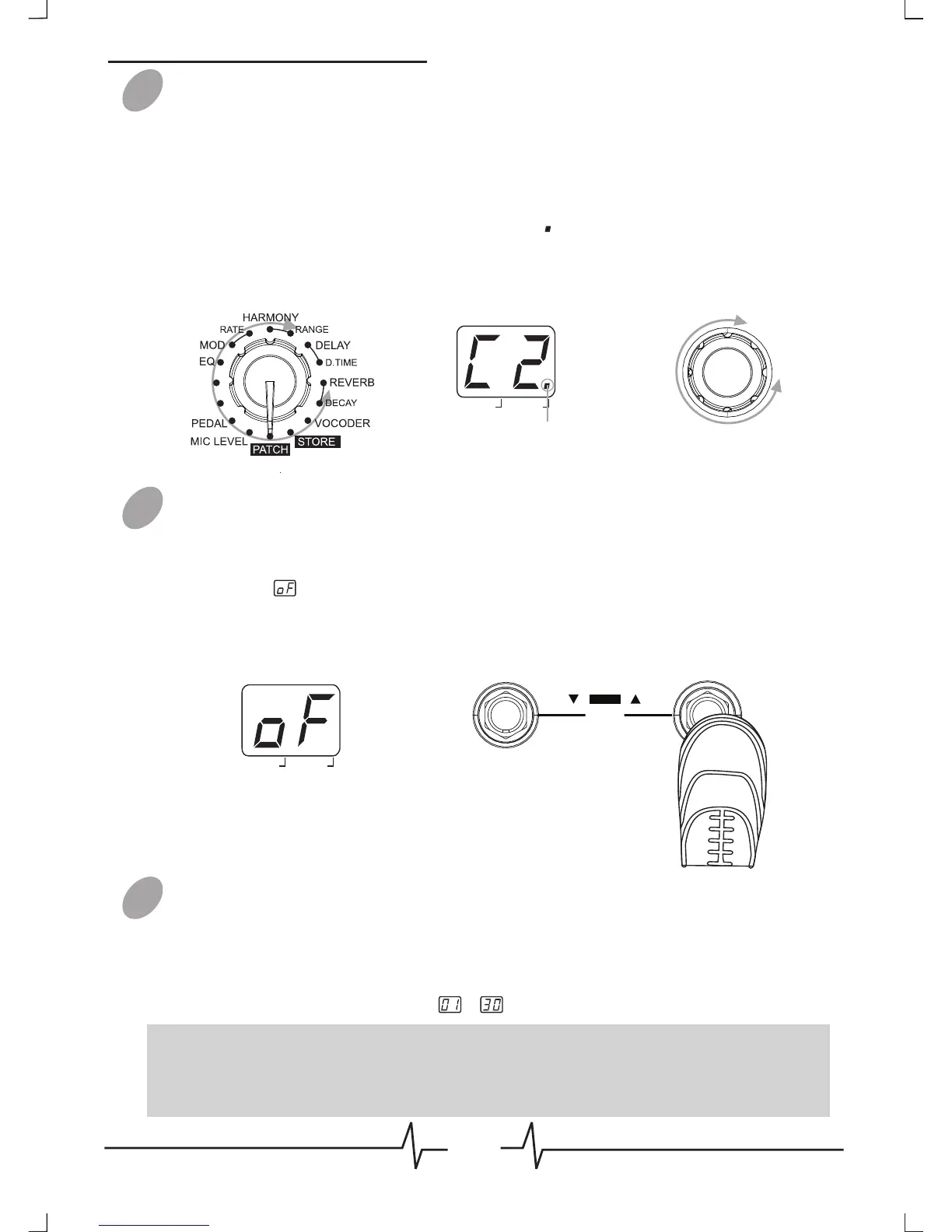
Press [VALUE] knob to change effect/parameter type ahead, hold
and rotate [VALUE] knob to change effect/parameter type ahead
(clockwise) or backwards (anticlockwise), rotate [VALUE] knob to
set a new value of the effect type or parameter. As long as the
selected item’s value changes, a dot ( ) will appear in the bottom
right of the display. This indicates that a setting has been changed
from the currently stored value.
Bypass an Effect Module
When adjusting an effect in EDIT mode, press [MODULE
BYPASS] / [PATCH +] footswitch to bypass this effect module, the
indication will appears on the display and the module will be
turned off. Pressing [MODULE BYPASS] / [PATCH +] switches
once more will return the setting to the previous condition.
Adjusting the MIC LEVEL
Set the Module Selector to [MIC LEVEL], rotate [VALUE] knob
to adjust the volume of a patch, LED display will show the current
level.
The range of patch level is ~ .
02
03
04
BANK PATCH
EDIT
VALUE
REC/OVERDUB
MODULE BYPASS
BYPASS
HOLD FOR LOOP
Patch Editing
Note: If you return to [PATCH] module and select another patch, the
changes you have made in edit mode will be lost unless you store the
patch first.
DATA
PATCH
BANK
Dot indicates that setting
PATCH
has been changed
EDIT
TRANS
PREAMP
DATA



 To Next Page