18
Factory Reset
Factory Reset function will initialize all setting of VEM Box. All the user
patches will be erased and overwritten by the preset patches.
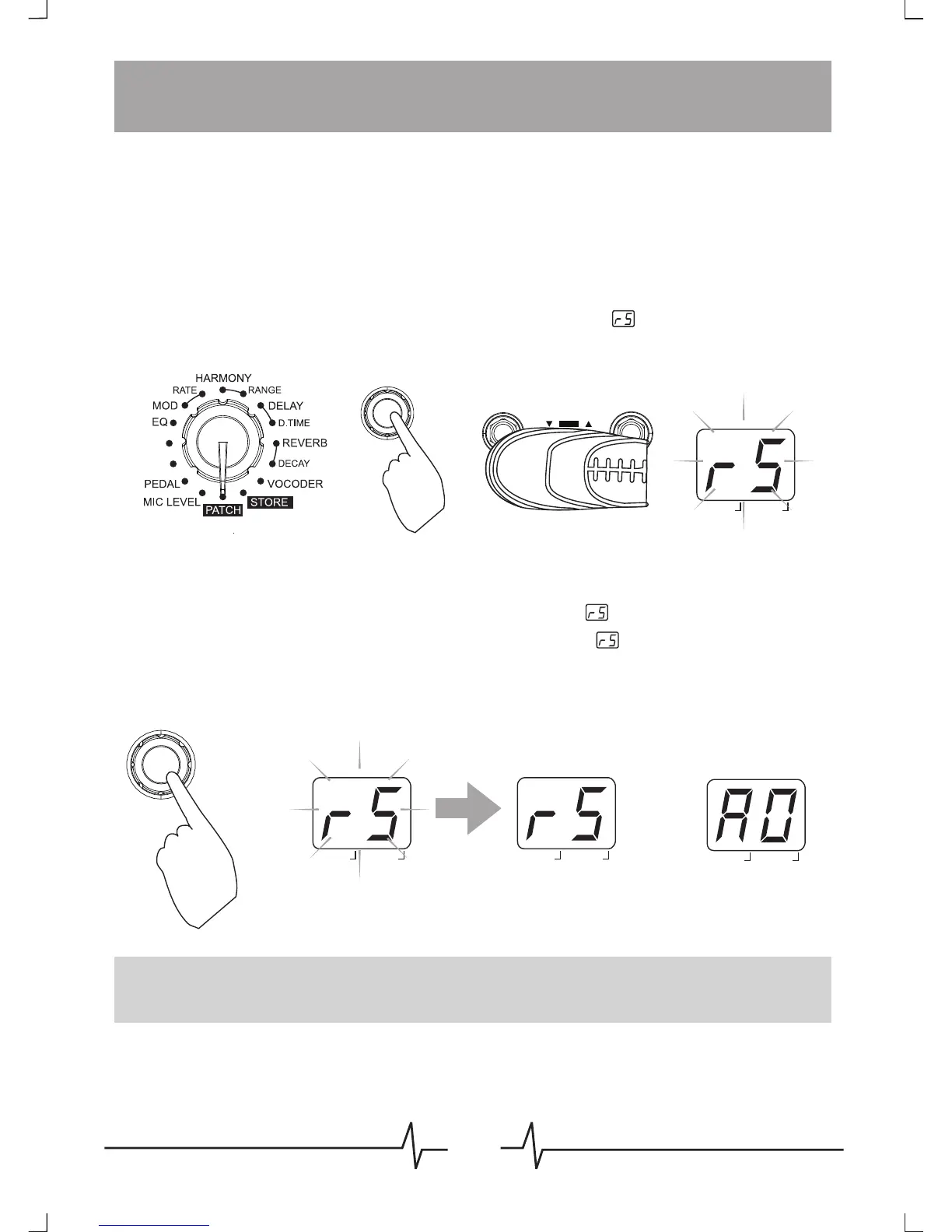
To do the factory reset, conform to the following instructions:
Before power on, set the Module Selector to [PATCH], hold down the
[PATCH -] and [PATCH +] footswitch and the [VALUE] button
simultaneously, and then power to the VEM Box, will appear on the
display and last flashing.
At that time, press [VALUE] button to confirm, will be flashing in a
faster speed for 2 seconds, then turn to display at a steady status
for 3 second, then back to the normal state, the factory reset operation
have been done.
Note: If you want to quit Factory Reset halfway, move the Module Selector to
another location, then the Factory Reset will be canceled.
HOLD
VALUE
PRESS
FASTER FLASHING
2 SECONDS
3 SECONDS
BANK PATCH
EDIT
BANK PATCH
EDIT
BANK PATCH
EDIT
BANK PATCH
EDIT
REC/OVERDUB
MODULE BYPASS
BYPASS / TUNER
HOLD FOR MUTE TUNING
PATCH
DATA
DATADATA
DATA
TRANS
PREAMP



 To Next Page