The Interface Solution Experts 41
SPA
2
Programmable Current/Voltage
Limit Alarm Trips
To create a custom curve:
1. Click the “Enabled” box .
2. Select the number of points for your curve (128
points maximum) and enter it into the “No Of
Points” text box.
3. In the “Custom PV (Y) Range” text boxes, enter
the values you wish displayed when your input
is at its upper and lower ranges.
4. Type your individual values in the X and Y
columns. Source variables are inserted into the
X Column while the corresponding data is
inserted into the Y Column.
5. After all of your data has been entered, you
must use the
Custom Curve
dropdown menu to
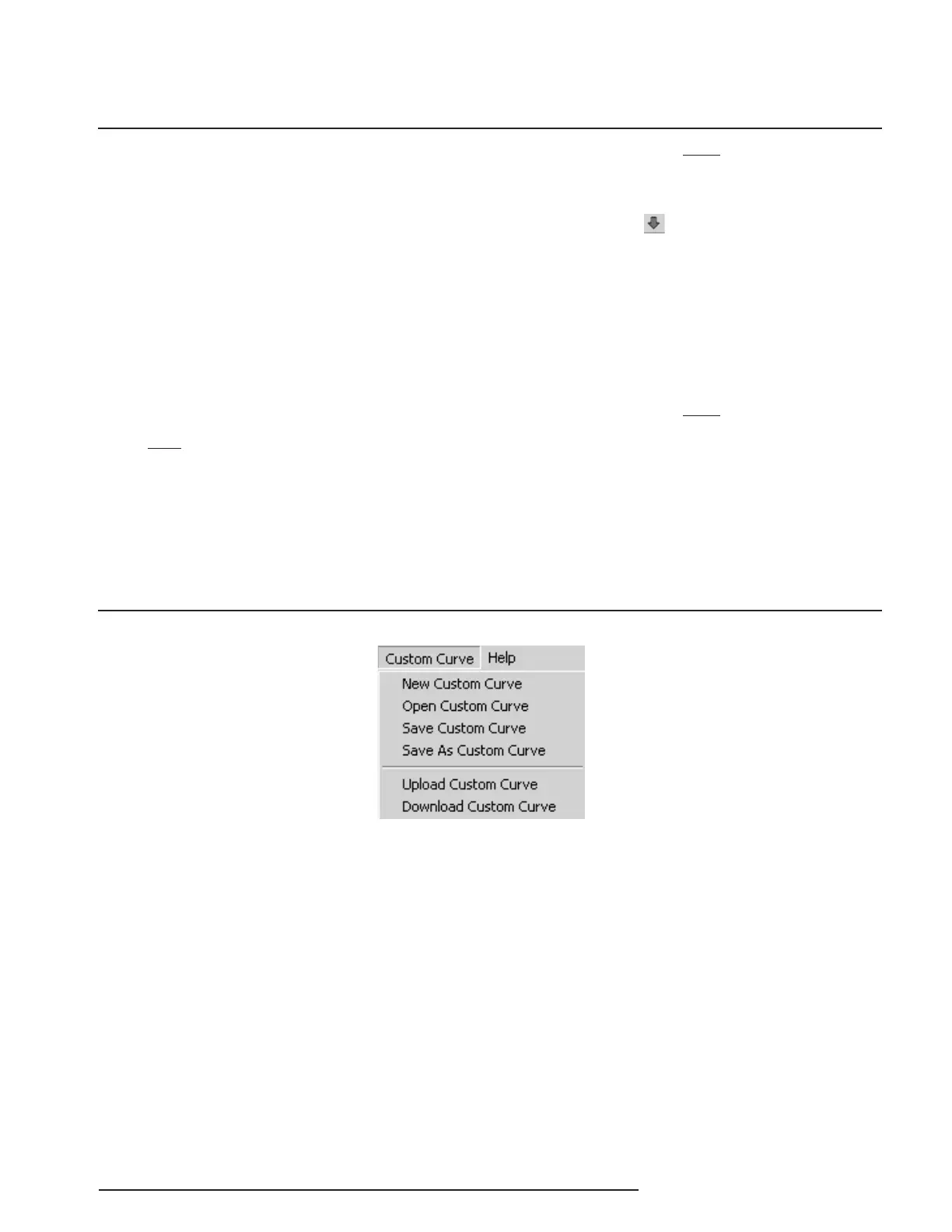
save your newly created custom table (“Save
Custom Curve”) and to download it to your
SPA
2
(“Download Custom Curve”). See
Figure 28.
Figure 28. Custom Curve Dropdown Menu
Note:
Once you have configured all parameters, download
to the unit by selecting “Download” in the Transfer
dropdown menu located in the Status Bar. Or,
click the button in the Tool Bar.
You may also use the
Quick Set
feature to configure
your
Custom Curve
parameters and download the
settings.
Configure your parameters and click the
Quick Set
button in the window.
Note:
When the Custom Curve feature is enabled for your
unit, the SPA
2
will display “CC” in the lower left
corner of its LCD.


 To Next Page