40 The Interface Solution Experts
SPA
2
Programmable Current/Voltage
Limit Alarm Trips
Scaling
Note:
Using the Scaling feature will disable the Custom
Curve capability. Since both are scaling features
used to manipulate the appearance of your process
variable, only one of these functions may be used at
a time.
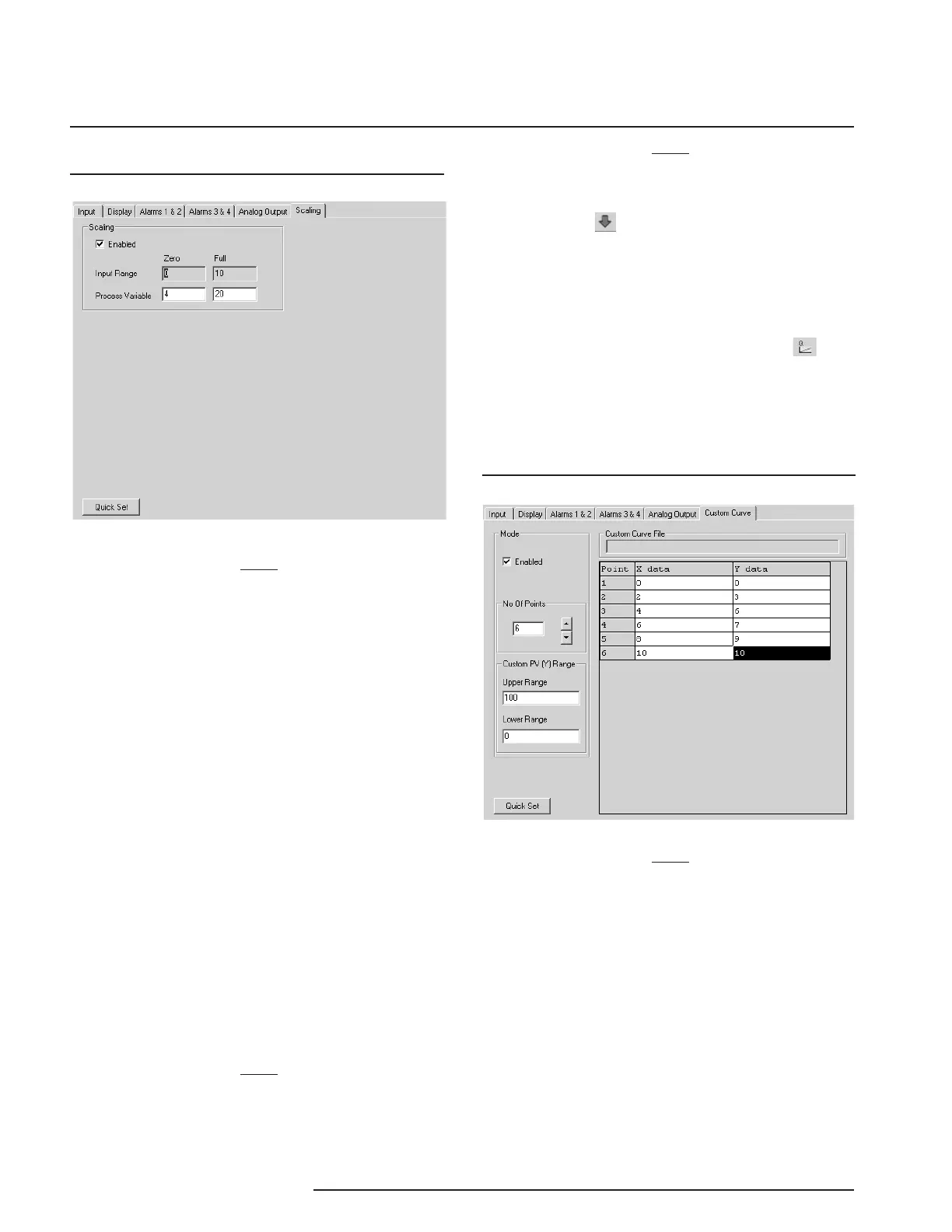
Scaling– This allows you to customize your display
for your application. By example: if your process is
sending a 4-20mA signal to the SPA
2
and you wish to
view the input as 0-100% then this can be accom-
plished with the Scaling feature.
To scale your instrument, perform the following steps.
1. Click the “Enabled” check box.
2. The “Input Range” boxes (in the
Scaling Tab)
will display the range selected in the “Input
Range” section of the
Input
screen.
3. In the “Process Variable” text boxes, enter the
values you wish displayed when your input is
at its Lower Range and Upper Range.
Once downloaded, your unit will display the scaled
values on its LCD.
Note:
In our above example, you may also wish to go to
the Display screen and click on “Use Custom Label”
and enter “PCT” (percent) as your new label.
Note:
Once you have configured all parameters, download
to the unit by selecting “Download” in the Transfer
dropdown menu located in the Status Bar. Or, click
the button in the Tool Bar.
You may also use the
Quick Set
feature to configure
your
Scaling
parameters and download the settings.
Configure your parameters and click the
Quick Set
button in the window. Or, you may click the but-
ton, located in the Tool Bar. The settings you have
chosen will be applied and downloaded to your unit.
Custom Curve
Note:
Using the Custom Curve feature will disable the
Scaling capability. Since both are scaling features
used to manipulate the appearance of your process
variable, only one of these functions may be used at
a time.
Custom Curve–The Custom Curve feature allows you
to set up your own custom curve table. This allows
you to tell the transmitter what it should output when it
receives a certain input. This feature also allows you
the ability to write a table in Microsoft
®
Excel, save it
in a .csv format, and import it into the Configuration
Software. This makes it simple to save the custom
table for downloading to multiple units or for backup
purposes.
Figure 27. Custom Curve Tab
Figure 26. Scaling Tab


 To Next Page