Troubleshooting
06
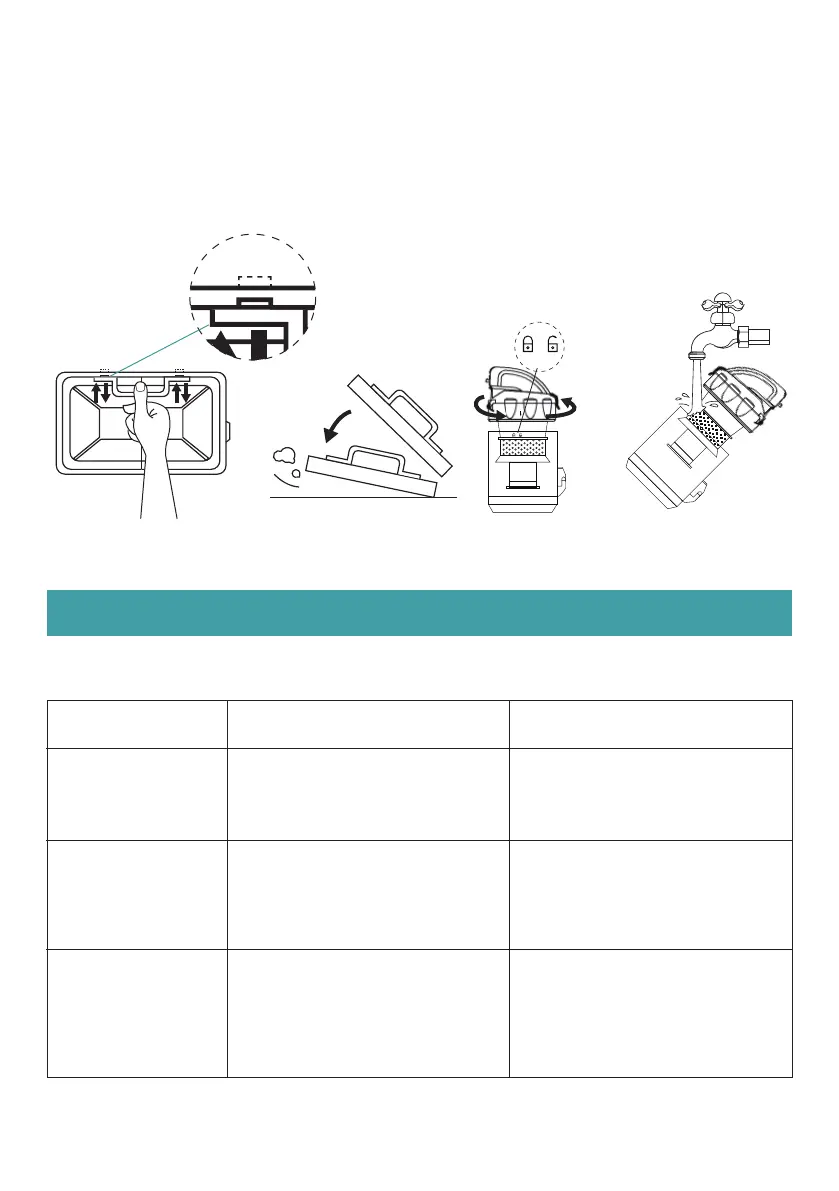
5. Press the buckle on the exhaust filter to remove it and vice versa. A "click" would be heard if the filter is
installed well.
6. Pat the exhaust filter slightly to remove dust on it.
7. Hold and rotate the dust cup cover counterclockwise to separate the filter and the dust cup.
8. Immerse both the filter and dust cup in water for cleaning.
9. Air dry them completely before next time use.
Problems Possible reasons Potential solutions
Machine won't work
Suction gets weak
1. The power cord is not plugged in
2. Switch is not turned on
1. Dust tank is full
2. The filter is too dirty
1. There is hair entangled on the
brush
2. The wrong type of the brush is
used
1. Unblock the brush
2. Switch type of the brush
The floor brush won't
work
1. Plug the power cord into a
functional socket
2. Turn on the power switch
1. Empty the dust cup
2. Clean the HEPA filter
3. Check if the dust tank is installed
correctly


 To Next Page