16
MORDAX : DATA
User Guide
SYS V. 01.00.00
BOOT V. 01.00.00
Updated: 161229
Cursor
As we saw in the sections on the DATA scope’s horizontal (X-axis) and vertical (Y-axis) scales, the scope’s grid can be used to
take quick measurements of an incoming signal’s voltage as well as its period and frequency. The scope’s cursors allow for more
precise measurements, in addition to creating custom visual windows or thresholds.
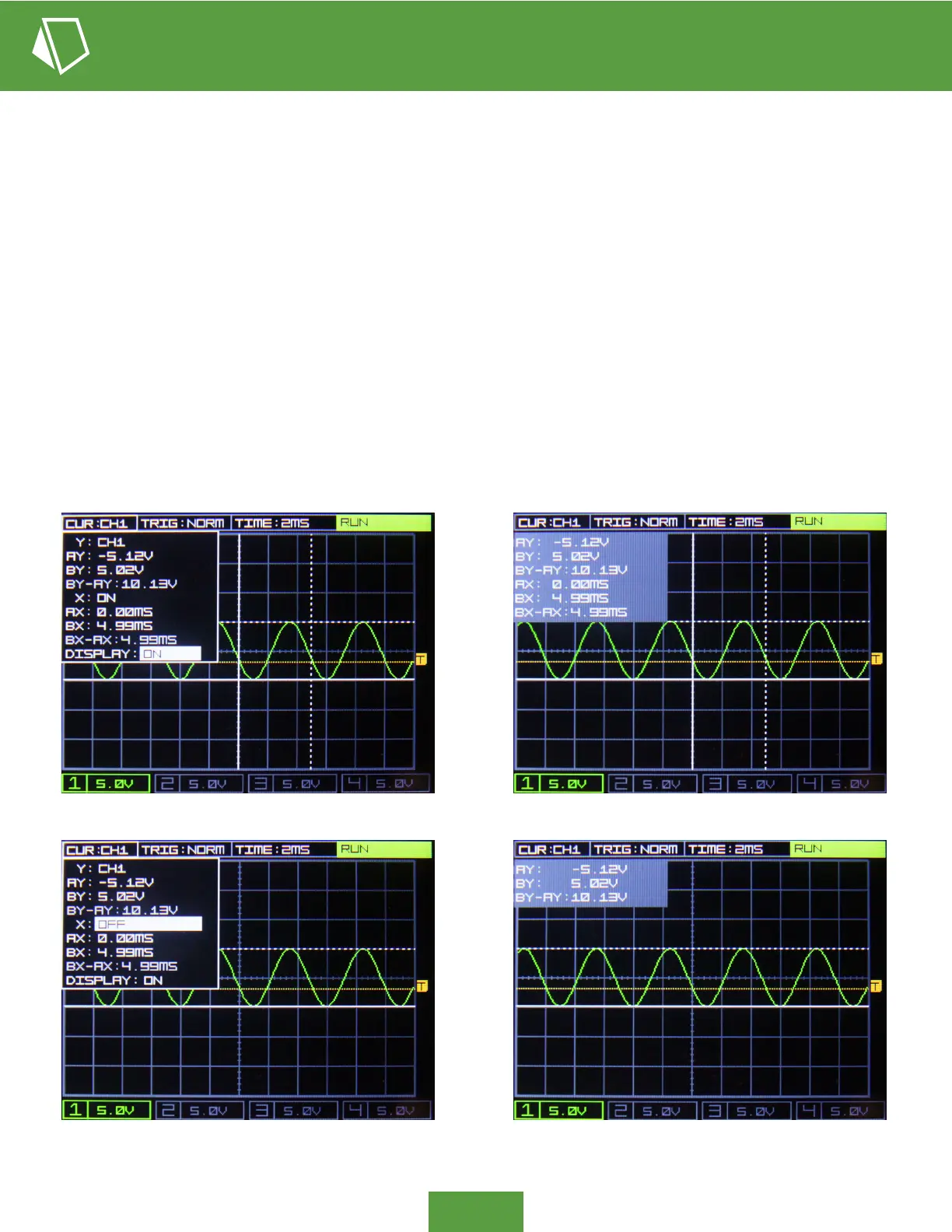
The cursor pop-up menu is accessed via the top left button (2-1), labeled CUR, with the current Y-axis scale reference shown.
The Y-axis scale can reference any of the four input channel’s scales; there’s no need to readjust the cursor if a channel’s voltage
scale or position is changed, as the cursor’s scale and relative position change along with it on the y. Similarly, the cursor’s
X-axis scale is automatically updated to reference the display’s current TIME setting.
There are two cursors available per axis, with cursors AY and AX displayed as a solid white lines and cursors BY and BX
displayed as dotted white lines. Difference (delta) between each axes’ cursors are shown under each set of controls, calculating
the span in voltage or span in time between their A and B cursors.
The DISPLAY parameter of the cursor pop-up menu turns on and off the cursor display. This allows you to continue viewing
the cursor’s position and delta values while the pop-up menu is not engaged. Only the active cursors are present in the display
window, saving display space when only one cursor axis is being used.


 To Next Page