SECTION 2
14
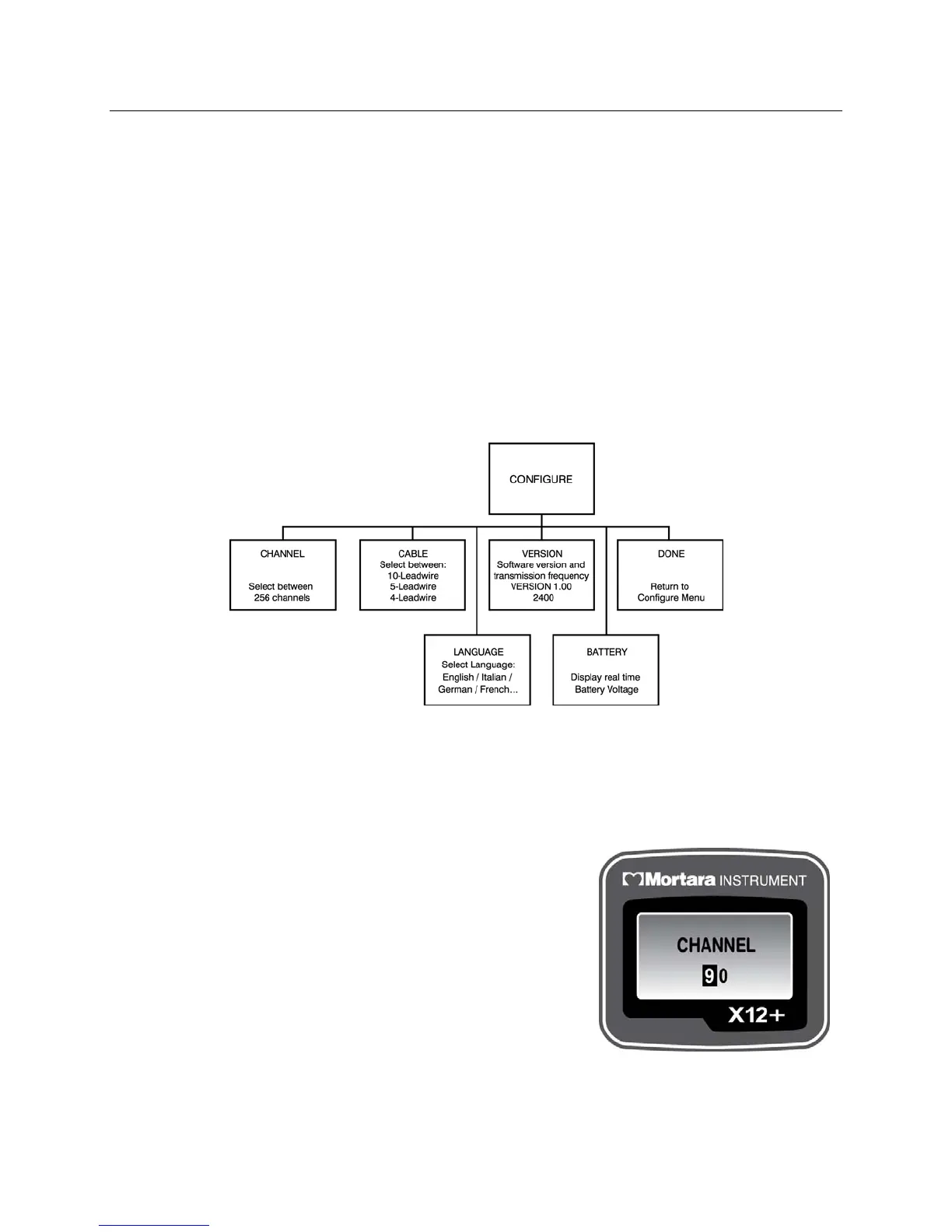
The CONFIGURE menu includes:
CHANNEL
CABLE
LANGUAGE
VERSION
BATTERY
DONE
Use Down or Up/Right to scroll through the CONFIGURE menu options. Press Enter when the desired option is
displayed. Select DONE and press Enter to return to the top level menu. Scroll to DONE and press Enter to
return to the main menu.
The operational flowchart of CONFIGURE menu options depicts the flow of functionality using the three keys.
Setting the Transmission Channel Number
The X12+ transmits the patient’s cardiac signals to the electrocardiograph using a specific channel number.
CHANNEL is used to enter the optimal transmission channel number before starting a patient session. The user
may choose from any of 256 channels. If ECG signal loss occurs, the transmission channel can be changed.
From the main menu, use Down or Up/Right to scroll to CHANNEL.
Press Enter to select.
To enter the channel number, move the cursor to the right or left
alphanumeric character field by pressing Up/Right. To move the cursor
one letter or digit at a time, press Down. When the cursor reaches the
end of the characters it will wrap to the beginning.
When finished, press Enter to exit the CHANNEL menu.
NOTE: When entering the channel number, the down arrow key
is used to change the characters. The cursor cannot be moved in
the up direction.



 To Next Page