RECHARGE
WATER MANAGEMENT SYSTEM
DAY
Mortonr Water Softener Installation & Operation Manual
23
MORTON WATER SOFTENER SERVICE, continued
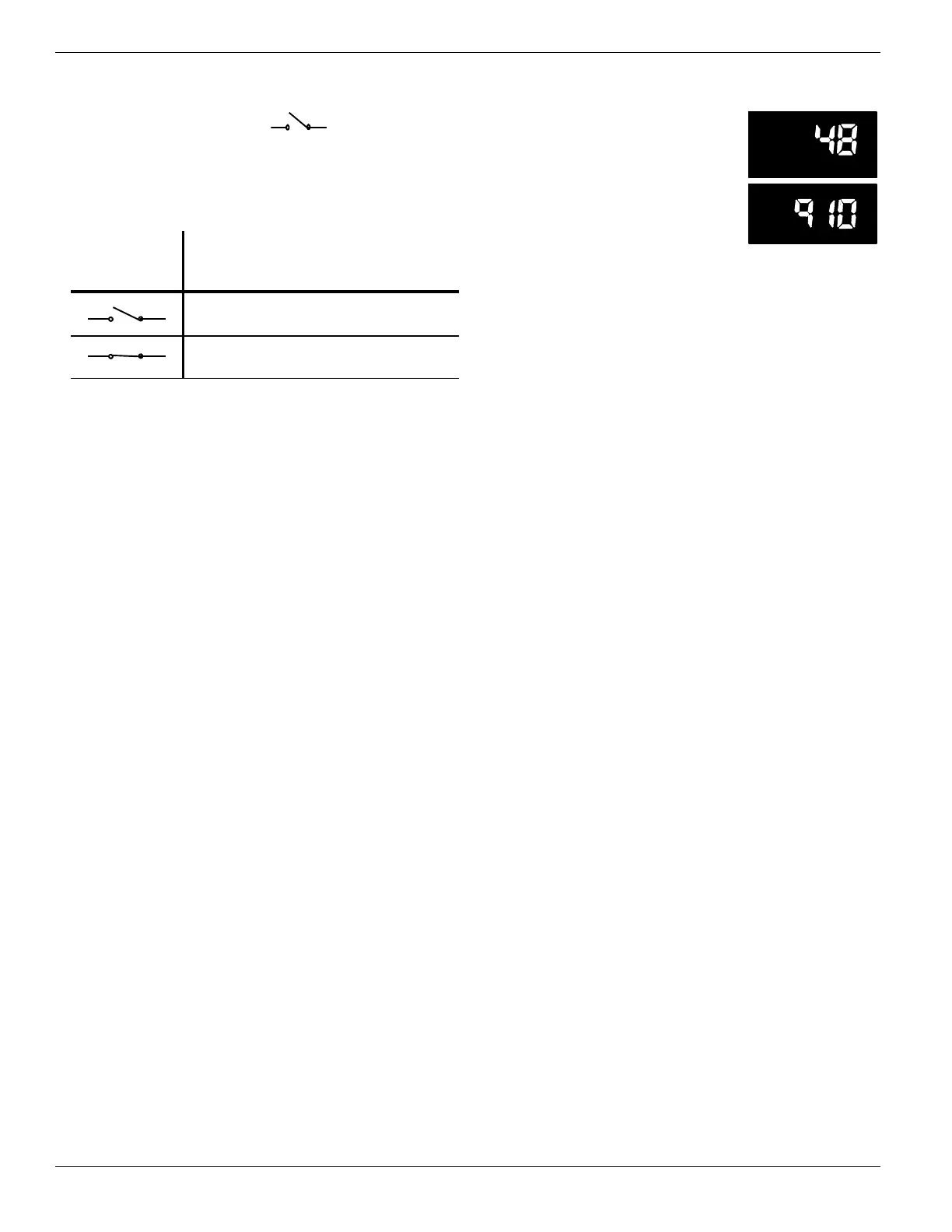
(B) This display segment ( ), in the following
table, indicates an open POSITION switch. The oth-
er indicates a closed switch. Use the RECHARGE
button to manually advance the valve into each
cycle and check correct switch operation.
CORRECT
SWIT CH
DISPLAYS VALVE CYCLE STATUS
Valve in service, fill, brining, back-
wash or fast rinse position.
Valve rotating from one position to
another.
2. Press the DATA button again.
This diagnostic display, shows
the total number of recharges
(top) since the timer was con-
nected to electrical power.
The number of days since the
timer was connected to electri-
cal power, is shown in the bottom part of the displa y.
If over 1999 days, a (x 10) indicator shows, meaning
you must multiply the number shown times 10.
3. Press DATA once again to return the present time
to the display.
service: MANUAL ADVANCE REGENERATION CHECK .....................................
This check verifies proper operation of the valve
motor, brine tank fill, brine draw, regeneration flow
rates, and other timer -- valve functions. First, make
the initial checks, and the manual initiated diag-
nostics.
NOTE: The face plate displa y must show a steady
time (not flashing).
1. Press the RECHARGE button and hold in for 3
seconds. RECHARGE NOW begins to flash as the
softener enters the fill cycle of regeneration. Re-
move the brinewell cover and, using a flashlight, ob-
serve fill water entering the brine tank.
' If water does not enter the tank, look for an ob-
structed nozzle, venturi, fill flow plug, brine tubing,
or brine valve riser pipe.
2. After observing fill, press the RECHARGE button
to move the softener into brining. A slow flow of wa-
ter to the drain will begin. Verify brine d raw from the
brine tank by shining a flashlight into the brinewell
and observing a noticeable drop in the liquid level.
NOTE: Be sure a salt bridge is not preventing water
with salt contact.
' If the softener does not draw brine
nozzle and/or venturi dirty or defective.
nozzle and venturi not seated properly on gasket.
restricted drain (check drain fitting and hose).
defective nozzle and venturi seal.
other inner valve defect (rotor seal, rotor & disc,
wave washer, etc.).
3. Press RECHARGE to move the softener into fast
rinse. Again look for a fast drain flow. Allow the soft-
ener to rinse for a few minutes to flush out any brine
that may remain in the resin tank from the brining
cycle test.
4. To return the softener to service, press RE-
CHARGE.
Need help troubleshooting? Call Toll Free 1--888--64 WATER (1--888--649--2837)
or visit www.mortonwatersofteners.com
When you call, please be prepared to provide the model and serial number,
located on the rating decal on back of the top cover .


 To Next Page