20
For a successful connection you need:
1. Android devices (smartphones, tablets)
2. Wi-Fi Camera Morvelli FHD22
3. Wi-Fi router with the internet that works at 2.4 GHz
Recommendations before installation.
Before connecting, please make sure of the following:
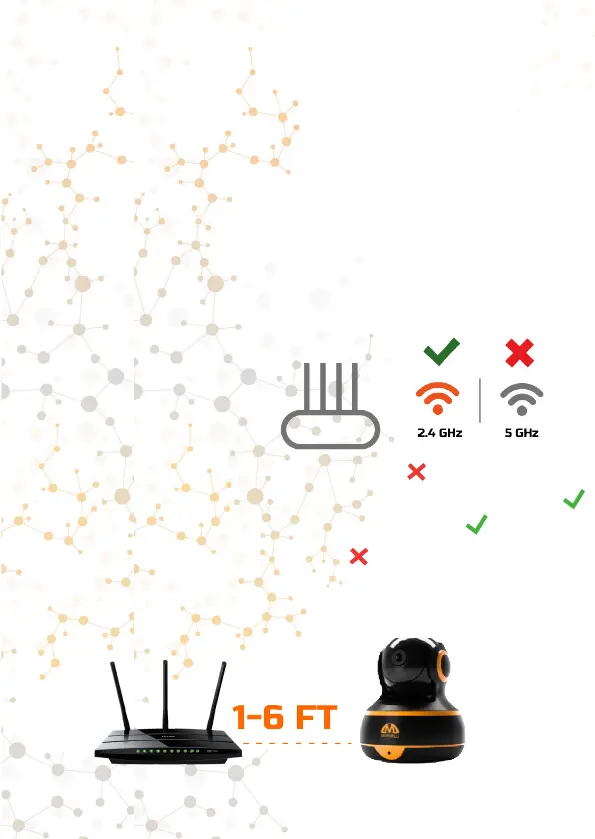
1. Your router operates at a frequency of 2.4 GHz (routers
operating at a frequency of 5 GHz are not supported). You
can check this information with the manufacturer of the router.
Note. If the router supports two frequencies, use a 2.4 GHz
network when connecting.
2. The security method of your
Wi-Fi network must be installed
with the latest version - WPA
/ WPA2 (if you have WEP
method, we strongly recommend
changing it for your own safety).
No Security
WPA/WPA2-Personal (Recommended)
WPA/WPA2-Enterprise
Wep
3.
For the rst connection, place the camera as close to the
router as possible (1-6ft). Connect iPhone to Wi-Fi camera
Morvelli FHD22



 To Next Page